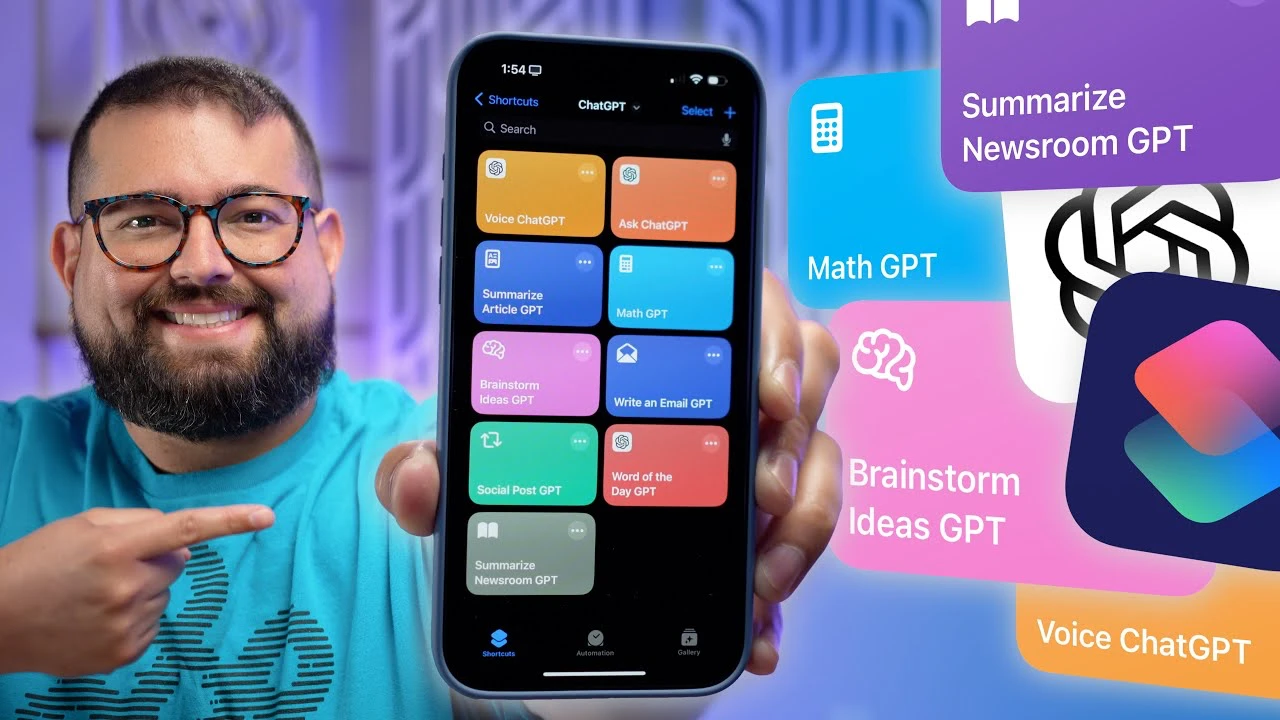
We have an awesome video from Stephen Robles that gives us details on 10 powerful iPhone ChatGPT-4o shortcuts that you need to trry out. With the advent of powerful AI tools like ChatGPT, it’s now possible to streamline various tasks and boost efficiency like never before. By harnessing the capabilities of ChatGPT on your Apple devices, you can unlock a new level of productivity. Here are ten essential shortcuts that integrate ChatGPT with your iPhone, iPad, or Mac to help you work smarter, not harder.

1. Voice Conversation Shortcut
One of the most convenient ways to interact with ChatGPT is through voice commands. By mapping the Action button on your iPhone to initiate a ChatGPT voice conversation, you can easily ask questions and get information hands-free. This is particularly useful when you’re multitasking or need quick access to information without typing. For example, you can ask ChatGPT about:
- The average rainfall in the Amazon basin
- The population of a specific city
- The distance between two locations
2. Text Prompt Shortcut
Sometimes, typing is more convenient than speaking. That’s where the text prompt shortcut comes in handy. By creating a shortcut that prompts for text input and generates a response from ChatGPT, you can quickly ask questions or seek information without navigating to the app. This feature is ideal for:
- Quick queries that don’t require a lengthy conversation
- Obtaining detailed responses to specific questions
- Gathering information on topics like historical figures, scientific concepts, or current events
For instance, you could use this shortcut to inquire about Winston Churchill’s hobbies or the capital of Azerbaijan.
3. Article Summarization
In the age of information overload, it’s essential to be able to quickly digest long articles and extract the key points. With the article summarization shortcut, you can use the share sheet to summarize articles in 120 words or less. This is perfect for:
- Quickly getting the gist of a lengthy news article
- Summarizing research papers or reports
- Staying informed on various topics without spending hours reading
For example, you can summarize an article from 9to5Mac about the latest iPhone features or a piece from The New York Times about global climate change.
4. Math Problem Solver
For students and professionals who deal with complex math problems, the math problem solver shortcut is a game-changer. By using OCR (Optical Character Recognition) and ChatGPT, you can take a photo of a math problem and have the AI solve it for you. This shortcut is particularly useful for:
- Solving complex equations quickly
- Checking your work for accuracy
- Understanding the steps involved in solving a problem
Whether you’re a high school student struggling with calculus or an engineer working on a complex project, this shortcut can save you time and frustration.
5. Brainstorming Ideas
Coming up with fresh ideas for content can be challenging, but with the brainstorming shortcut, you can streamline the process. By dictating your ideas for blog posts, ChatGPT can generate titles and bullet points to help you flesh out your concepts. This is particularly useful for:
- Content creators who need to generate ideas quickly
- Marketers looking for new angles on a topic
- Writers struggling with writer’s block
For example, you can generate blog post ideas about the new iPad Pro or the Nintendo 64 Rumble Pack.
6. Email Composition
Writing professional emails can be time-consuming, but with the email composition shortcut, you can draft polished messages in no time. Simply dictate the core details of your email, and ChatGPT will compose it in a more refined format. This is ideal for:
- Drafting important business emails
- Composing thoughtful responses to client inquiries
- Ensuring your emails are clear, concise, and professional
For instance, you can dictate an email to your colleague Ashley about lunch plans and a new project proposal.
7. Social Media Post Creation
Maintaining an active social media presence is crucial for businesses and individuals alike. With the social media post creation shortcut, you can generate engaging posts from article content, limited to 140 characters. This is perfect for:
- Creating concise, attention-grabbing posts
- Repurposing blog content for social media
- Maintaining a consistent posting schedule without spending hours crafting messages
For example, you can create a tweet about a foldable display MacBook Pro or a new software update for iPhone.
8. Word of the Day Enhancement
Expanding your vocabulary is an ongoing process, and the word of the day enhancement shortcut makes it easier than ever. By getting definitions and usage examples for the Word of the Day, you can learn new words and incorporate them into your language. This is great for:
- Improving your communication skills
- Writing more eloquently and precisely
- Impressing others with your extensive vocabulary
For instance, you can define and use the word from Merriam-Webster’s Word of the Day Calendar.
9. RSS Feed Summarization
Staying up-to-date with the latest news and articles can be overwhelming, but the RSS feed summarization shortcut makes it manageable. By summarizing multiple articles from an RSS feed into concise text blocks, you can quickly digest the most important information. This is useful for:
- Keeping up with industry news and trends
- Staying informed about current events
- Quickly review updates from your favorite websites or blogs
For example, you can summarize articles from the Apple Newsroom RSS feed or your favorite tech blog.
10. Podcast Show Notes Automation
For podcasters, creating detailed show notes can be a time-consuming task. With the podcast show notes automation shortcut, you can streamline the process by automatically generating titles, descriptions, and formatted links. This is perfect for:
- Saving time on post-production tasks
- Ensuring consistent, professional show notes
- Making your podcast more accessible and discoverable
For instance, you can generate show notes for the Primary Technology Podcast or your own podcast series.
By integrating these ten essential ChatGPT shortcuts into your daily workflow, you can significantly boost your productivity and efficiency on your Apple devices. These shortcuts are designed to be easily accessible and customizable, allowing you to tailor them to your specific needs. Whether you’re a student, professional, content creator, or simply someone looking to work smarter, these shortcuts will help you make the most of your time and resources. Embrace the power of AI and streamline your tasks with ChatGPT on your iPhone, iPad, and Mac today.
Source & Image Credit Stepehn Robles
Filed Under: Apple, Apple iPhone, Gadgets News
Latest Geeky Gadgets Deals
Disclosure: Some of our articles include affiliate links. If you buy something through one of these links, Geeky Gadgets may earn an affiliate commission. Learn about our Disclosure Policy.
Credit: Source link