
If you’re looking for more information on how to use the relatively new Google AI Studio. You will be pleased to know that Corbin AI has created a fantastic beginners guide to take you through the basics and get you started. AI Studio is a innovative platform that empowers developers to harness the full potential of Google’s innovative AI capabilities.
With its intuitive interface and comprehensive suite of tools, Google AI Studio streamlines the process of creating, managing, and deploying AI models. Whether you’re a seasoned developer or just starting your AI journey, this guide will walk you through the essential steps to leverage the power of Google AI Studio effectively.
Getting Started with Google AI Studio
To begin your Google AI Studio experience, simply sign in using your Google account. Once logged in, you’ll gain access to a world of AI possibilities. The first crucial step is to create API keys, which serve as the gatekeepers to the platform’s vast array of AI services. These keys ensure that your requests are authenticated and authorized, providing a secure and seamless experience.
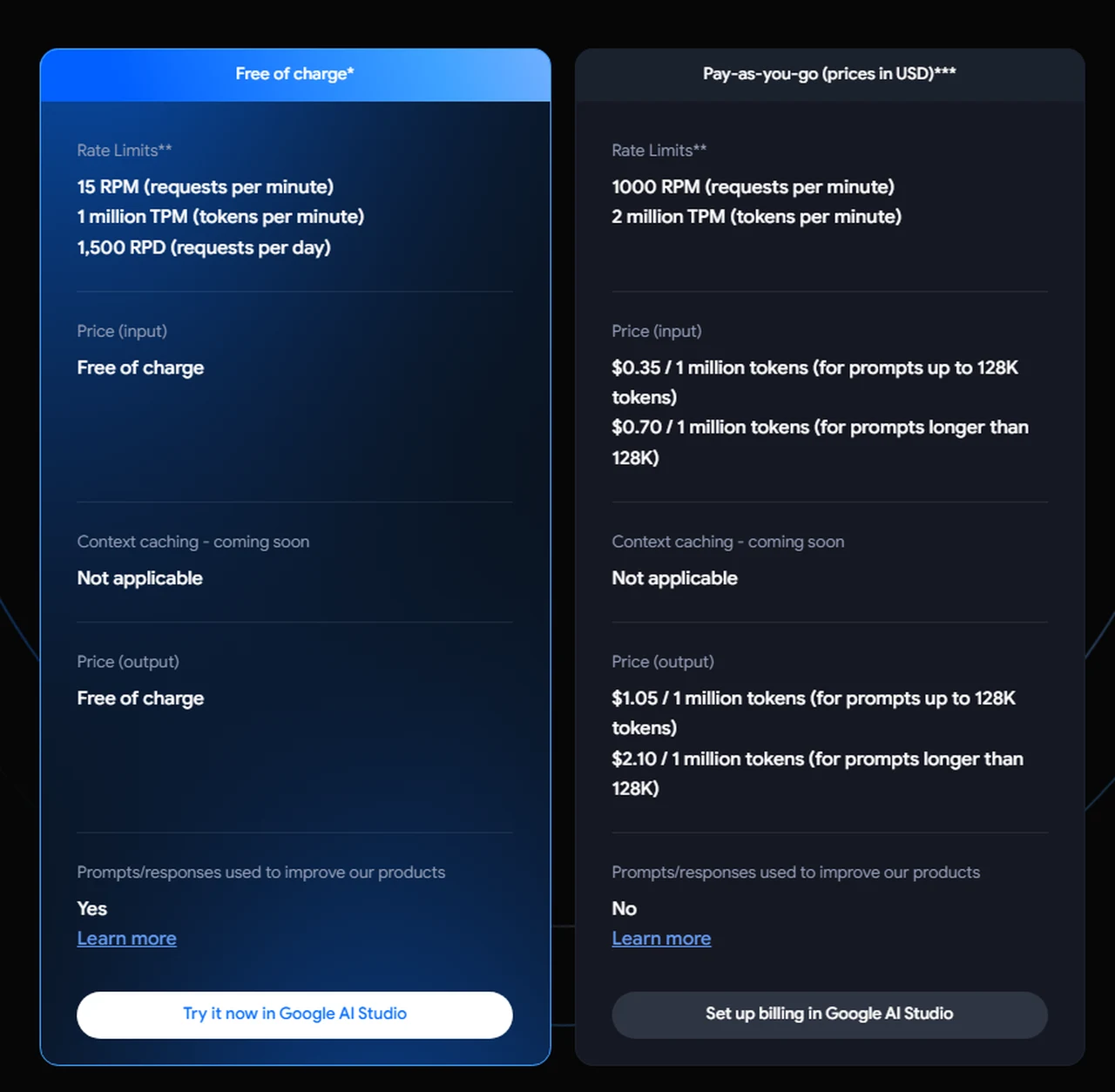
When embarking on your AI journey with AI Studio, it’s essential to understand the pricing structure. Google AI Studio offers a transparent and straightforward pricing model based on input and output tokens. Compared to competitors like OpenAI, Google’s pricing can be more cost-effective, especially for large-scale projects. By monitoring your token usage closely, you can effectively manage expenses and ensure that you’re getting the most value for your investment.
Mastering the Art of Prompt Creation
At the core of AI Studio lies the art of prompt creation. Whether you opt for chat prompts or structured prompts, the platform’s user-friendly interface makes it a breeze to input system instructions and user messages. These elements serve as the guiding light for the AI, allowing it to generate accurate and relevant responses tailored to your specific needs. With Google AI Studio, you have the power to craft prompts that unlock the full potential of AI-driven conversations.

Here are some other articles you may find of interest on the subject of Google’s artificial intelligence :
Fine-Tuning Models for Customization and Integration
One of the standout features of AI Studio is the ability to fine-tune models for greater customization. By leveraging data from Google Sheets or CSV files, you can train the AI to excel at specific tasks, making it a valuable asset for your unique requirements. Once fine-tuned, these models can be seamlessly integrated as API endpoints, opening up a world of possibilities for various applications.
- Integration with Google Drive: Google AI Studio offers seamless integration with Google Drive, allowing you to work with a wide range of data formats effortlessly.
- Prompt Gallery: Save time and jumpstart your projects with the prompt gallery, which provides a collection of pre-made templates ready to be customized to your needs.
- Chat History and Reference: Google AI Studio enables you to save and reference past chats, making iterative development and debugging a breeze.
Google AI Studio is not just a platform; it’s a gateway to the future of AI development. By following this guide and exploring the wealth of features and capabilities offered by Google AI Studio, you’ll be well-equipped to create, deploy, and integrate AI models that push the boundaries of what’s possible. To learn more about Google AI Studio jump over to the official website.
Video Credit: Source
Filed Under: Guides
Latest Geeky Gadgets Deals
Disclosure: Some of our articles include affiliate links. If you buy something through one of these links, Geeky Gadgets may earn an affiliate commission. Learn about our Disclosure Policy.
Credit: Source link