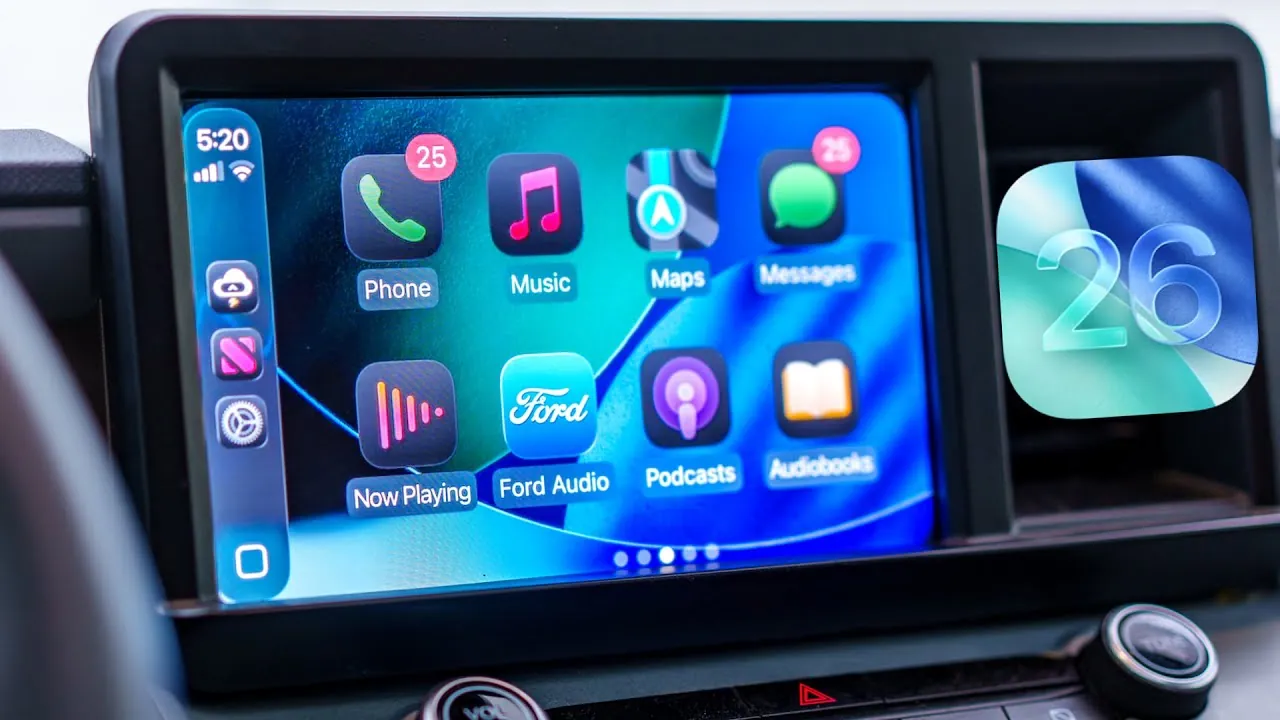
iOS 26 brings a fantastic update to CarPlay, redefining its design, functionality, and customization capabilities. This release emphasizes seamless iPhone integration, enhanced usability, and accessibility improvements. Whether you’re navigating, managing media, or controlling smart devices, iOS 26 aims to deliver a more intuitive and personalized driving experience, making sure that every journey is both efficient and enjoyable. The video below from Brandon Butch gives us more details about the new Apple CarPlay features in iOS 26.

Key Design Updates: A Sleeker Interface
CarPlay’s visual overhaul introduces a liquid glass redesign, offering a modern and polished aesthetic. The interface is now more streamlined and customizable, with several key updates:
- Rounded icons for a cleaner and more cohesive appearance.
- Customizable themes, including light, dark, and auto modes, to suit varying lighting conditions.
- New wallpapers with a simplified selection process, making personalization effortless.
These updates ensure that the interface is not only visually appealing but also tailored to individual preferences, enhancing the overall user experience.
Widgets and Live Activities: Real-Time Information
Widgets take center stage in iOS 26, offering real-time updates and greater customization options. These features make accessing important information more convenient than ever:
- Support for third-party widgets, including Spotify, Instagram, and weather apps, expands functionality.
- Smart rotate functionality and widget suggestions adapt to your time, location, and usage patterns.
- Live activities provide real-time tracking for food deliveries, flight details, and sports scores, keeping you informed on the go.
By integrating these features, iOS 26 ensures that the information you need is always accessible and relevant, enhancing both convenience and practicality.
Maps Enhancements: Smarter Navigation
Navigation in CarPlay becomes more intelligent and user-friendly with several significant enhancements. These updates aim to simplify complex routes and improve overall efficiency:
- On-device travel pattern recognition predicts frequently used routes and suggests alternatives based on real-time traffic conditions.
- Pinch-to-zoom support for compatible head units allows for more precise map interaction and better route visualization.
- Expanded incident reporting options, including road closures, hazards, and traffic delays, keep you informed of potential disruptions.
These improvements make navigating both familiar and unfamiliar routes easier, making sure a smoother driving experience.
Accessibility Improvements: Inclusive Features
iOS 26 introduces a range of accessibility enhancements, making sure that CarPlay is usable for all drivers, regardless of their needs. Key updates include:
- Adjustable text size, allowing font enlargement up to 135% for improved readability.
- Sound recognition alerts for critical sounds, such as car horns or emergency sirens, enhancing safety and awareness.
- Smart display zoom, which optimizes screen scaling for easier interaction and better visibility.
These features prioritize inclusivity, making CarPlay a more accessible tool for a diverse range of users while maintaining a focus on safety and convenience.
App-Specific Updates: Enhanced Usability
Several apps receive targeted updates in iOS 26, improving their functionality and usability within CarPlay. These updates ensure a more seamless and efficient experience:
- Messages: A redesigned interface introduces pinned conversations and quick “tap back” reactions for faster communication.
- Music: Pinned playlists and a layout similar to the iPhone version create a more intuitive music experience.
- Podcasts: Precise playback speed controls allow for better listening customization.
- Calls: A compact call UI places incoming calls at the bottom of the screen, minimizing distractions while driving.
These updates enhance the usability of essential apps, making sure that interactions are both intuitive and efficient.
Convenience Features: Streamlined Control
iOS 26 introduces several convenience-focused features designed to improve the overall driving experience. These additions make CarPlay more versatile and user-friendly:
- Integration of HomeKit widgets allows you to manage smart home devices directly from your dashboard, such as adjusting lights or controlling thermostats.
- An option to disable CarPlay screenshots enhances privacy and security, making sure sensitive information remains protected.
- Video playback support while the car is in park provides entertainment options for passengers, with availability depending on developer implementation.
These features streamline control and expand CarPlay’s functionality, making it a more comprehensive tool for drivers.
A Unified and Enhanced Experience
The iOS 26 update redefines CarPlay by focusing on design, real-time information, and accessibility. With smarter navigation, improved app functionality, and enhanced customization, CarPlay becomes an indispensable tool for drivers. Whether you’re managing media, navigating complex routes, or controlling smart devices, iOS 26 ensures a seamless and intuitive experience tailored to your needs. This update solidifies CarPlay’s role as a vital companion for modern driving, offering a unified and enhanced experience for all users.
Find more information on iOS 26 CarPlay Features by browsing our extensive range of articles, guides and tutorials.
Source & Image Credit: Brandon Butch
Filed Under: Apple, Apple iPhone, Top News
Latest Geeky Gadgets Deals
Disclosure: Some of our articles include affiliate links. If you buy something through one of these links, Geeky Gadgets may earn an affiliate commission. Learn about our Disclosure Policy.
Credit: Source link