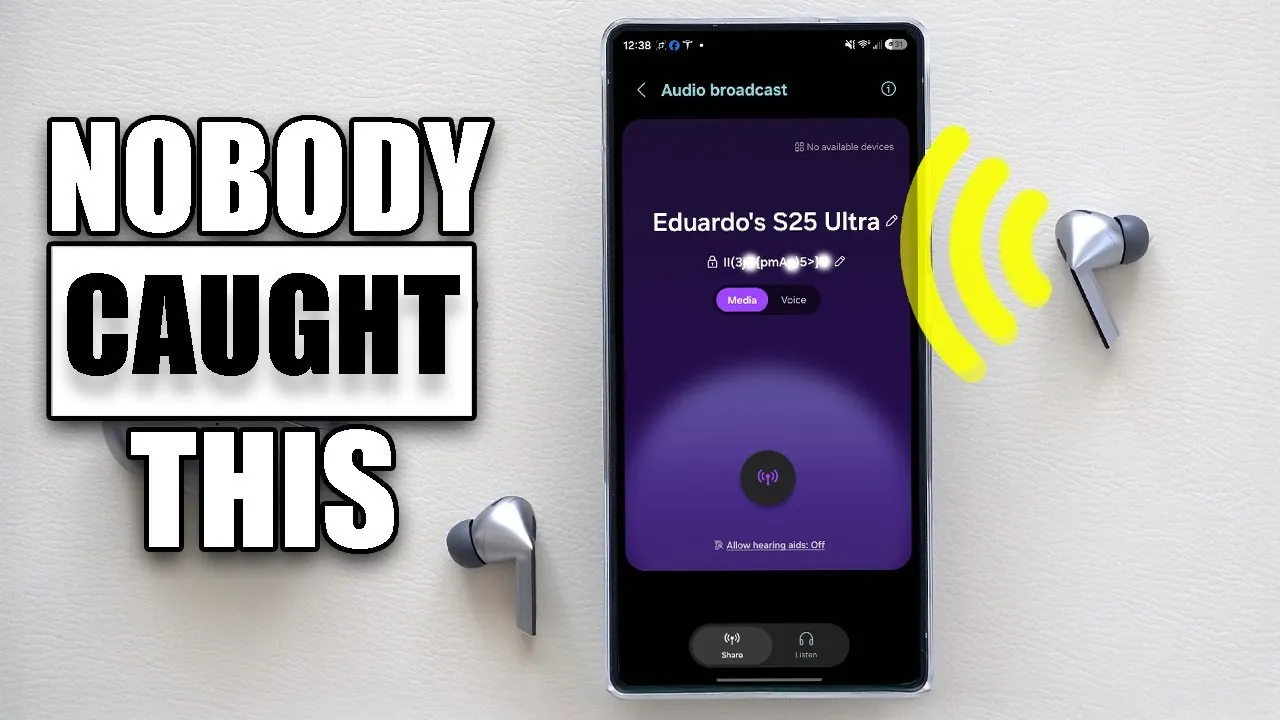
Samsung has unveiled the beta version of One UI 8.5, exclusively available for the Galaxy S25 series. This update introduces a range of enhancements designed to improve customization, streamline functionality, and strengthen security. The official release is anticipated in early 2026, coinciding with the launch of the Galaxy S26 series. These updates aim to refine the user experience, offering tools and features that cater to both everyday users and tech enthusiasts. Below is an in-depth look at the key features that could transform how you interact with your Samsung device in a new video from HotshotTek.

UI Customization: Tailored to Your Preferences
One UI 8.5 brings a new level of personalization to Samsung devices. Users can now resize icons and shortcuts within the control center, allowing for a more customized and user-friendly interface. This feature ensures that your device adapts to your specific preferences, making navigation more intuitive and efficient. Additionally, the home screen layout options have been expanded, allowing you to create a setup that aligns with your workflow or aesthetic preferences. These enhancements reflect Samsung’s commitment to empowering users with greater control over their devices.
Seamless Wireless File Sharing
File sharing between Samsung devices has been significantly upgraded in One UI 8.5. The wireless file-sharing feature now provides a smoother and more reliable experience, reducing interruptions during transfers. Quick Share, Samsung’s proprietary sharing tool, has been enhanced with faster transfer speeds and improved compatibility across devices. Whether you’re sharing photos, videos, or important documents, these updates make the process faster and more convenient. This improvement is particularly beneficial for users who frequently collaborate or transfer files between devices.
Advanced Photo Editing and Screen Recording
The photo editing tool in One UI 8.5 has been enhanced with an undo/redo history log, allowing for precise adjustments and greater flexibility during the editing process. This feature is especially useful for users who require detailed edits or wish to experiment with different styles. Screen recording has also received significant upgrades, allowing users to crop specific areas of the screen and select audio sources, including internal, external, or both. These enhancements cater to content creators and professionals, providing tools that simplify the creation of high-quality recordings.
Smart View and Audio Broadcast Upgrades
Smart View, Samsung’s screen mirroring feature, now offers faster connection times, reducing delays when linking your device to compatible screens. This improvement enhances the overall usability of the feature, making it more practical for presentations, entertainment, or collaborative work. Additionally, the new audio broadcast feature allows users to share or listen to audio across multiple Samsung devices simultaneously. This functionality is ideal for group settings, allowing seamless audio sharing for both collaborative and entertainment purposes.
Strengthened Security Features
Security remains a top priority in One UI 8.5. A fail authentication lock has been introduced, which automatically secures your device after multiple failed login attempts. This feature provides an additional layer of protection, making sure that your personal data remains safe from unauthorized access. Furthermore, Samsung has enhanced its biometric authentication systems, improving both speed and accuracy. These updates reflect Samsung’s dedication to safeguarding user privacy and maintaining trust in its devices.
Power-Saving Modes with Real-Time Insights
One UI 8.5 introduces two distinct power-saving modes—standard and maximum—each designed to optimize battery performance based on your needs. These modes now include real-time battery life estimates, allowing you to make informed decisions about your device’s power usage. Whether you’re conserving energy during travel or maintaining peak performance for demanding tasks, these options provide flexibility and control. The addition of detailed power consumption analytics further enhances your ability to manage battery life effectively.
App Enhancements and Visual Redesigns
Several native apps have been updated to improve usability and aesthetics, offering a more cohesive and enjoyable experience:
- Clock App: A redesigned interface now includes a time zone converter, making it easier for global users to manage schedules across different regions.
- Calculator App: Light and dark modes have been introduced, along with glow effects for better visibility. The history section has been relocated for quicker access.
- Weather Animations: Dynamic weather animations are now integrated into alarm backgrounds, adding a visually engaging element to your wake-up routine.
These updates demonstrate Samsung’s focus on refining the details that enhance everyday usability.
Intuitive Lock Screen and Wallpaper Configuration
Setting wallpapers has become more intuitive in One UI 8.5. The auto-configuration feature ensures that your lock screen layout complements your chosen wallpaper, creating a cohesive and visually appealing interface. This update simplifies the customization process, allowing users to achieve a polished look with minimal effort. Additionally, new wallpaper categories and themes have been added, providing more options to personalize your device.
Samsung Dex: Enhanced Multitasking
Samsung Dex, the platform that enables desktop-like functionality on Samsung devices, has been refined in One UI 8.5. Tabs and windows now resume from your last session, making for a seamless transition when reconnecting. This improvement is particularly beneficial for multitaskers and professionals who rely on Dex for productivity. The updated interface also includes new shortcuts and tools, further enhancing the multitasking experience.
Beta Enrollment and Device Compatibility
The One UI 8.5 beta is currently available for Galaxy S25 series users. If you own an eligible device, you can enroll in the beta program through the Samsung Members app. This allows users to explore the new features ahead of the official release and provide feedback to Samsung. The full release is expected to coincide with the launch of the Galaxy S26 series in early 2026, marking a significant milestone in Samsung’s software development.
Samsung’s One UI 8.5 represents a comprehensive update that prioritizes customization, functionality, and security. With features designed to enhance both usability and performance, this update underscores Samsung’s commitment to delivering a superior user experience. As the beta program progresses, further refinements are expected, setting the stage for a seamless transition to the official release.
Gain further expertise in One UI 8.5 by checking out these recommendations.
Source & Image Credit: HotshotTek
Filed Under: Android News, Mobile Phone News, Top News
Latest Geeky Gadgets Deals
Disclosure: Some of our articles include affiliate links. If you buy something through one of these links, Geeky Gadgets may earn an affiliate commission. Learn about our Disclosure Policy.
Credit: Source link