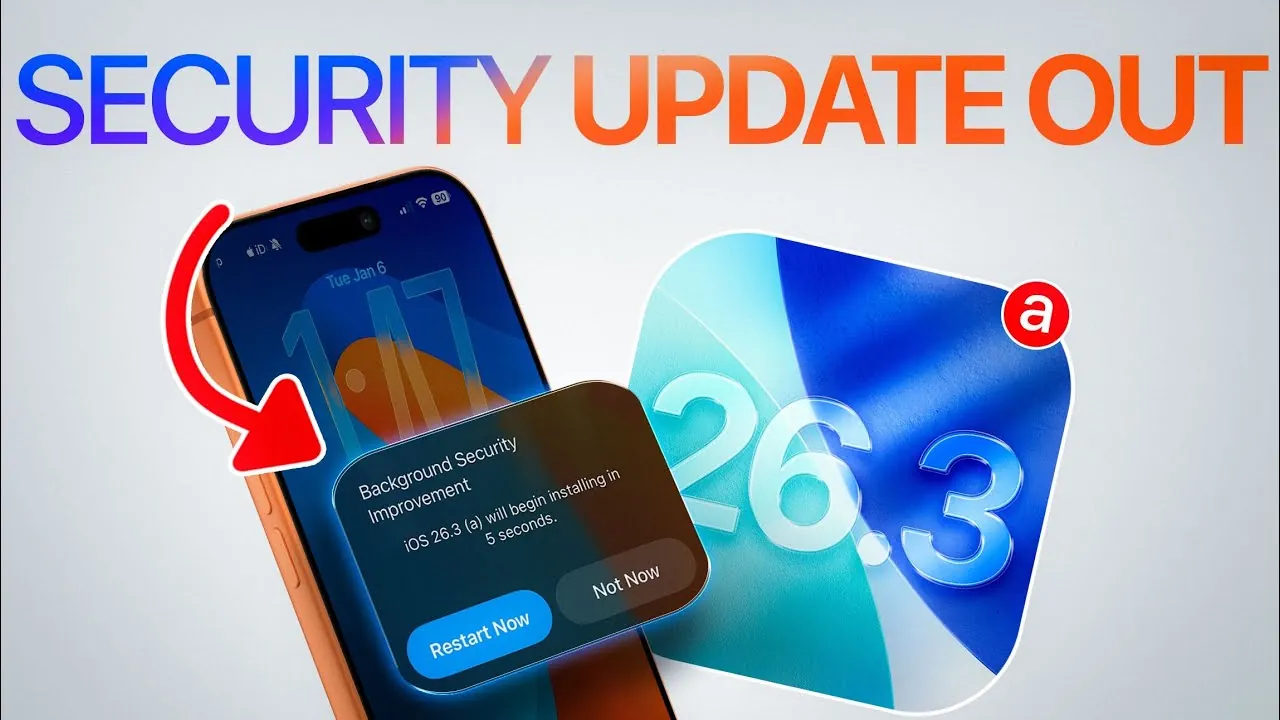
Apple has released the iOS 26.3 (a) beta security update to developers, bringing significant advancements in both security and usability. This update, available to developers and public beta testers, introduces a key feature: background security improvements. This functionality allows you to install critical security updates independently of full iOS upgrades, making sure your device remains protected against emerging threats. Additionally, the update addresses several persistent issues, including Wi-Fi connectivity problems, battery drain, and Face ID malfunctions, aiming to enhance overall performance and user satisfaction. The video below from iDeviceHelp gives us more details.

Background Security Improvements: A New Standard in Protection
The most notable feature of iOS 26.3 is its background security improvements, which represent a significant step forward in device security. This feature allows you to receive and install critical security updates without requiring a full system upgrade. Located within the Privacy and Security settings, these updates can be configured to install automatically or manually, depending on your preferences. This flexibility ensures your device remains secure while minimizing disruptions to your daily activities.
For beta testers, this feature offers a glimpse into Apple’s evolving approach to balancing security with convenience. By allowing users to stay protected without the need for frequent system upgrades, Apple is addressing a long-standing challenge in mobile security. This approach not only simplifies the update process but also ensures that your device is always equipped to handle the latest threats.
Resolving Persistent Issues from iOS 26.2
Apple has also prioritized fixing several issues reported in the previous iOS 26.2 update. These include Wi-Fi instability, excessive battery drain, and Face ID malfunctions, which have been a source of frustration for many users. The iOS 26.3 update aims to resolve these problems comprehensively, improving both functionality and user experience.
In addition to the major update, Apple is expected to release iOS 26.2.1, a targeted patch designed to address these issues more quickly. Unlike major updates, minor patches like this are typically deployed without extensive beta testing, allowing Apple to respond swiftly to critical concerns. This dual approach underscores Apple’s commitment to maintaining a seamless and reliable user experience.
Beta Testing iOS 26.3: Early Access and Feedback
For those enrolled in Apple’s beta testing program, iOS 26.3 offers an opportunity to explore its latest features ahead of the general release. The second beta version is expected to roll out soon, with the final release projected for late January or early February. Beta testing not only provides early access to new functionalities but also allows you to contribute valuable feedback that helps Apple refine the update.
To participate in the beta program, ensure your device is enrolled and updated through the Privacy and Security settings. This process is straightforward and provides a hands-on experience with the new features, including the background security improvements. By participating, you play a role in shaping the final version of the update, making sure it meets the needs of a diverse user base.
Key Features of iOS 26.3
The iOS 26.3 update introduces several features designed to enhance both security and usability. Below are the key highlights:
- Background Security Improvements: Install critical security updates independently of full iOS upgrades, making sure continuous protection.
- Wi-Fi Connectivity Fixes: Improved stability and performance for wireless connections, addressing previous issues with network reliability.
- Battery Optimization: Solutions to reduce excessive battery drain, extending device usage time.
- Face ID Enhancements: Resolved malfunctions for smoother and more reliable authentication.
- Automatic Updates: Enhanced update management through the Privacy and Security settings, offering greater control and convenience.
These features collectively aim to provide a more secure, efficient, and user-friendly experience, addressing both immediate concerns and long-term needs.
Preparing for the Final Release
As the final release of iOS 26.3 approaches, it’s essential to prepare your device to fully benefit from the update. For beta testers, staying current with the latest beta versions ensures access to new features and allows you to provide feedback that contributes to the update’s refinement. For general users, the final release will deliver a polished experience, addressing known issues while introducing innovative security measures.
To prepare, ensure your device is backed up and has sufficient storage space for the update. Regularly checking for updates through the Privacy and Security settings will help you stay informed and ready for the final rollout. By taking these steps, you can ensure a seamless transition to iOS 26.3.
Why iOS 26.3 is a Significant Update
The iOS 26.3 update underscores Apple’s ongoing commitment to enhancing user security and device performance. By introducing background security improvements, Apple is setting a new standard for protecting your data without requiring frequent system upgrades. This feature not only simplifies the update process but also ensures that your device remains secure against emerging threats.
Additionally, the update’s focus on resolving persistent issues like Wi-Fi connectivity and battery drain reflects a user-centric approach to software development. These improvements demonstrate Apple’s dedication to addressing user feedback and delivering a more reliable and efficient operating system.
Next Steps for Users
To make the most of iOS 26.3, consider the following steps:
- Enroll in the Beta Program: If you’re interested in early access to new features, join Apple’s beta testing program and explore the latest functionalities.
- Stay Updated: For beta testers, ensure your device is running the latest beta version to experience the full range of features and provide feedback.
- Prepare for the Final Release: General users should stay informed about the final release date and ensure their devices are ready for the update.
With iOS 26.3, Apple is addressing current challenges while paving the way for a more secure and efficient user experience. By staying proactive and informed, you can take full advantage of the update’s features and improvements.
Here are more detailed guides and articles that you may find helpful on iOS 26.3 security updates.
Source & Image Credit: iDeviceHelp
Filed Under: Apple, Apple iPhone, Guides
Latest Geeky Gadgets Deals
Disclosure: Some of our articles include affiliate links. If you buy something through one of these links, Geeky Gadgets may earn an affiliate commission. Learn about our Disclosure Policy.
Credit: Source link