Have you ever found yourself drowning in a sea of media files, struggling to keep everything organized, encoded, and ready for use? For content creators and media professionals, this is more than just an occasional inconvenience, it’s a persistent bottleneck that eats into valuable time and creative energy. That’s where the idea for an automated media ingestion server was born: a system designed to handle the heavy lifting of media management, from encoding to storage, without constant manual intervention. By blending innovative hardware, Python-driven automation, and even custom 3D printing, this project showcases how technology can transform a chaotic workflow into a streamlined, efficient process.
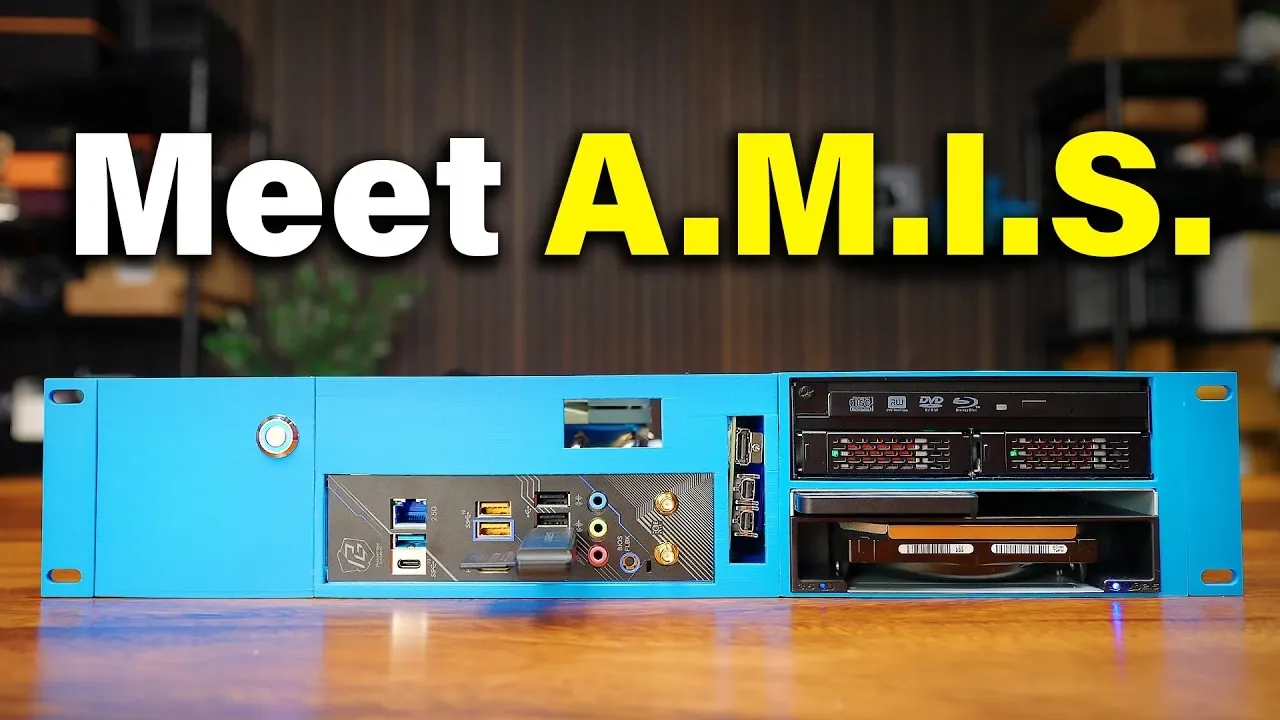
In this fantastic project its creator, Raid Owl explain the creation of “Amos,” a purpose-built server that automates the tedious yet essential tasks of media preparation. You’ll discover how it uses tools like FFmpeg and HandBrake CLI to encode files, generates proxies for seamless editing, and centralizes storage for easy access. Along the way, we’ll dive into the challenges of hardware compatibility, the ingenuity behind its modular design, and the lessons learned from building a system that’s as scalable as it is practical. Whether you’re a filmmaker, a video editor, or just someone with a growing media library, this journey offers insights into how automation can transform your workflow. What would you do with the extra hours saved?
Automated Media Management Solution
TL;DR Key Takeaways :
- The “Amos” media ingestion server automates media file detection, encoding, and transfer, optimizing workflows for content creators and media professionals.
- Key hardware features include a 3D-printed chassis, AMD Ryzen 7600X processor, Intel Arc A310 GPU, and modular components like Icy Dock units for hot-swappable storage.
- Software automation, driven by Python scripts, uses HandBrake CLI and FFmpeg for efficient encoding and centralized storage on a NAS system.
- Challenges included hardware compatibility issues and limited SATA ports, which were addressed through creative solutions like M.2 to SATA adapters and GPU integration.
- Future opportunities include enhanced hardware integration, containerized software deployment, advanced cooling solutions, and scalable storage options for improved performance and flexibility.
Core Functionality of the Media Ingestion Server
The primary role of the media ingestion server is to automate the detection, encoding, and transfer of media files from various storage devices. By eliminating manual intervention, the server ensures a seamless workflow for media preparation. Its key features include:
- Automated Encoding: Converts media files into efficient formats using the H.265 codec, optimizing them for long-term storage.
- Proxy Creation: Generates proxies tailored for editing workflows, making sure consistency across projects and reducing editing complexity.
- Centralized Storage: Transfers encoded files to a network-attached storage (NAS) system, streamlining access and organization.
This automation not only saves time but also enhances uniformity and reliability in media preparation. Whether you’re working with SD cards, USB drives, SSDs, hard drives, DVDs, or Blu-rays, the server simplifies the process, making it an invaluable tool for professionals in the media industry.
Hardware Design: A Modular and Scalable Approach
The hardware design of the server emphasizes both performance and practicality, making sure it meets the demands of modern media workflows. Housed in a custom 3D-printed 2U rack-mountable chassis, the system is compact yet modular, allowing for future upgrades. The key hardware components include:
- ITX Motherboard: Provides a small footprint while offering essential connectivity for the system.
- AMD Ryzen 7600X Processor: Delivers robust multi-threaded performance, ideal for handling intensive encoding tasks.
- Intel Arc A310 GPU: Chosen for its hardware encoding capabilities, addressing compatibility challenges with Linux-based encoders.
- Icy Dock Units: Assist hot-swappable storage, allowing quick and efficient media transfers from multiple sources.
- M.2 to SATA Adapters: Expand SATA connectivity to accommodate additional drives, enhancing storage flexibility.
- Low-Profile Cooling Systems: Maintain thermal efficiency within the compact chassis, making sure reliable performance.
This modular design ensures the system can adapt to evolving needs, while the hot-swappable storage simplifies the ingestion of media from various devices. The use of 3D printing for the chassis highlights the project’s focus on customization and cost-effectiveness.
DIY Automated Media Ingestion Server

Gain further expertise in file organization by checking out these recommendations.
Software Automation: Streamlining Media Workflows
The server’s functionality is driven by Python-based automation scripts, which continuously monitor connected storage devices for new media files. Once detected, the files are processed using two powerful encoding tools:
- HandBrake CLI: Specializes in converting DVDs and Blu-rays into digital formats, making sure compatibility and efficiency.
- FFmpeg: A versatile tool for encoding and processing a wide range of video file types, offering flexibility in media workflows.
The server employs multi-threaded processing to handle multiple encoding tasks simultaneously, maximizing hardware utilization and efficiency. After encoding, the files are automatically transferred to a NAS system, making sure centralized access, secure storage, and streamlined collaboration. This level of automation significantly reduces manual effort, allowing media professionals to focus on creative tasks rather than technical processes.
Challenges and Lessons Learned
Building a custom media ingestion server presented several challenges, particularly in hardware compatibility and system integration. Key obstacles included:
- Hardware Compatibility: While the AMD Ryzen processor excelled in multi-threaded tasks, its limited compatibility with Linux-based encoders required the addition of an Intel GPU for hardware encoding.
- Storage Expansion: The ITX motherboard’s limited SATA ports necessitated creative solutions, such as M.2 to SATA adapters, to expand connectivity and accommodate additional drives.
These challenges underscored the importance of thorough planning, testing, and adaptability during the design phase. Future iterations of the server could benefit from improved hardware integration, cleaner software configurations, and the use of containerization to simplify deployment and maintenance.
Practical Applications and Future Opportunities
The server’s impact on media workflows is significant, offering practical benefits across various use cases. These include:
- Editing Workflows: Automates the creation of consistent proxies, eliminating issues with mixed codecs in editing timelines and improving efficiency.
- Media Organization: Simplifies the organization of personal or professional media libraries, making sure efficient storage and easy retrieval.
- Remote Collaboration: Centralizes media on a NAS system, allowing seamless remote editing and collaboration among team members.
Looking ahead, there are several opportunities to enhance the server’s functionality and performance. Potential improvements include:
- Enhanced Hardware Integration: Addressing compatibility issues and optimizing performance through better hardware selection and configuration.
- Containerization: Simplifying software deployment, updates, and maintenance by using containerized environments.
- Advanced Cooling Solutions: Exploring innovative cooling methods to further optimize thermal efficiency and system reliability.
- Scalable Storage Options: Expanding storage capacity to accommodate larger media libraries and support growing workflows.
By combining hardware innovation with software automation, this project demonstrates a unique approach to media management. Whether you’re managing a personal media library or supporting a professional editing workflow, the insights gained from this project can serve as a valuable guide for streamlining your own media workflows.
Media Credit: Raid Owl
Filed Under: DIY Projects, Hardware, Top News
Latest Geeky Gadgets Deals
Disclosure: Some of our articles include affiliate links. If you buy something through one of these links, Geeky Gadgets may earn an affiliate commission. Learn about our Disclosure Policy.
Credit: Source link