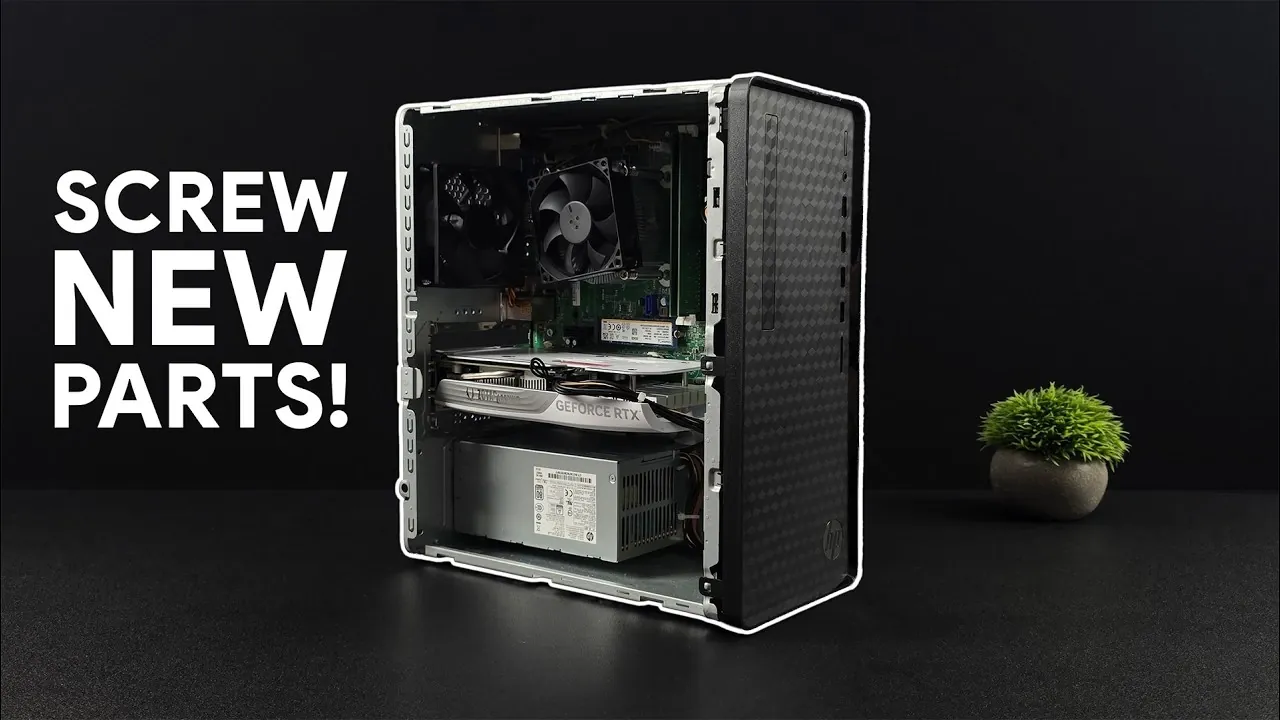
Building a gaming PC that balances affordability and performance is entirely possible, as demonstrated by ETA Prime. By starting with a prebuilt system like the HP Pavilion desktop and making a few strategic upgrades, you can create a machine capable of running modern games at 1440p or 1080p ultra settings without exceeding a modest budget. This approach uses second-hand components and cost-effective upgrades, such as replacing the stock power supply and adding a dedicated GPU, to maximize value while keeping expenses in check.
In this breakdown, you’ll learn how to select a reliable base system, such as the HP M01 F319 with its AMD Ryzen 5700G processor, and identify essential upgrades like a higher-wattage power supply and a compatible GPU. You’ll also discover how to evaluate second-hand components for compatibility and condition, making sure a smooth build process. By following these steps, you can assemble a gaming PC that delivers excellent performance in titles like Red Dead Redemption 2 and Spider-Man 2, all while staying within your financial limits.
Build a Budget Gaming PC
TL;DR Key Takeaways :
- Building a budget gaming PC is achievable by using second-hand components and starting with affordable prebuilt systems like the HP Pavilion desktop, which offers a solid foundation for upgrades.
- Key upgrades include replacing the stock power supply with a 400W or higher unit and adding a dedicated GPU like the Nvidia RTX 4060 or AMD Radeon RX 7600 for optimal gaming performance.
- The Ryzen 5700G processor, included in some HP Pavilion models, provides excellent multitasking and gaming capabilities with its 8 cores and 16 threads, complemented by 16GB DDR4 RAM and a fast M.2 SSD.
- With these upgrades, the system can handle modern games at 1440p or 1080p ultra settings, delivering smooth gameplay and high-quality visuals, supported by features like DLSS and frame generation technology.
- This build offers expandability for future upgrades, making sure long-term value and flexibility, making it a cost-effective solution for gamers seeking affordability without sacrificing performance.
Overcoming Challenges
Building a gaming PC on a budget can be a challenging task. The prices of new hardware, including CPUs, GPUs, and RAM, have steadily increased, making it difficult to stay within a limited budget. However, opting for pre-owned components from platforms like eBay, Facebook Marketplace, or Amazon can significantly reduce costs. These second-hand parts often deliver excellent performance at a fraction of the price, making them a practical choice for budget-conscious gamers.
To ensure success, it’s important to carefully evaluate the condition and compatibility of used components. Look for sellers with positive reviews and detailed product descriptions to minimize risks. This approach allows you to build a powerful gaming PC without overspending.
Choosing the Right Base System
The foundation of your budget gaming PC is crucial, and prebuilt systems like the HP Pavilion desktop offer an excellent starting point. Models such as the M01, TG01, or TP01 are affordable and come with hardware that can be upgraded for gaming purposes. For example, the HP M01 F319 is a standout option, featuring an AMD Ryzen 5700G processor, 16GB DDR4 RAM, and a 512GB M.2 SSD.
The Ryzen 5700G, with its 8 cores and 16 threads, provides smooth multitasking and gaming performance, making it a reliable choice for this build. Additionally, the included M.2 SSD ensures fast load times, while the 16GB of RAM is sufficient for most modern games. Starting with a solid base system like this simplifies the upgrade process and keeps costs manageable.
This Budget PC Plays Everything You Need : Without Going Broke
Check out more relevant guides from our extensive collection on Budget Gaming PC that you might find useful.
Essential Upgrades for Optimal Performance
To transform your base system into a gaming powerhouse, a few key upgrades are necessary. These upgrades ensure compatibility with modern games and improve overall performance.
- Power Supply Upgrade: Stock HP Pavilion desktops typically include low-wattage power supplies, such as 180W units, which are insufficient for running dedicated GPUs. Replacing the stock power supply with a 400W or higher unit is essential. Affordable options can be found on platforms like AliExpress, making sure compatibility with your chosen GPU while keeping costs low.
- Graphics Card Selection: The GPU is the most critical component for gaming performance. While Intel ARC GPUs are available, they often face compatibility issues with older systems. Instead, consider the Nvidia RTX 4060 or AMD Radeon RX 7600. Both GPUs deliver excellent performance for 1440p gaming and support advanced features like DLSS (Deep Learning Super Sampling) and frame generation technology, which enhance gameplay smoothness and visual quality.
These upgrades not only improve gaming performance but also ensure your system remains compatible with future titles, providing long-term value.
Performance Expectations and Gaming Benchmarks
With the upgraded HP Pavilion desktop, you can expect impressive gaming performance across a variety of modern titles. Games such as Spider-Man 2, Mortal Kombat 1, Japanese Drift Master, and Red Dead Redemption 2 run smoothly at 1440p resolution with DLSS set to balanced or quality modes. For those who prefer 1080p gaming, ultra settings deliver stunning visuals without compromising frame rates.
This build ensures you can enjoy modern games with high-quality graphics and smooth gameplay, making it an ideal choice for both casual gamers and dedicated enthusiasts. The combination of the RTX 4060 or RX 7600 GPU with the Ryzen 5700G processor provides a balanced system capable of handling demanding games with ease.
Additional Features and Expandability
Beyond gaming, this build offers flexibility and room for future upgrades. The included M.2 SSD ensures fast boot times and quick game loading, while additional storage drives can be added to accommodate a growing game library. The RTX 4060’s frame generation support further enhances performance in compatible games, making sure your system remains relevant for upcoming titles.
Moreover, the HP Pavilion desktop’s compact design makes it easy to upgrade components as needed. Whether you want to add more RAM, increase storage capacity, or upgrade to a more powerful GPU in the future, this build provides the foundation for a versatile and expandable gaming system.
Affordable Gaming Without Sacrifices
This budget-friendly gaming PC demonstrates that you don’t need to spend a fortune to enjoy modern gaming. By starting with an HP Pavilion desktop and upgrading key components like the power supply and GPU, you can achieve excellent performance at 1440p or 1080p resolutions. This approach combines affordability with capability, allowing you to enjoy a seamless gaming experience without breaking the bank. Whether you’re a casual gamer or a dedicated enthusiast, this build offers a cost-effective solution that delivers both quality and performance.
Media Credit: ETA PRIME
Filed Under: Gaming News, Guides, Hardware
Disclosure: Some of our articles include affiliate links. If you buy something through one of these links, Geeky Gadgets may earn an affiliate commission. Learn about our Disclosure Policy.
Credit: Source link