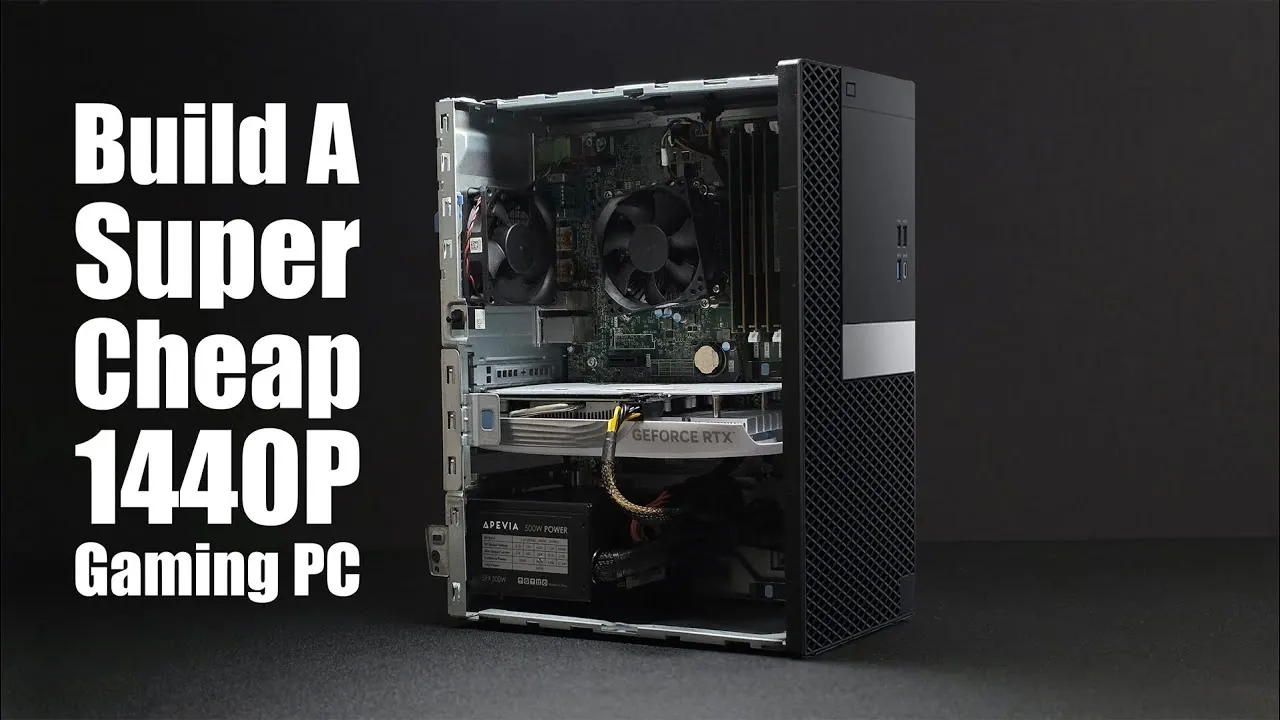
Is building a gaming PC on a budget still possible in today’s market? With hardware prices climbing, many gamers are questioning whether affordable builds are a thing of the past. In the video, ETA Prime breaks down how to assemble a surprisingly powerful gaming rig for just $330–$340. By starting with a refurbished Dell Optiplex 7070, this method transforms a standard office PC into a machine capable of running modern games at 1080p and even 1440p resolutions, all while keeping costs low.
This budget PC build guide dives into the strategic upgrades that make this build shine, such as adding a 500W SFX power supply and pairing the system with a used GPU like the RTX 4060 or AMD Radeon RX 6600. ETA PRIME also highlights why the Optiplex 7070 is a standout choice for budget-conscious gamers, showing how small, thoughtful adjustments can unlock impressive performance. For anyone eager to save money while building a capable gaming PC, this guide offers a practical and exciting solution.
Budget Gaming PC Guide 2026
TL;DR Key Takeaways :
- The Dell Optiplex 7070, priced at $100–$120, serves as an affordable and modifiable foundation for building a budget gaming PC, featuring an Intel Core i7-9700 CPU and 16GB of RAM.
- Upgrading the power supply to a 500W SFX unit (around $40 including adapter) is essential to support a dedicated GPU for gaming performance.
- Recommended GPUs for this build include the Nvidia RTX 3060, RTX 4060, and AMD Radeon RX 6600, with the RTX 4060 offering excellent 1440p performance for $190–$235.
- This build delivers strong gaming performance at 1080p and 1440p resolutions, achieving 80+ FPS in modern titles like Spider-Man 2 and Cyberpunk 2077 with DLSS and high settings.
- The total cost of the build is approximately $330–$340, with future upgrade potential for components like the GPU, CPU, and storage, making sure long-term value and flexibility.
Why the Dell Optiplex 7070 Is a Smart Starting Point
The Dell Optiplex 7070 offers an excellent foundation for budget-conscious PC builders. Priced between $100 and $120, this system comes equipped with an Intel Core i7-9700 CPU and 16GB of RAM, providing a solid baseline for gaming when paired with the right upgrades. Its availability and ease of modification make it a standout choice compared to similar systems from brands like HP or Lenovo.
The Optiplex 7070’s compact design and reliable build quality further enhance its appeal. While it may not be a gaming powerhouse out of the box, its compatibility with modern components allows for significant performance improvements without breaking the bank.
Upgrading the Power Supply: A Crucial Step
One of the first upgrades required for the Dell Optiplex 7070 is replacing its stock power supply. The original unit lacks the wattage and necessary connectors to support a dedicated GPU, which is essential for gaming. To address this limitation, you’ll need to install a 500W SFX power supply, which is compact enough to fit within the Optiplex’s case.
Additionally, a power supply-to-motherboard adapter, costing around $6–$7, is required to ensure compatibility. While installing the new power supply, you may need to make minor modifications to the case to accommodate the upgraded unit. This step is critical for allowing the system to handle the demands of modern gaming hardware.
Unlock more potential in budget gaming PC builds by reading previous articles we have written.
Choosing the Right GPU for Performance and Value
The GPU is the most important component for gaming performance, and selecting the right one is key to achieving a balance between cost and capability. Here are three strong options for this build:
- Nvidia RTX 3060: A dependable choice for smooth 1080p gaming with solid performance across a wide range of titles.
- Nvidia RTX 4060: Offers improved performance, support for DLSS, and frame generation technology, making it ideal for 1440p gaming.
- AMD Radeon RX 6600: A budget-friendly alternative that delivers competitive performance for its price.
Used GPUs are widely available on platforms like eBay, allowing you to save money while still obtaining a capable graphics card. For example, the RTX 4060 typically costs between $190 and $235, making it an excellent choice for gamers seeking high performance without overspending.
Performance Expectations: What This Build Can Deliver
Once assembled, this budget gaming PC delivers impressive performance across a variety of modern games. Testing at 1440p with medium to high settings yields the following results:
- Spider-Man 2: Medium settings, 80+ FPS.
- Forza Horizon 5: Ultra settings, 100+ FPS.
- Street Fighter 6: Very high settings, 60+ FPS.
- God of War Ragnarok: High settings, 84 FPS.
- Cyberpunk 2077: High settings with DLSS, 81 FPS.
Technologies like DLSS and frame generation significantly enhance performance, particularly in demanding titles such as Cyberpunk 2077 and Spider-Man 2. These features allow for smoother gameplay and higher frame rates without sacrificing visual quality, making sure a satisfying gaming experience even on a budget.
Cost Breakdown: Building an Affordable Gaming PC
This build demonstrates that a capable gaming PC can be assembled for approximately $330–$340. Here’s a breakdown of the costs:
- Base system (Dell Optiplex 7070): $100.
- Power supply and adapter: $40.
- GPU (e.g., RTX 4060): $190–$235.
By sourcing used components and focusing on strategic upgrades, you can achieve a gaming experience comparable to much more expensive systems. This approach not only saves money but also ensures that your investment delivers strong performance for its price.
Future-Proofing and Upgrade Potential
This build isn’t just about immediate affordability, it also offers room for future upgrades. For instance, the RTX 4060 can be reused in a more powerful system with an upgraded CPU and motherboard. This flexibility ensures that your investment remains relevant as gaming requirements evolve over time.
Additionally, the modular nature of this build allows you to replace or enhance individual components as needed. Whether it’s adding more storage, upgrading the GPU, or transitioning to a larger case, this system provides a solid foundation for long-term use and customization.
Crafting a Cost-Effective Gaming Experience
In an era where building a budget gaming PC feels increasingly out of reach, this guide demonstrates that it is still possible to assemble a capable machine without overspending. By starting with a refurbished Dell Optiplex 7070 and upgrading key components like the power supply and GPU, you can enjoy smooth performance in modern games at 1080p and 1440p resolutions. With careful planning and a willingness to source used parts, this build represents a practical and affordable solution for gamers seeking quality performance on a budget.
Media Credit: ETA PRIME
Filed Under: Gaming News, Guides, Hardware
Latest Geeky Gadgets Deals
Disclosure: Some of our articles include affiliate links. If you buy something through one of these links, Geeky Gadgets may earn an affiliate commission. Learn about our Disclosure Policy.
Credit: Source link