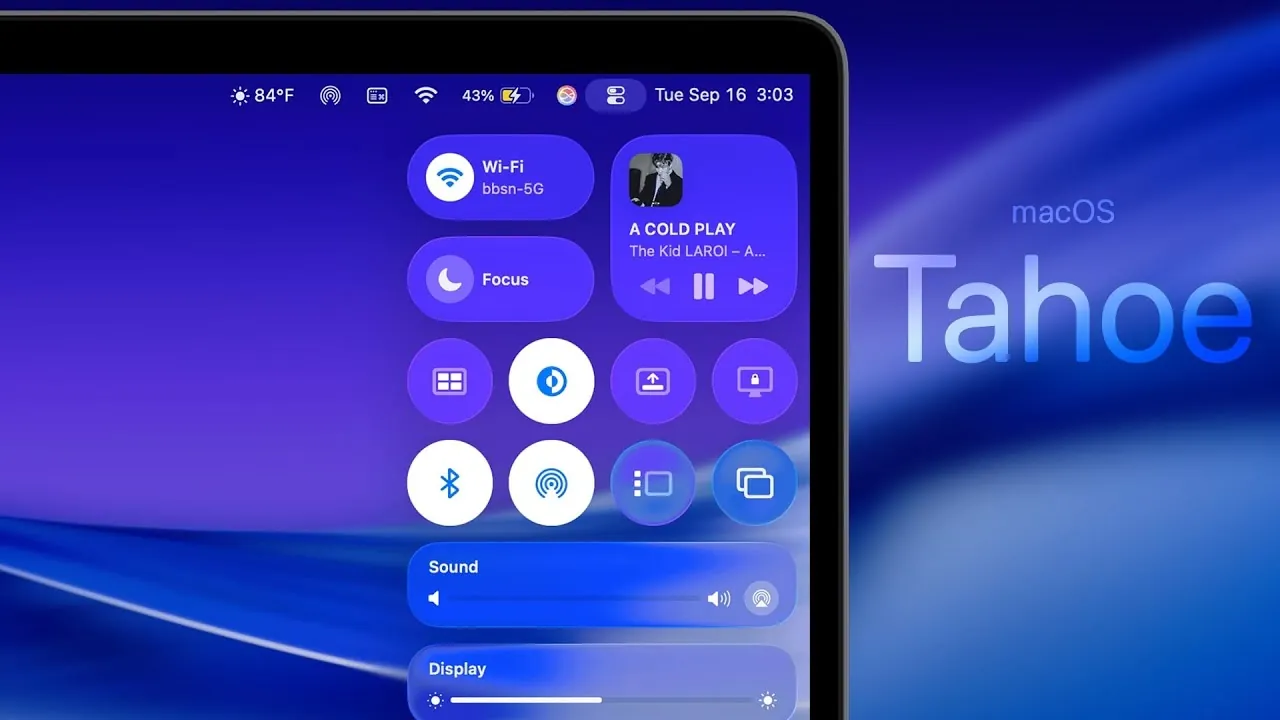
Apple has unveiled macOS Tahoe, a major update that redefines the desktop experience with a focus on usability, customization, and performance. This release introduces a redesigned interface, smarter Spotlight Search, and a host of new applications, making it one of the most comprehensive updates in recent years. Below is an in-depth look at the standout features and improvements that macOS Tahoe brings to the table in an awesome new video from Brandon Butch.

Redesigned User Interface: A Modern Aesthetic
macOS Tahoe debuts the “Liquid Glass” design, a visually striking update that emphasizes sleekness and modernity. This design overhaul includes:
- Customizable app icons, widgets, and folder colors, allowing users to create a desktop that reflects their personal style.
- Systemwide contextual menus and glyph icons, making sure a consistent and cohesive visual experience across the operating system.
The combination of rounded UI elements, transparent menu bars, and smoother animations creates a refined interface that balances aesthetics with functionality, enhancing both form and usability.
Spotlight Search: Enhanced Intelligence and Integration
Spotlight Search has received a significant upgrade, using machine learning to deliver faster and more accurate results. Key enhancements include:
- Dedicated sections for applications, files, actions, and clipboard history, making it easier to locate specific items.
- Integration with Siri and ChatGPT, allowing advanced queries and multitasking capabilities.
- iPhone app mirroring and a built-in clipboard manager with an 8-hour history, streamlining cross-device workflows.
These updates transform Spotlight into a centralized productivity hub, offering users a smarter and more efficient way to navigate their Mac.
Control Center: Fully Customizable for Your Needs
The revamped Control Center in macOS Tahoe prioritizes customization and efficiency, allowing users to tailor it to their workflow. Notable features include:
- The ability to add third-party app toggles for quick access to frequently used tools.
- Options to group icons in the menu bar, improving organization and reducing clutter.
This level of customization ensures that essential tools are always within reach, making daily tasks more seamless and intuitive.
New and Updated Applications: Expanding Functionality
macOS Tahoe introduces several new native apps and updates existing ones to align with its modern design philosophy. Highlights include:
- Phone App: Enables users to make and receive calls directly on their Mac, synced seamlessly with their iPhone.
- Journal App: A new tool for organizing personal entries, complete with categorized journaling features.
- Magnifier App: Integrates with the iPhone camera to provide enhanced accessibility options.
- Redesigned versions of Freeform, TV, Podcasts, Photos, and Music, updated to match the sleek “Liquid Glass” aesthetic.
These additions and updates not only enhance functionality but also provide a more cohesive and enjoyable user experience.
Safari: A Refined Browsing Experience
Safari has been updated to align with macOS Tahoe’s design and performance goals. Key improvements include:
- A “Liquid Glass” toolbar and adaptive color-matching for websites, creating a more immersive browsing experience.
- Improved tab design and sidebar layout, making navigation more intuitive.
- Support for HDR images, SVG icons, and two-factor authentication autofill in third-party browsers, enhancing both security and visual quality.
These updates make Safari a more secure, efficient, and visually appealing browser for macOS users.
Shortcuts and Automations: Simplifying Complex Tasks
Automation in macOS Tahoe has been significantly enhanced, offering new tools to streamline workflows. Key features include:
- Triggers for files, folders, and external drives, allowing users to automate repetitive tasks with ease.
- Apple Intelligence actions, such as image creation and text rewriting, powered by advanced machine learning algorithms.
These capabilities are particularly valuable for power users, saving time and simplifying complex processes.
Customization and Accessibility: Inclusive by Design
macOS Tahoe introduces a range of customization and accessibility features to cater to diverse user needs. Notable updates include:
- New lock screen clock styles and weights, allowing users to personalize their device further.
- Systemwide reader mode, providing a distraction-free reading experience across all apps.
- Enhanced Braille display interface and improved screen-sharing settings, making the system more accessible to users with disabilities.
- Vehicle motion cues to reduce motion sickness for users sensitive to screen movement.
These features underscore Apple’s commitment to creating an operating system that is both inclusive and adaptable.
Gaming and Performance: Optimized for Gamers
Gaming on macOS Tahoe has reached new heights, thanks to several performance-focused enhancements. Key updates include:
- A new Games app that centralizes your gaming library, making it easier to access and manage titles.
- MetalFX updates for faster installations and smoother gameplay, improving the overall gaming experience.
- An automatic low-power mode during gameplay, optimizing battery life without compromising performance.
These improvements make macOS Tahoe a more attractive platform for gamers, offering a seamless and efficient gaming experience.
Additional Features: Productivity and Privacy at the Forefront
Beyond its headline features, macOS Tahoe introduces a variety of tools designed to enhance productivity and privacy. These include:
- Live Activities integration in the menu bar, providing real-time updates for ongoing tasks and events.
- Improved parental controls and privacy settings, giving users greater control over their data and device usage.
- Terminal updates with new themes, fonts, and glyph support, catering to developers and advanced users.
- HDR screen recording, allowing high-quality video capture for content creators.
- A standalone blocked contacts section, simplifying communication management.
These additions ensure that macOS Tahoe offers something for every user, from professionals to casual users.
A Comprehensive Upgrade for All Users
macOS Tahoe represents a significant evolution in Apple’s desktop operating system, combining modern design, advanced functionality, and enhanced performance. With its focus on personalization, smarter tools, and inclusivity, this update caters to a wide range of users. Whether you’re a professional seeking productivity enhancements, a gamer looking for optimized performance, or someone who values accessibility and customization, macOS Tahoe delivers a compelling and well-rounded upgrade.
Below are more guides on macOS Tahoe from our extensive range of articles.
Source & Image Credit: Brandon Butch
Filed Under: Apple, Guides, Laptops, Top News
Latest Geeky Gadgets Deals
Disclosure: Some of our articles include affiliate links. If you buy something through one of these links, Geeky Gadgets may earn an affiliate commission. Learn about our Disclosure Policy.
Credit: Source link