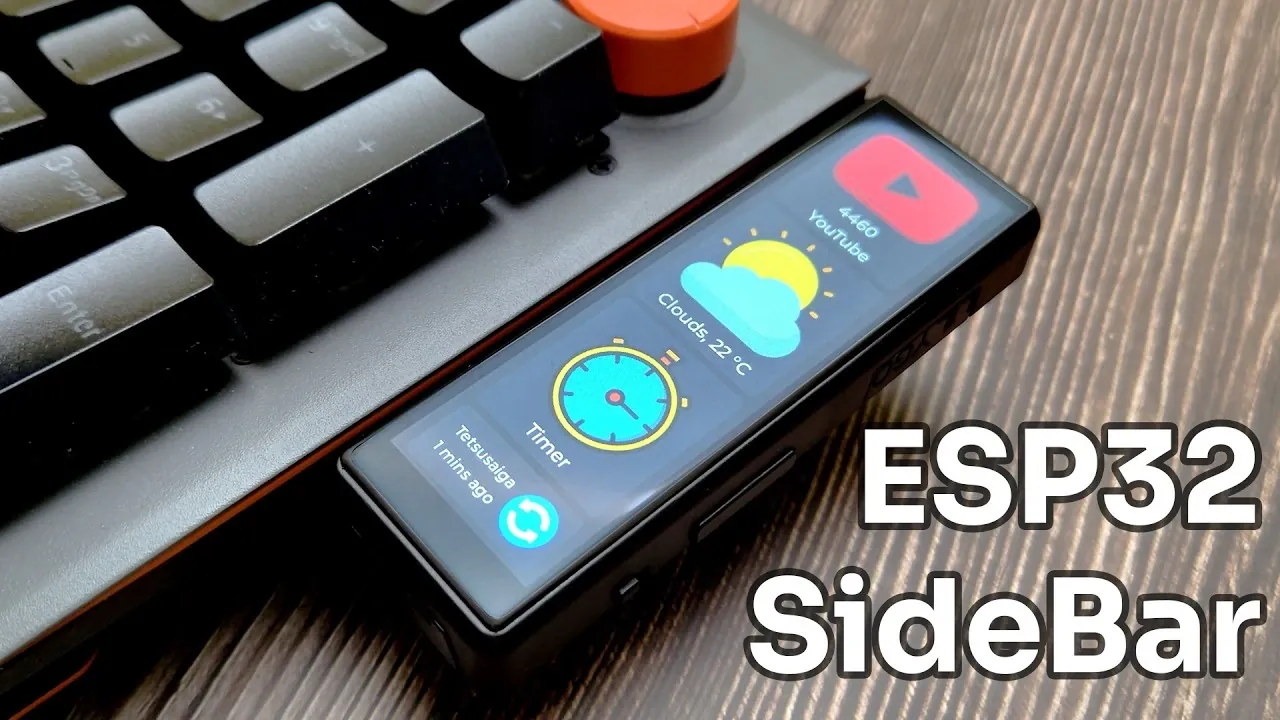
What if your keyboard could do more than type? Imagine glancing down and instantly seeing your latest YouTube stats, the current weather, or a countdown timer, all without opening a single app. Enter the snap-on mini dashboard, a sleek, touchscreen device that attaches directly to your keyboard, transforming it into a hub of real-time information. Built around the powerful ESP32S3 microcontroller and the T-Display S3 Long, this compact gadget blends functionality with innovation, offering a seamless way to monitor data that matters most to you. Whether you’re a content creator tracking analytics or a productivity enthusiast managing tasks, this dashboard promises to transform how you interact with your workspace.
In this project Tech Talkies takes you through how to build this space-saving device that merges innovative hardware with open source software to deliver a customizable, user-friendly experience. From weather updates to Wi-Fi status, the dashboard’s panels are designed to keep essential information at your fingertips. But that’s just the beginning, its open source design means you can adapt it to fit your unique needs, whether that’s integrating new APIs or creating entirely custom widgets. By the end, you’ll see how this mini dashboard isn’t just a tool, it’s a gateway to a smarter, more efficient workspace. Sometimes, the smallest upgrades make the biggest difference.
Customizable DIY Snap-On Dashboard
TL;DR Key Takeaways :
- The snap-on mini dashboard, built around the T-Display S3 Long and powered by the ESP32S3 microcontroller, offers a compact and customizable solution for displaying real-time data like YouTube analytics, weather updates, and timers directly on your keyboard.
- Its 3.4-inch touchscreen LCD provides an intuitive and visually appealing interface, with a magnetic attachment for easy integration into your workspace without clutter.
- The dashboard features four primary panels: YouTube Stats, Weather, Timer, and Wi-Fi Status, delivering essential information in a clear and accessible format.
- It is open source and highly customizable, allowing users to integrate APIs, modify layouts, and add new widgets using tools like the Arduino IDE and Easy Studio.
- The device is designed for versatility and future expansion, allowing users to adapt it for additional applications such as fitness tracking, smart home control, or cryptocurrency monitoring.
Innovative Hardware with a Space-Saving Design
At the heart of this project is the T-Display S3 Long, a 3.4-inch touchscreen LCD paired with the ESP32S3 microcontroller. This combination provides the processing power and display clarity necessary for a responsive and visually appealing user experience. The touchscreen enables intuitive interaction, while its magnetic attachment allows it to snap securely onto your keyboard. By occupying minimal desk space, the dashboard remains easily accessible without contributing to workspace clutter.
The hardware’s compact design ensures it blends seamlessly into your setup, making it a practical addition for those who value both functionality and aesthetics. Its portability also means you can move it between devices or workstations effortlessly, enhancing its versatility.
Core Features: Real-Time Information at Your Fingertips
This mini dashboard is designed to deliver critical information through four primary panels, each tailored to specific needs:
- YouTube Stats Panel: Keep track of your channel’s performance with metrics such as subscriber count, video count, and watch time. This feature is ideal for content creators who need quick access to their analytics without navigating multiple platforms.
- Weather Panel: Stay informed about temperature, humidity, wind speed, and forecasts using data from the OpenWeatherMap API. This ensures you’re always prepared for changing weather conditions, whether planning your day or managing outdoor activities.
- Timer Panel: Use this panel as a focus timer, countdown, or stopwatch to manage tasks effectively. It’s a valuable tool for boosting productivity and maintaining focus during work or study sessions.
- Wi-Fi Status Panel: Monitor your network name, last update time, and connectivity status with a single tap. This feature simplifies troubleshooting and ensures you stay connected without interruptions.
Each panel is designed for clarity and ease of use, making sure that the information you need is always accessible and presented in a visually engaging format.
Snap-On Mini Dashboard for Your Keyboard | Weather, YouTube Stats, Timer & More

Gain further expertise in esp32s3 by checking out these recommendations.
Software: Open source and Customizable
The dashboard is programmed using the Arduino IDE, a popular platform for microcontroller projects. The user interface is built with the LVGL library (version 8.11), which offers powerful tools for creating interactive and visually appealing designs. This combination ensures a smooth and user-friendly experience, even for those new to microcontroller programming.
API integration plays a crucial role in the dashboard’s functionality. The YouTube Data API provides real-time channel statistics, while the OpenWeatherMap API delivers accurate weather updates. These integrations ensure the dashboard remains up-to-date and reliable. Users can also customize the refresh intervals, with a default setting of five minutes, to suit their preferences.
For further customization, Easy Studio, a free and open source tool, allows you to modify the dashboard’s layout, icons, and overall design. This flexibility makes it easy to create a personalized interface that aligns with your specific requirements.
Simple Setup and Endless Customization
Setting up the mini dashboard is straightforward, even for beginners. To get started, you’ll need API keys for YouTube and weather data, which are readily available from their respective platforms. Clear, step-by-step instructions guide you through configuring the Arduino IDE and hardware, making sure a hassle-free setup process.
One of the standout features of this project is its adaptability. Using Easy Studio, you can customize the dashboard’s layout, change icons, and even add new panels. Whether you want to track additional data, such as stock market updates or calendar notifications, or create entirely new widgets, the dashboard’s open source nature allows for endless possibilities. This flexibility ensures the device can evolve alongside your needs and interests.
Future Potential and Practical Applications
The open source design of this mini dashboard unlocks a world of possibilities for expansion and innovation. Users can integrate additional APIs, develop new widgets, or suggest features to enhance its functionality. For instance, you could add panels to display fitness tracking data, control smart home devices, or monitor cryptocurrency prices. The only limits are your imagination and technical expertise.
This dashboard is not just a tool but a platform for creativity and problem-solving. It enables users to design a personalized, data-driven workspace that aligns with their unique goals and preferences. Whether you’re a content creator seeking streamlined analytics, a productivity enthusiast aiming to optimize your workflow, or a DIY electronics hobbyist exploring new projects, this device offers a versatile and practical solution.
By combining the T-Display S3 Long, ESP32S3 microcontroller, and open source tools, this snap-on mini dashboard transforms your keyboard into a powerful, customizable interface. Its compact design, user-friendly software, and potential for future expansion make it an invaluable addition to any tech-savvy setup.
Media Credit: Tech Talkies
Filed Under: DIY Projects, Guides, Hardware
Latest Geeky Gadgets Deals
Disclosure: Some of our articles include affiliate links. If you buy something through one of these links, Geeky Gadgets may earn an affiliate commission. Learn about our Disclosure Policy.
Credit: Source link