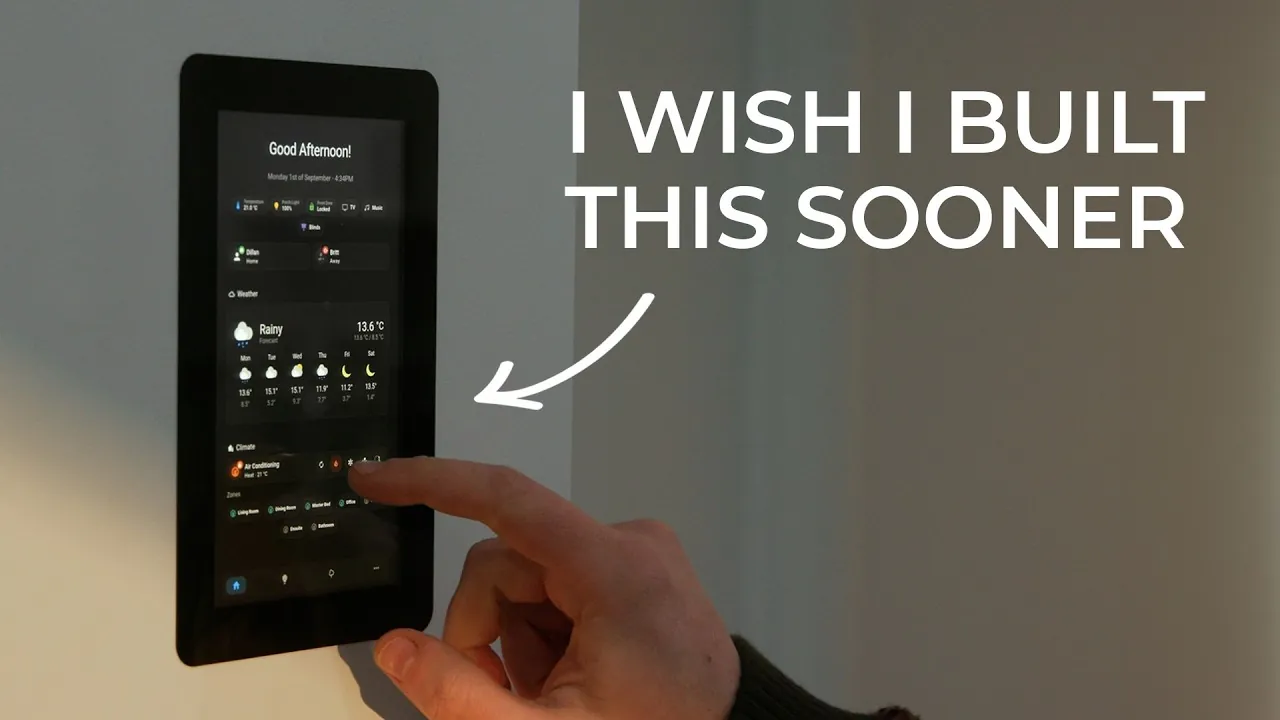
Imagine walking into your home and, with a single tap on a sleek, wall-mounted screen, adjusting the lights, setting the perfect temperature, or even queuing up your favorite playlist, all without fumbling through a cluttered smartphone. Sounds futuristic, right? Yet, with a few affordable components and a bit of creativity, this vision can become your reality. A custom-built smart home control panel doesn’t just centralize control over your devices; it transforms how you interact with your space, blending convenience with a touch of tech-savvy elegance. Whether you’re a seasoned DIY enthusiast or just dipping your toes into home automation, this project offers a unique opportunity to craft something both functional and personal.
In this step-by-step primer from Stock Pot, you’ll uncover how to design and build a wall-mounted smart home control panel tailored to your needs. From selecting the right hardware, like a Raspberry Pi and touchscreen display, to configuring software that unifies your smart devices, this guide covers it all. You’ll also explore tips for creating a low-profile mounting system that seamlessly integrates into your home’s aesthetic. By the end, you won’t just have a control panel; you’ll have a personalized command center that simplifies your daily routines and enhances your home’s efficiency. Ready to rethink what your walls can do? Let’s explore the possibilities.
DIY Smart Home Control Panel
TL;DR Key Takeaways :
- Building a wall-mounted smart home control panel using a Raspberry Pi and touchscreen display centralizes control over devices like lighting, blinds, and thermostats, offering a distraction-free and customizable interface.
- Essential hardware includes a Raspberry Pi 5 (8GB), Raspberry Pi Display 2 (720p touchscreen), Power over Ethernet (PoE) module, and an active cooling module for optimal performance and reliability.
- A well-designed mounting system using 3D-printed components ensures a sleek, secure, and accessible installation that blends seamlessly with home interiors.
- Software setup involves installing Pi OS, allowing kiosk mode for a full-screen dashboard, and integrating Home Assistant to manage and customize smart device controls.
- Key features include customizable widgets, compatibility with Zigbee and Z-Wave devices, and potential for future enhancements like live security camera feeds and doorbell notifications.
Why Build a Smart Home Control Panel?
A wall-mounted smart home control panel offers a dedicated interface that simplifies the management of your smart devices. Unlike smartphones, which can be cluttered with apps and notifications, a control panel provides a streamlined, distraction-free experience. It consolidates control over multiple systems, allowing quick access to frequently used functions. This approach not only enhances convenience but also improves the overall efficiency of your smart home setup. By building your own, you gain the flexibility to customize features and design the interface to suit your specific needs.
Essential Hardware Components
To construct a reliable and responsive smart home control panel, you will need the following hardware:
- Raspberry Pi 5 (8GB): The core processing unit that powers the control panel and manages device integrations.
- Raspberry Pi Display 2: A 720p touchscreen display that serves as the primary user interface.
- Power over Ethernet (PoE) Module: Supplies consistent power while reducing cable clutter for a cleaner installation.
- Active Cooling Module: Prevents overheating during prolonged use, making sure optimal performance.
These components form the foundation of your smart home control panel, offering both functionality and reliability.
Wall Mounted Smart Home Control Panel Project
Advance your skills in smart home by reading more of our detailed content.
Designing the Mounting System
A well-thought-out mounting system is crucial for achieving a professional and seamless installation. Using 3D-printed components, you can create a low-profile, flush-mounted display that integrates smoothly into your wall. Key factors to consider when designing the mounting system include:
- Secure Mounting: Ensure the display is firmly attached to the wall with minimal protrusion for a sleek appearance.
- Ease of Installation: Incorporate screw-mounted mechanisms to simplify the installation process and provide stability.
- Accessibility: Design the mount to allow easy access to the Raspberry Pi for maintenance, upgrades, or troubleshooting.
Balancing aesthetics and practicality is essential to create a mounting system that complements your home’s interior while remaining functional.
Setting Up the Software
The software setup is what transforms your hardware into a fully operational smart home control panel. Follow these steps to configure the system:
- Install Pi OS: Begin by installing the Raspberry Pi operating system, which provides the foundation for your control panel.
- Enable Kiosk Mode: Use Touch Kio or a similar software to display your dashboard in a full-screen, distraction-free interface.
- Integrate Home Assistant: Install Home Assistant, an open source platform that connects and manages your smart devices.
Once the software is installed, customize your Home Assistant dashboard to include essential controls, such as:
- Lighting and blinds management for individual rooms.
- Thermostat controls and real-time weather updates.
- Media controls for audio and video devices.
This setup ensures a user-friendly interface tailored to your specific smart home requirements.
Key Features of the Dashboard
The dashboard serves as the central hub of your smart home control panel, offering a range of features designed to enhance usability and functionality. Key features include:
- Customizable Widgets: Add shortcuts for frequently used devices and systems, allowing for quick access.
- Device Compatibility: Integrate Zigbee and Z-Wave devices to expand the range of supported smart home products.
- Future-Proofing: Plan for additional features, such as live security camera feeds and doorbell notifications, to enhance the system over time.
These features make the dashboard a powerful and adaptable tool for managing your smart home efficiently.
Advantages and Limitations
Building your own smart home control panel offers several advantages compared to commercial solutions:
- Customization: Tailor the interface, layout, and features to match your preferences and specific needs.
- Cost-Effectiveness: Create a high-functioning control panel at a fraction of the cost of commercial alternatives.
- Expandability: Add new features and integrations as your smart home ecosystem grows.
However, there are some limitations to consider:
- The 720p resolution of the Raspberry Pi Display 2 may not meet the expectations of users accustomed to higher-quality screens.
- The display’s larger bezel could detract from the overall aesthetic of the installation.
- Limited onscreen keyboard functionality may restrict certain use cases, such as text input for advanced configurations.
Despite these drawbacks, the project remains a flexible and cost-effective solution for smart home enthusiasts.
Potential Enhancements
To further enhance the functionality of your smart home control panel, consider integrating additional features:
- Live Security Camera Feeds: Monitor your home in real-time by adding camera feeds to the dashboard.
- Doorbell Notifications: Receive alerts when visitors arrive, complete with video or audio integration if supported.
- Network Connectivity: Use the Raspberry Pi to extend your network’s capabilities or run Home Assistant directly for improved performance.
These enhancements can significantly elevate the utility of your control panel, making it an indispensable part of your smart home setup.
Media Credit: The Stock Pot
Filed Under: DIY Projects, Guides, Hardware
Latest Geeky Gadgets Deals
Disclosure: Some of our articles include affiliate links. If you buy something through one of these links, Geeky Gadgets may earn an affiliate commission. Learn about our Disclosure Policy.
Credit: Source link