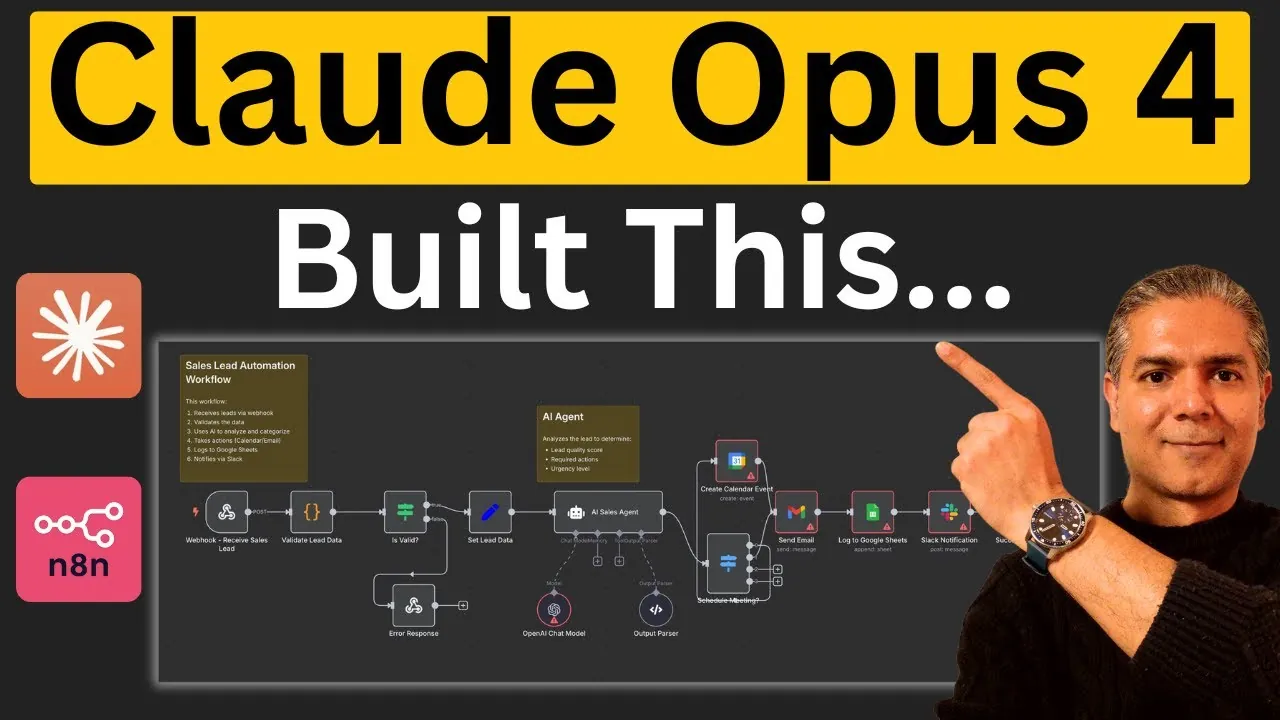
What if you could build a fully functional AI agent in minutes—without writing a single line of code? With the rise of tools like Claude Opus 4, this is no longer a distant dream but a tangible reality. Whether you’re automating repetitive tasks, integrating tools like Slack and Google Sheets, or designing custom workflows, Claude Opus 4 offers a powerful way to streamline your processes. But here’s the catch: while the AI is incredibly capable, its true potential lies in how you guide it. That’s where this step-by-step overview comes in—helping you unlock the full power of Claude to build n8n AI agents that work seamlessly and efficiently.
In this guide by Nimish Parmar, you’ll discover how to turn Claude Opus 4 into your ultimate automation ally. From mastering its deep research capabilities to generating precise JSON workflows, this walkthrough will equip you with the tools to create AI agents tailored to your unique needs. Along the way, you’ll learn how to tackle common challenges—like refining outputs and configuring nodes—making sure your workflows are not just functional but optimized. Whether you’re a seasoned automation enthusiast or just starting out, this guide promises actionable insights and practical steps to help you transform your ideas into reality. After all, the key to innovation isn’t just having the right tools—it’s knowing how to wield them.
Key Features of Claude Opus 4
TL;DR Key Takeaways :
- Claude Opus 4 excels in advanced AI tasks like deep research, extended reasoning, and workflow automation, allowing seamless integration with tools like Google Sheets, Slack, and email systems.
- Its key features include generating JSON workflows, using community insights, and incorporating best practices for efficient automation processes.
- Building n8n AI agents with Claude involves structured steps such as training, allowing advanced features, and refining generated workflows for accuracy and functionality.
- Challenges like errors in JSON outputs and manual node configuration can be addressed through re-prompting, testing, and fine-tuning workflows.
- Claude Opus 4 offers significant advantages, including time efficiency, versatility, and integration of best practices, but requires manual adjustments and subscription considerations for optimal use.
Claude Opus 4 is designed to handle sophisticated tasks with remarkable precision. Its core features include:
- Deep Research and Extended Thinking: The AI can analyze extensive datasets, identify optimal strategies, and generate detailed implementation plans tailored to specific needs.
- Workflow Automation: It creates JSON workflows that integrate with widely used tools such as Google Sheets, Slack, and email systems, allowing seamless automation.
- Web Search and Community Insights: By pulling insights from forums, GitHub repositories, and other resources, Claude enhances workflow designs with proven best practices.
These features provide a robust foundation for creating workflows, reducing the need to start from scratch and allowing more efficient automation processes.
Step-by-Step Workflow Creation
Building an n8n AI agent with Claude Opus 4 involves a series of structured steps. Follow these to ensure success:
- Training and Prompting: Begin by training Claude with clear instructions and relevant materials. Provide detailed prompts to guide its output effectively.
- Enable Advanced Features: Activate capabilities such as deep research, extended reasoning, and web search to enhance the quality and relevance of the workflows generated.
- Generate Workflows: Request Claude to create workflows tailored to your specific requirements, such as managing webhooks, scheduling tasks, or sending notifications through Slack or email.
While Claude provides a strong starting point, refining the outputs is often necessary to ensure accuracy and functionality. Testing and adjustments are essential to achieve optimal results.
How to Build AI Agents Using Claude Opus 4 and n8n
Enhance your knowledge on n8n automations by exploring a selection of articles and guides on the subject.
Challenges and How to Overcome Them
Despite its advanced capabilities, using Claude Opus 4 comes with certain challenges. Addressing these effectively is crucial for successful workflow creation:
- Errors in JSON Outputs: Initial workflows may include placeholder IDs or incomplete configurations. These issues can be resolved by re-prompting the AI or manually editing the files to ensure they meet your requirements.
- Manual Node Configuration: Finalizing workflows often requires manual adjustments, such as setting up credentials or fine-tuning node parameters to ensure proper functionality.
By proactively addressing these challenges, you can ensure that your workflows are fully operational and aligned with your specific needs.
Advantages of Using Claude Opus 4
Claude Opus 4 offers several compelling benefits for workflow automation, making it a valuable tool for professionals:
- Time Efficiency: The AI accelerates workflow creation by providing a detailed and structured starting point, saving hours of manual effort.
- Best Practices Integration: By analyzing community resources and forums, Claude incorporates proven methods into your workflows, enhancing their effectiveness.
- Versatility: From lead generation to task scheduling, Claude supports a wide range of automation scenarios, catering to diverse business needs.
These advantages make Claude Opus 4 an indispensable resource for optimizing workflow processes and improving productivity.
Limitations and Recommendations
While Claude Opus 4 is a powerful tool, it is not without its limitations. Understanding these can help you use the AI more effectively:
- Manual Adjustments Required: The workflows generated by Claude often require additional configuration to function correctly, such as fine-tuning node parameters or setting up integrations.
- Subscription Constraints: The availability of certain features and usage limits depends on your subscription plan. Higher-tier plans, such as Pro, offer greater flexibility and access to advanced capabilities.
To maximize its potential, treat Claude as a foundation for workflow creation rather than a complete solution. Thoroughly test and refine workflows after generation to ensure they meet your specific requirements.
Practical Applications
Claude Opus 4 can be applied to a wide range of automation tasks, making it a versatile tool for various industries and use cases:
- Task Automation: Simplify repetitive tasks such as scheduling, email communication, and Slack notifications, freeing up time for more strategic activities.
- Tool Integration: Connect workflows with platforms like Google Sheets and Slack to enhance collaboration and productivity across teams.
- Custom Workflow Design: Develop tailored solutions for specific business processes, such as lead generation, customer support, or data analysis.
These practical applications demonstrate the flexibility and utility of Claude Opus 4 in addressing diverse automation needs, making it a valuable asset for businesses and professionals alike.
Media Credit: Nimish Parmar
Filed Under: AI, Guides
Latest Geeky Gadgets Deals
Disclosure: Some of our articles include affiliate links. If you buy something through one of these links, Geeky Gadgets may earn an affiliate commission. Learn about our Disclosure Policy.
Credit: Source link