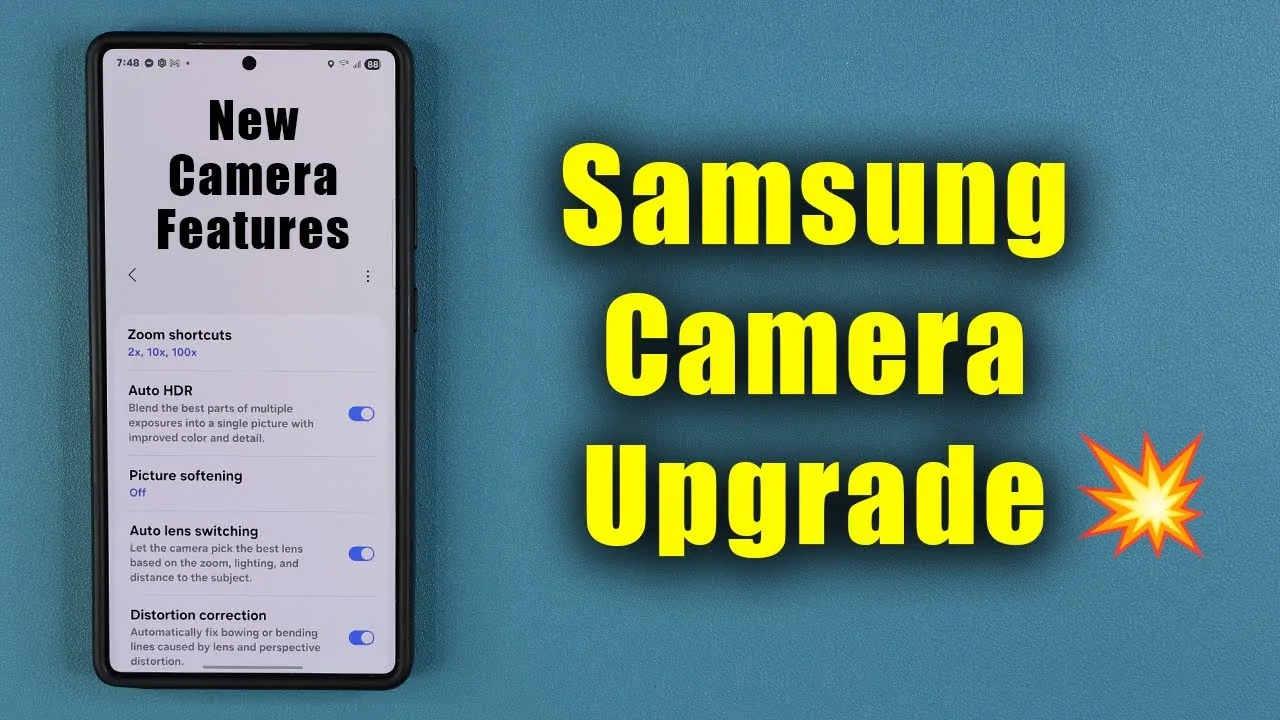
Samsung Galaxy smartphone users now have the opportunity to elevate their photography experience with the Camera Assistant app, available for download in the Galaxy Store. Developed by Samsung Electronics, this app introduces over 10 advanced features, offering enhanced customization and functionality for your device’s camera. Whether you’re a photography enthusiast or someone who simply wants more control over your shots, this app provides tools to improve your results and make your smartphone photography more versatile. The video below from Sakitech gives us more details about the Camera Assistant app and how it can enhance your Galaxy device.

What Is the Camera Assistant App?
The Camera Assistant app is a software enhancement designed to expand the capabilities of your Samsung Galaxy smartphone’s camera. It is compatible with a wide range of Galaxy devices, including the latest Galaxy S25 Ultra and S25 Plus models. By installing this app, you unlock a suite of features that improve image quality, simplify camera operation, and give you greater creative control over your photos and videos.
This app is particularly valuable for users who want to go beyond the default camera settings, offering tools that cater to both casual users and those with a more professional approach to photography. With its intuitive interface and advanced functionality, the Camera Assistant app bridges the gap between convenience and creativity.
Key Features: What You’ll Gain
The Camera Assistant app introduces a variety of tools tailored to different photography needs. These features are designed to help you capture professional-grade photos and videos directly from your smartphone. Here’s what you can expect:
- Zoom Shortcuts: Quickly switch between zoom levels for precise framing and composition, making it easier to capture the perfect shot.
- Auto HDR and HDR+ Recording: Record videos with enhanced dynamic range, making sure balanced exposure even in high-contrast scenes.
- Picture Softening: Reduce excessive sharpness in your images for a more natural and polished appearance.
- Auto Lens Switching: Seamlessly transition between lenses based on the scene or subject, optimizing results without requiring manual adjustments.
- Distortion Correction: Automatically correct lens-related distortions, such as warping or bending, for more accurate image representation.
- Adaptive Pixel Resolution: Dynamically adjust resolution to enhance clarity based on lighting conditions and subject detail, making sure optimal results in every shot.
These features are particularly useful for users who want to achieve high-quality results without relying on third-party apps or additional equipment. Whether you’re capturing landscapes, portraits, or action shots, the Camera Assistant app provides the tools you need to enhance your photography.
How to Install the Camera Assistant App
Installing the Camera Assistant app is a straightforward process that takes only a few minutes. Follow these steps to get started:
- Ensure your Galaxy Store is updated to the latest version to avoid compatibility issues.
- Open the Galaxy Store on your Samsung Galaxy smartphone.
- Search for “Camera Assistant” using the app search bar.
- Download and install the app onto your device.
- Access the new features by navigating to the camera settings menu within your phone’s camera app.
Once installed, the app integrates seamlessly with your device’s camera, allowing you to explore its features immediately. You can experiment with the tools to find the settings that best suit your photography style and preferences.
Device Compatibility: What You Need to Know
The Camera Assistant app is compatible with most Samsung Galaxy smartphones, but the availability of certain features may vary depending on your device model. For example:
- The Galaxy S25 Ultra offers the most comprehensive support, including advanced HDR+ recording and Adaptive Pixel resolution, thanks to its innovative hardware.
- The Galaxy S25 Plus and other models may support a slightly reduced feature set due to hardware limitations, but still provide significant enhancements to the camera experience.
To confirm compatibility, check the app’s description in the Galaxy Store or refer to Samsung’s official documentation for your specific device. Making sure your device is running the latest software version can also help maximize compatibility and performance.
Why You Should Try the Camera Assistant App
The Camera Assistant app is a powerful tool for anyone looking to maximize their Samsung Galaxy smartphone’s camera capabilities. With features like zoom shortcuts, HDR video recording, and distortion correction, it enables you to capture stunning photos and videos effortlessly. Whether you’re a casual user capturing everyday moments or a photography enthusiast aiming for professional-grade results, this app offers tools that make your camera more versatile and capable.
By installing the Camera Assistant app, you can unlock the full potential of your device’s camera and take your photography to the next level. With its advanced features and user-friendly interface, this app is a must-have for anyone who values high-quality smartphone photography. Explore the app today and discover how it can transform the way you capture and share your world.
Advance your skills in Samsung Galaxy Camera Assistant by reading more of our detailed content.
Source & Image Credit: sakitech
Filed Under: Android News, Guides, Mobile Phone News, Top News
Latest Geeky Gadgets Deals
Disclosure: Some of our articles include affiliate links. If you buy something through one of these links, Geeky Gadgets may earn an affiliate commission. Learn about our Disclosure Policy.
Credit: Source link