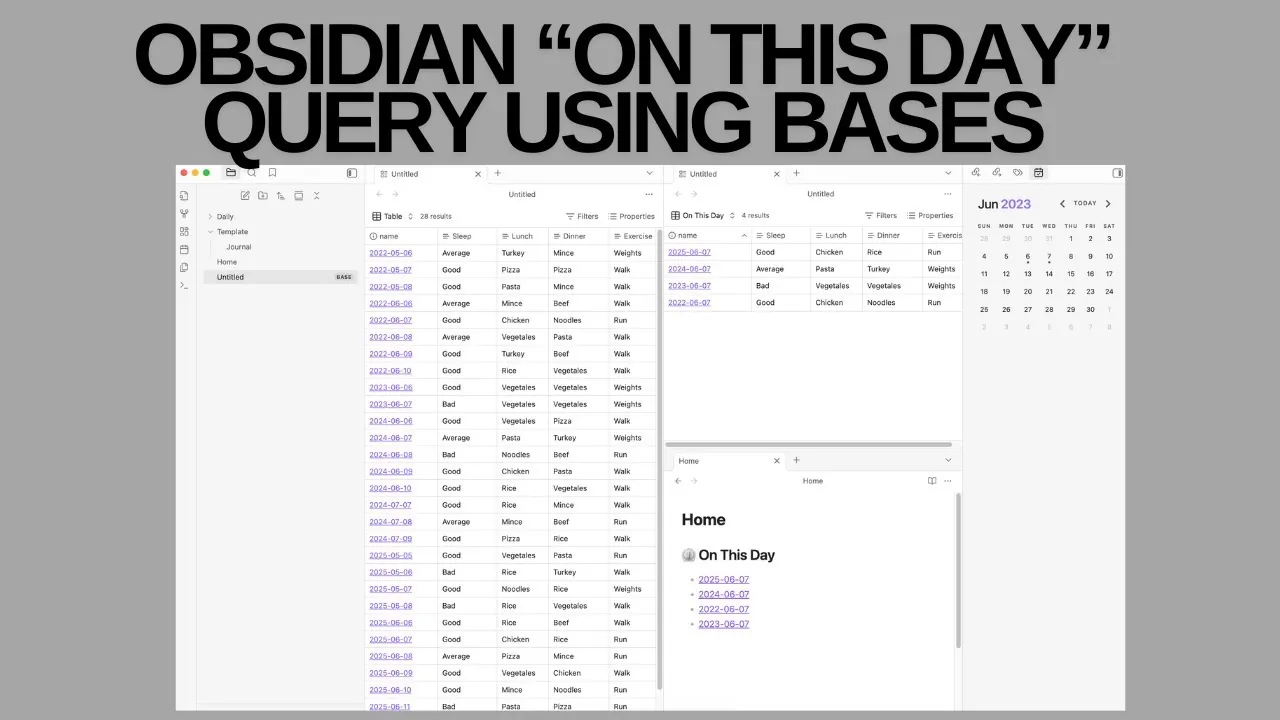
Have you ever wondered what stories your notes from years past might tell if only you could revisit them effortlessly? For avid users of Obsidian, the challenge of organizing and rediscovering historical entries often feels like trying to piece together a puzzle without the picture on the box. Enter the Obsidian Bases plugin, a innovative tool that transforms your vault into a dynamic, database-like workspace. With its ability to create an “On This Day” query, Bases offers a seamless way to surface notes from the same date across different years—without the manual hassle. Imagine effortlessly reflecting on past insights, tracking long-term patterns, or simply revisiting moments that might otherwise fade into obscurity.
Ed Nico explains how the Obsidian Bases plugin can transform the way you interact with your notes. From its automatic updates that eliminate tedious manual adjustments to its customizable table views that bring clarity to your historical data, this plugin is designed to simplify and enhance your workflow. Whether you’re a journal enthusiast, a professional tracking project milestones, or someone curious about spotting trends over time, you’ll discover how Bases can unlock new dimensions of organization and insight. By the end, you might just find yourself rethinking how you approach note-taking altogether.
Obsidian Bases Plugin Overview
TL;DR Key Takeaways :
- The Obsidian Bases plugin introduces database-like functionality to organize and display notes dynamically, including an “On This Day” query for revisiting historical entries by date.
- Unlike the DataView plugin, Bases automates updates and offers a user-friendly interface, allowing direct editing of note properties within a customizable table view.
- Setting up an “On This Day” query involves organizing notes by folder, using consistent date properties, and configuring dynamic date comparison formulas for seamless historical tracking.
- The plugin supports extensive customization, including hiding unnecessary data, tailoring table views, and using automatic updates to streamline note management and analysis.
- Obsidian Bases enhances efficiency and interactivity, making it an ideal tool for users seeking to improve note organization, track trends, and gain insights into historical data effortlessly.
What is the Obsidian Bases Plugin?
The Obsidian Bases plugin enhances your note-taking experience by integrating database-style capabilities directly into your vault. It allows you to dynamically organize, filter, and display notes in a customizable table view. One of its most notable features is its ability to update automatically based on the current date, removing the need for manual adjustments. This makes it particularly effective for date-based queries, such as tracking historical daily notes or reviewing past events.
By allowing you to create dynamic queries and customize how data is displayed, the plugin transforms your vault into a more interactive and organized workspace. Whether you’re managing personal reflections, professional logs, or habit trackers, Bases offers a streamlined approach to handling your notes.
How Does it Compare to the DataView Plugin?
The DataView plugin is a widely used tool for querying and displaying note data, but it often requires manual setup and ongoing adjustments. For instance, when creating date-based queries, users may need to update parameters manually to reflect the current date. In contrast, the Obsidian Bases plugin automates this process, saving you time and effort while reducing the likelihood of errors.
Another significant advantage of Bases is its user-friendly interface. It allows you to edit note properties directly within the table view, eliminating the need to open individual notes for minor adjustments. This feature is particularly useful for tracking specific details, such as daily habits or recurring activities. For users who prioritize simplicity and dynamic updates, Bases provides a more efficient and accessible alternative to DataView.
Obsidian On This Day Query

Discover other guides from our vast content that could be of interest on the Obsidian note taking platform .
How to Set Up an “On This Day” Query
Creating an “On This Day” query with the Obsidian Bases plugin is a straightforward process. Follow these steps to get started:
- Organize daily notes by folder: Store your daily notes in a dedicated folder to simplify filtering and improve query accuracy.
- Identify date properties: Use consistent file naming conventions or metadata to associate each note with a specific date.
- Configure date comparison formulas: Set up the query to compare the current date with historical note dates, making sure only relevant entries are displayed.
- Customize the table view: Design a dynamic table to display notes from the same date across different years, offering a clear and organized view of your historical data.
This setup ensures that your query adapts automatically to changes in the system date, making it easier to retrieve and analyze historical notes. By following these steps, you can create a seamless system for revisiting past entries and gaining insights into your personal or professional history.
Customizing and Using the Query
The Obsidian Bases plugin offers extensive customization options, allowing you to tailor the “On This Day” query to your specific needs. These features enhance both the functionality and usability of your note management system:
- Edit note properties directly: Add or modify details about daily activities, events, or observations without needing to open individual notes.
- Streamline the interface: Hide unnecessary columns or data points to create a cleaner, more focused table view that highlights the most relevant information.
- Use dynamic updates: Ensure your query remains accurate and up-to-date without requiring manual adjustments, saving you time and effort.
These customization options make it easier to manage and analyze your notes, providing valuable insights into your historical data. Whether you’re tracking trends, revisiting past events, or exploring patterns over time, the plugin’s flexibility allows you to adapt it to your unique workflow.
Why Choose the Obsidian Bases Plugin?
The Obsidian Bases plugin offers several key benefits for users looking to improve note organization and historical tracking. Its features are designed to enhance efficiency, clarity, and ease of use:
- Effortless setup: The intuitive interface and dynamic functionality simplify the process of creating and managing queries, making it accessible even for users new to advanced note management.
- Automatic updates: Date-based queries adjust automatically to reflect the current date, eliminating the need for manual intervention and making sure your data remains relevant.
- Improved visibility: The customizable table view provides a clear and organized display of note properties, making it easier to analyze and track data over time.
- Enhanced interactivity: Direct property editing within the table view allows for quick adjustments, streamlining your workflow and reducing the time spent navigating between notes.
By integrating the Obsidian Bases plugin into your workflow, you can unlock new ways to organize, interact with, and analyze your notes. Its dynamic features and user-friendly design make it an invaluable tool for anyone looking to streamline their note-taking process and gain deeper insights into their historical data.
Media Credit: Ed Nico
Filed Under: Guides
Latest Geeky Gadgets Deals
Disclosure: Some of our articles include affiliate links. If you buy something through one of these links, Geeky Gadgets may earn an affiliate commission. Learn about our Disclosure Policy.
Credit: Source link