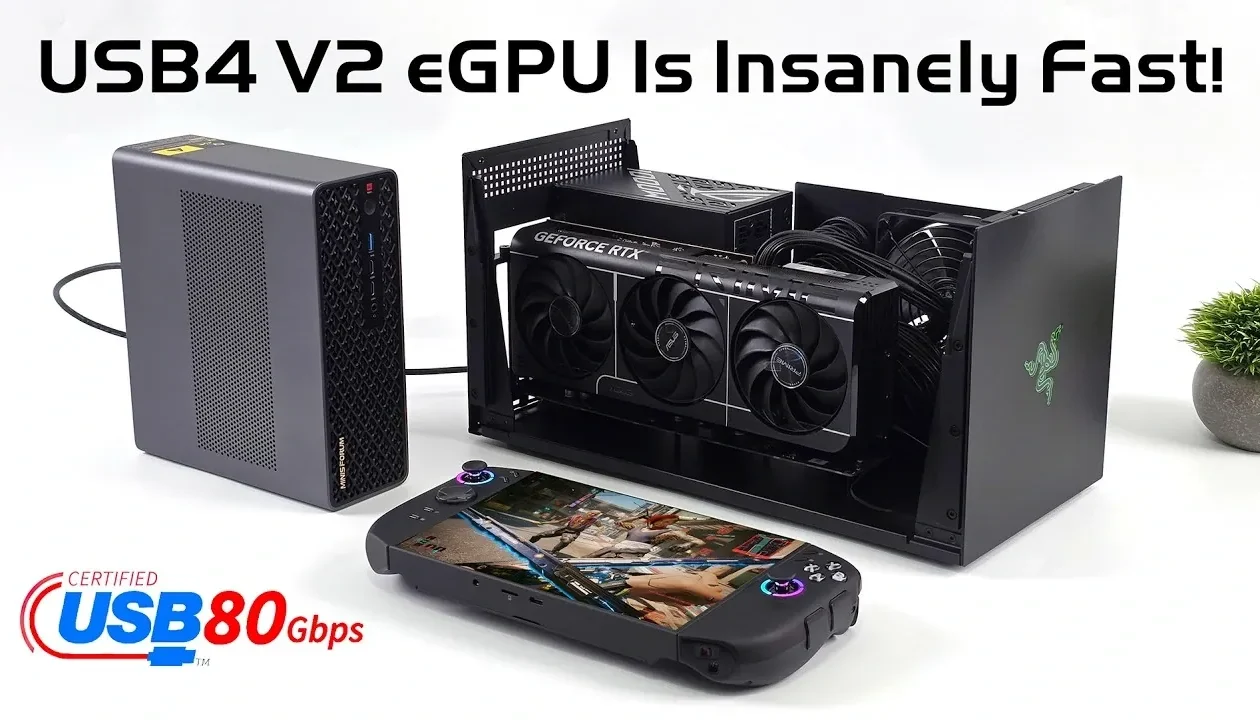
What if your compact gaming rig or mini PC could rival the performance of a full-fledged desktop setup? With the advent of USB4 V2, this once-impossible dream is now a reality. Boasting jaw-dropping data transfer speeds of up to 80 Gbps, double that of its predecessor, USB4 V2 is rewriting the rules for external GPU (eGPU) performance. Imagine playing graphically demanding titles like Cyberpunk 2077 at ultra settings with buttery-smooth frame rates, all on a portable system. Whether you’re a gamer, content creator, or professional in need of serious computing power, USB4 V2 is poised to deliver a level of performance that feels almost too good to be true.
In this review, ETA Prime uncovers how USB4 V2 is transforming the landscape of high-performance computing. From its new asymmetrical data transfer mode, capable of reaching 120 Gbps in one direction, to its enhanced power delivery of up to 240 watts, this technology is packed with innovations that redefine what eGPU setups can achieve. You’ll discover real-world benchmarks that showcase its ability to handle resource-intensive tasks, from 3D rendering to high-frame-rate gaming, with ease. But USB4 V2 isn’t just about numbers, it’s about bridging the gap between portability and power in ways that could reshape how we think about computing. Could this be the future of gaming and productivity on the go? Let’s find out.
USB4 V2 Transforms eGPUs
TL;DR Key Takeaways :
- USB4 V2 doubles the data transfer speed of its predecessor, reaching up to 80 Gbps, with an innovative asymmetrical mode offering up to 120 Gbps in one direction and 40 Gbps in the other.
- Enhanced power delivery of up to 240 watts makes USB4 V2 ideal for powering high-demand devices like eGPUs, making sure stable performance and faster charging.
- Real-world tests with setups like the Razer Core X and RTX 5080 GPU demonstrated near-desktop performance, with significant improvements in gaming and resource-intensive tasks.
- Gaming benchmarks showed dramatic performance boosts, with frame rates in demanding titles like “Horizon Zero Dawn” and “Cyberpunk 2077” significantly surpassing USB4 V1 capabilities.
- USB4 V2’s versatility extends beyond gaming, benefiting professional workflows such as video editing and 3D rendering, while paving the way for compact systems to achieve desktop-level performance.
Key Innovations in USB4 V2
USB4 V2 introduces several new features that set it apart from its predecessor. While USB4 V1 already delivered impressive speeds, USB4 V2 takes performance to the next level with symmetrical data transfer rates of 80 Gbps. Additionally, it introduces an innovative asymmetrical mode, allowing up to 120 Gbps in one direction and 40 Gbps in the other. This flexibility ensures optimal performance for resource-intensive tasks such as gaming, video editing, and 3D rendering.
Another notable enhancement is its improved power delivery capabilities. USB4 V2 can supply up to 240 watts, making it ideal for powering high-demand devices and allowing faster charging. This feature is particularly advantageous for eGPU setups, where stable power and high bandwidth are critical for smooth operation. Real-world tests have demonstrated USB4 V2 achieving practical throughput of up to 56 Gbps, nearly double the 30 Gbps achieved by USB4 V1.
Performance Testing: USB4 V2 in Action
To evaluate USB4 V2’s real-world performance, a test setup was configured using the Razer Core X Thunderbolt 5 dock paired with an RTX 5080 GPU. This setup was connected to a Minism MSS1 system equipped with USB4 V2 ports. The Razer Core X, featuring a robust 1000W power supply, provided a stable platform for testing under demanding conditions.
The results were remarkable. Synthetic benchmarks revealed only minor performance drops compared to traditional desktop setups, while real-world gaming tests showcased significant improvements. These findings confirm that USB4 V2 is not just a theoretical upgrade but a practical solution for enhancing eGPU performance.
USB4 V2 eGPU Performance is Crazy Fast!

Enhance your knowledge on gaming by exploring a selection of articles and guides on the subject.
Gaming Performance: Unleashing New Potential
USB4 V2’s impact on gaming performance is particularly noteworthy. Tests conducted with graphically demanding games highlighted its ability to handle intensive workloads with ease. Below are some key results:
- Horizon Zero Dawn Remastered (1440p, very high settings): Frame rates soared to an average of 108 FPS with USB4 V2, compared to just 36 FPS on USB4 V1.
- Cyberpunk 2077 (1440p, ultra settings, no DLSS): Gameplay was smooth and responsive, even with ray tracing enabled, demonstrating USB4 V2’s capability to manage resource-heavy tasks.
- Borderlands 4 (1440p, very high settings, DLSS quality): Frame rates consistently exceeded 80 FPS, showcasing the synergy between USB4 V2 and AI-driven upscaling technologies like DLSS.
These results underscore USB4 V2’s ability to elevate gaming on portable systems. Whether you are using a handheld gaming device or a mini PC, USB4 V2 enables high-quality gaming without the need for a bulky desktop setup.
Expanding Applications Beyond Gaming
The advantages of USB4 V2 extend well beyond gaming. Its integration with Thunderbolt 5 and support for high-bandwidth connections make it an excellent choice for a variety of professional applications, including video editing, 3D rendering, and data-intensive workflows. Handheld gaming devices, in particular, stand to gain significantly, as they can now dock seamlessly with eGPU setups to unlock desktop-level performance.
Looking ahead, the potential for PCIe X8 eGPU setups could further enhance performance, pushing the boundaries of what compact systems can achieve. As USB4 V2 becomes more widely adopted, its integration into laptops, gaming consoles, and other devices will likely accelerate. This will make high-performance computing more accessible to a broader audience, allowing users to achieve more with smaller, more portable systems.
The Future of High-Performance Computing
USB4 V2 represents a fantastic leap in eGPU technology, delivering near-desktop performance for portable systems. Its ability to double connection speeds, support asymmetrical data transfer, and provide enhanced power delivery makes it a critical upgrade for users seeking high-performance solutions in a compact form factor.
As this technology continues to evolve, its adoption across various devices, including handheld gaming systems, laptops, and mini PCs, is expected to grow rapidly. Whether you are a gamer seeking smoother gameplay or a professional requiring faster workflows, USB4 V2 offers a glimpse into the future of high-performance computing, where portability and power coexist seamlessly.
Media Credit: ETA PRIME
Filed Under: Hardware
Latest Geeky Gadgets Deals
Disclosure: Some of our articles include affiliate links. If you buy something through one of these links, Geeky Gadgets may earn an affiliate commission. Learn about our Disclosure Policy.
Credit: Source link