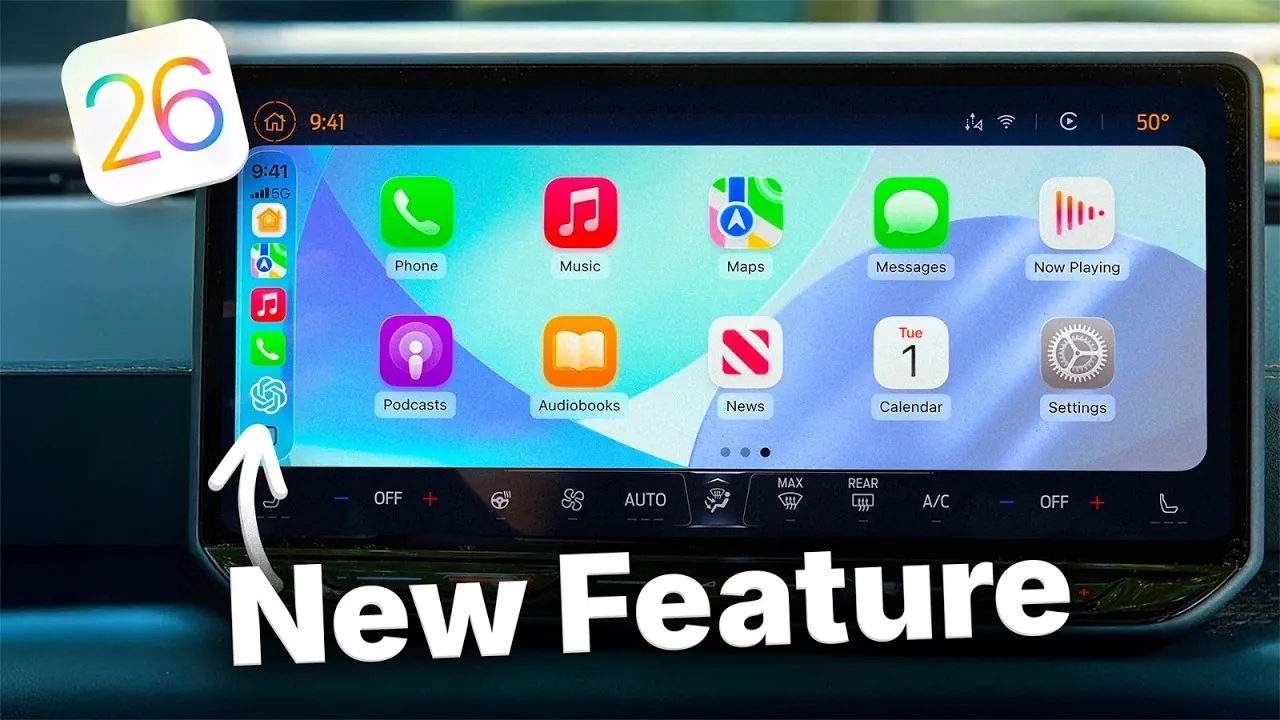
Apple’s iOS 26 introduces a comprehensive upgrade to Apple CarPlay, emphasizing enhanced functionality, refined design, and an improved user experience. With features such as customizable widgets, live activities, a modernized interface, and expanded media capabilities, this update redefines how drivers interact with their car’s infotainment system. Whether you’re managing music, navigating routes, or staying connected, iOS 26 delivers a more intuitive and personalized experience. The video below from Nikias Molina gives us more details on Apple CarPlay in iOS 26.

Key Features at a Glance
The latest CarPlay update brings a host of improvements designed to enhance usability and convenience. Key highlights include:
- Customizable widgets for real-time updates and quick access to essential information.
- Live activities for seamless tracking of ongoing events.
- Liquid Glass design for a sleek and modern visual experience.
- Enhanced Apple Music and Apple Maps functionality for a more engaging driving experience.
- Video streaming support for parked moments, transforming your car into an entertainment hub.
These features collectively elevate CarPlay’s practicality and appeal. Let’s delve deeper into each of these enhancements.
Widgets: Real-Time Information at Your Fingertips
Widgets in iOS 26 CarPlay offer a new level of convenience by providing quick access to essential information directly on your dashboard. You can now create customized widget stacks for weather updates, reminders, music controls, and even live sports scores. The system’s smart rotation feature ensures the most relevant widgets appear based on your current activity, minimizing distractions while driving.
Additionally, AI-powered widgets, such as ChatGPT integration, bring advanced functionality to your car, allowing smarter interactions. For those with connected smart home devices, CarPlay now allows you to control lights, thermostats, and other appliances without leaving your vehicle, making it a central hub for both driving and home management.
Live Activities: Stay Updated Without Distractions
The introduction of live activities in iOS 26 ensures that you remain informed with real-time updates displayed seamlessly on your dashboard. Whether you’re tracking a flight, monitoring a countdown timer, or following a live sports game, this feature keeps critical information accessible without overwhelming your attention.
By integrating live activities into the CarPlay interface, Apple has prioritized safety and convenience, making sure that drivers can stay updated without compromising their focus on the road.
Liquid Glass Design: A Sleek Visual Upgrade
The new Liquid Glass design language in iOS 26 offers a polished and modern aesthetic, enhancing both usability and visual appeal. Redesigned icons and customizable interface modes—including light, dark, and clear themes—allow for greater personalization. Drivers can also select from a range of wallpapers inspired by previous iOS generations, adding a nostalgic touch to the updated interface.
This design overhaul not only improves the overall look of CarPlay but also ensures that navigating the system feels intuitive and seamless, making every interaction more enjoyable.
Apple Music: A Tailored Audio Experience
Apple Music in CarPlay now mirrors the robust functionality of its iPhone counterpart. With personalized playlists, curated recommendations, and pinned albums, accessing your favorite music has never been easier. The redesigned interface, featuring Liquid Glass elements, simplifies navigation through your music library, making sure that you can quickly find the perfect soundtrack for your drive.
Whether you’re streaming your favorite tracks, exploring new artists, or enjoying curated playlists, the updated Apple Music experience ensures that your journey is always accompanied by high-quality audio.
Apple Maps: Smarter Navigation for Safer Journeys
Navigation in CarPlay has been significantly improved with updates to Apple Maps. The addition of multi-touch support enables effortless zooming and panning, provided your car’s hardware supports this feature. Predictive route suggestions help you plan your trips more efficiently, while real-time incident reporting keeps you informed about traffic conditions, road closures, and accidents.
These enhancements make navigation safer and more convenient, making sure that you can reach your destination with minimal stress and maximum efficiency.
Communication Features: Streamlined Calls and Messaging
iOS 26 introduces a compact, pill-shaped UI for calls, designed to minimize distractions while driving. For those moments when more detail is needed, you can switch to a full-screen mode, providing a clearer view of call information.
In iMessage, pinned conversations and Tapback reactions make it easier to stay connected with friends and family. These updates ensure that communication remains seamless and accessible, even while on the road.
Video Streaming: Entertainment for Parked Moments
CarPlay now supports video streaming via AirPlay, allowing access to platforms like YouTube and Netflix when your car is parked. This feature transforms your vehicle into a mobile entertainment hub, perfect for long waits or breaks during road trips.
By offering versatile media playback options, iOS 26 ensures that your parked moments are as enjoyable as your time on the road.
Apple Podcasts: Personalized Listening Options
The redesigned Apple Podcasts interface in CarPlay introduces playback customization, allowing you to adjust speeds from 0.5x to 3x. Whether you’re catching up on your favorite shows or exploring new content, these updates provide a more tailored listening experience.
With improved navigation and playback controls, Apple Podcasts in CarPlay ensures that every drive is accompanied by engaging and personalized audio content.
Improved Navigation with Sidebar and Menu Bar Updates
The updated sidebar in CarPlay now supports up to four visible app icons, making it easier to access frequently used applications. This improvement streamlines navigation within the interface, making sure that you can quickly find what you need without unnecessary scrolling or searching.
Beta Release: For Developers Only
Currently, iOS 26 is available in beta for developers to test and optimize their applications. The official release is expected in September. For non-developers, it is recommended to wait for the stable release to ensure a smooth and reliable experience.
Transforming the Driving Experience
The iOS 26 update improves CarPlay into a more intuitive, customizable, and visually appealing platform. From real-time widgets and live activities to enhanced media capabilities and a sleek design, these features cater to both convenience and personalization. As Apple continues to refine its technology, CarPlay evolves into an indispensable tool for drivers, seamlessly blending innovation with practicality.
Advance your skills in iOS 26 CarPlay by reading more of our detailed content.
Source & Image Credit: Nikias Molina
Filed Under: Apple, Apple iPhone, Guides
Latest Geeky Gadgets Deals
Disclosure: Some of our articles include affiliate links. If you buy something through one of these links, Geeky Gadgets may earn an affiliate commission. Learn about our Disclosure Policy.
Credit: Source link