Apple’s iOS 26 introduces a range of features designed to enhance your device’s performance, security, and customization. These updates empower you to tailor your iPhone or iPad to your specific needs, offering smarter tools and greater control. From improved battery management to advanced privacy measures, iOS 26 ensures a more seamless and personalized user experience. In the video below, iReviews explores the most impactful settings you should adjust to unlock the full potential of your device.

Battery Optimization: Smarter Power Management
One of the standout features in iOS 26 is Adaptive Power settings, which intelligently adjust your device’s energy usage based on your daily habits. This feature works in the background to optimize power consumption, making sure your battery lasts longer throughout the day. Notifications provide real-time updates on when Adaptive Power is active, giving you insights into how it’s extending your device’s lifespan. By allowing this feature, you can reduce unnecessary energy drain and maintain your battery’s health over time.
Additionally, iOS 26 includes enhanced battery usage analytics, allowing you to monitor which apps consume the most power. This transparency helps you make informed decisions about app usage and background activity, further improving battery efficiency.
Screenshot Options: More Control, Less Clutter
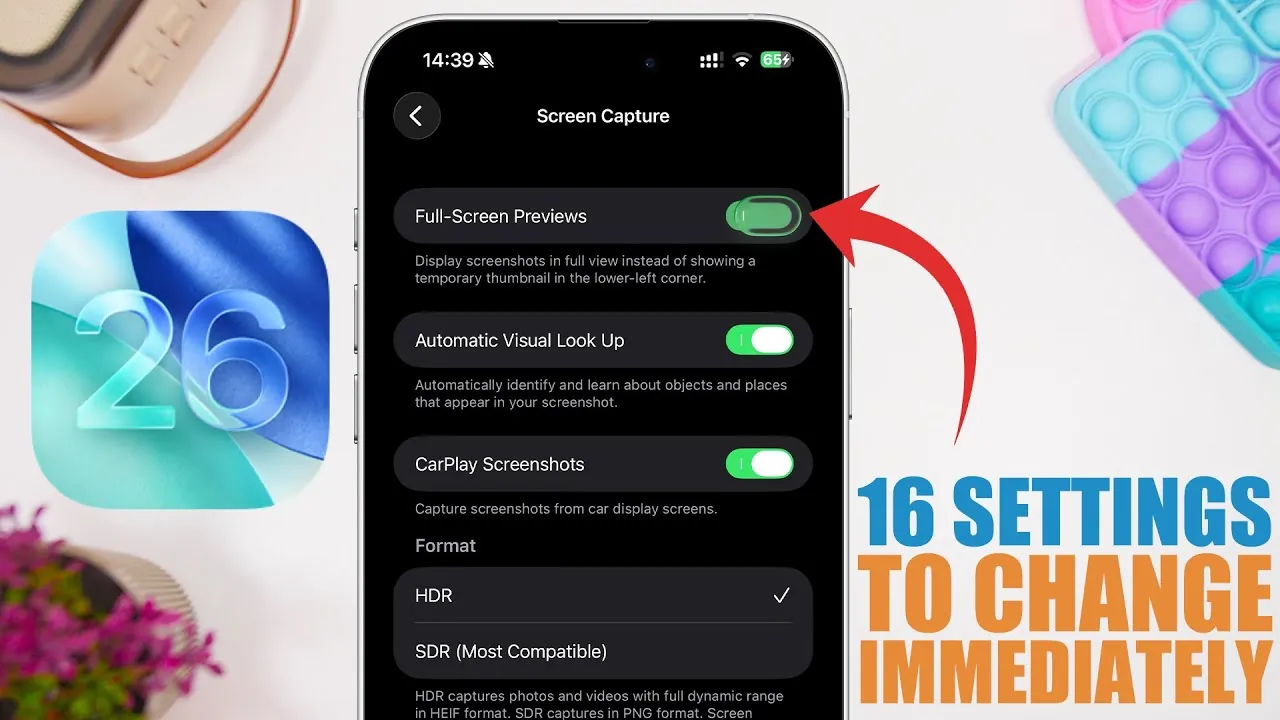
Taking screenshots becomes more versatile and user-friendly in iOS 26. You can now choose between HDR (high-quality) and SDR (storage-saving) formats, depending on your priorities. HDR ensures sharper, more vibrant images, while SDR helps conserve storage space. This flexibility allows you to balance quality and efficiency based on your needs.
Another useful addition is the ability to toggle full-screen previews on or off. If you frequently take screenshots, disabling previews can streamline the process and reduce interruptions. For users of CarPlay, iOS 26 introduces the option to capture screenshots directly from the interface, making it easier to document navigation routes or app screens for future reference.
Camera Notifications: Keeping Your Lens Clean
To ensure your photos and videos remain sharp, iOS 26 introduces lens cleaning notifications. These proactive alerts notify you when your camera lens is smudged or obstructed, helping you avoid blurry or compromised images. This feature is particularly useful for those who frequently use their device’s camera, as it ensures your lens is always ready for high-quality captures. By addressing lens cleanliness before taking photos or videos, you can consistently achieve professional-grade results.
Microphone Prioritization: Fine-Tuned Audio Control
Audio clarity is essential for calls, recordings, and video production. iOS 26 allows you to prioritize specific microphones for different tasks, giving you greater control over sound quality. While the default automatic selection works well in most scenarios, manual adjustments can be invaluable in noisy environments or specialized recording situations. For instance, you can prioritize the front microphone for video calls or the rear microphone for capturing ambient sound during outdoor recordings. This level of customization ensures optimal audio performance across various activities.
Privacy Enhancements: Protecting Your Data
Privacy remains a cornerstone of iOS 26, with new features designed to safeguard your personal information. One notable addition is the requirement to unlock your device before any wired accessory can access your data. This added layer of security is particularly useful when charging your device in public places or using shared accessories, as it prevents unauthorized access to your files and settings.
Another privacy enhancement is the improved app tracking transparency framework. You now have more granular control over which apps can track your activity, making sure that your data is only shared with your explicit consent. These updates reinforce Apple’s commitment to protecting user privacy in an increasingly connected world.
Call Management: Smarter Communication Tools
The Phone app in iOS 26 introduces features that streamline call handling and improve communication efficiency. Hold Assist Detection alerts you when a call on hold is ready to resume, saving you from unnecessary waiting. This feature is particularly useful for managing multiple calls or navigating customer service lines.
Additionally, unknown callers are now prompted to state their reason for calling before you answer. This helps you decide whether to take the call, reducing interruptions and improving your overall call management experience. These tools make it easier to stay connected while minimizing distractions.
Message Filtering: Focus on What Matters
Managing your messages is more intuitive in iOS 26, thanks to enhanced filtering options. Spam filtering automatically screens messages from unknown senders, hiding unwanted content to reduce clutter. For important conversations, time-sensitive notifications ensure you never miss critical updates, even when your device is in Focus Mode.
You can also customize iMessage conversation backgrounds, adding a personal touch to your chats. For users on limited data plans, allowing low-quality photo previews can help conserve bandwidth without compromising communication. These features make it easier to stay organized and focused on the messages that matter most.
Focus Mode Filtering: Tailored to Your Lifestyle
Focus Mode in iOS 26 becomes even more personalized, allowing you to assign specific SIM cards to different focus modes. This ensures that only relevant calls and notifications come through during work, personal time, or other activities. For example, you can route work-related calls to one SIM card while keeping personal calls on another, maintaining a clear boundary between professional and personal life.
In addition, Focus Mode now integrates with third-party apps more seamlessly, allowing you to customize app notifications based on your current activity. This targeted approach helps you maintain concentration and balance in your daily routine.
File Management: Streamlined Workflow
The Files app in iOS 26 offers significant improvements to enhance productivity and organization. You can now set default apps for opening specific file types, streamlining your workflow and reducing the need for manual adjustments. For example, PDFs can automatically open in your preferred reader, while spreadsheets launch in your chosen editing app.
A new preview app serves as the default for file viewing, offering quick access to document contents without requiring a full application launch. These updates make it easier to manage and interact with your files, whether you’re working on a project or organizing personal documents.
Maximizing the Benefits of iOS 26
iOS 26 delivers a comprehensive suite of updates designed to enhance your device’s performance, security, and usability. By exploring and configuring these new settings, you can optimize your iPhone or iPad to better suit your lifestyle and preferences. From smarter battery management to advanced privacy controls and app-specific enhancements, these features provide greater control and convenience. Adjust these settings today to fully experience the benefits of iOS 26.
Find more information on iOS 26 battery optimization by browsing our extensive range of articles, guides and tutorials.
Source & Image Credit: iReviews
Filed Under: Apple, Apple iPhone, Guides, Top News
Latest Geeky Gadgets Deals
Disclosure: Some of our articles include affiliate links. If you buy something through one of these links, Geeky Gadgets may earn an affiliate commission. Learn about our Disclosure Policy.
Credit: Source link