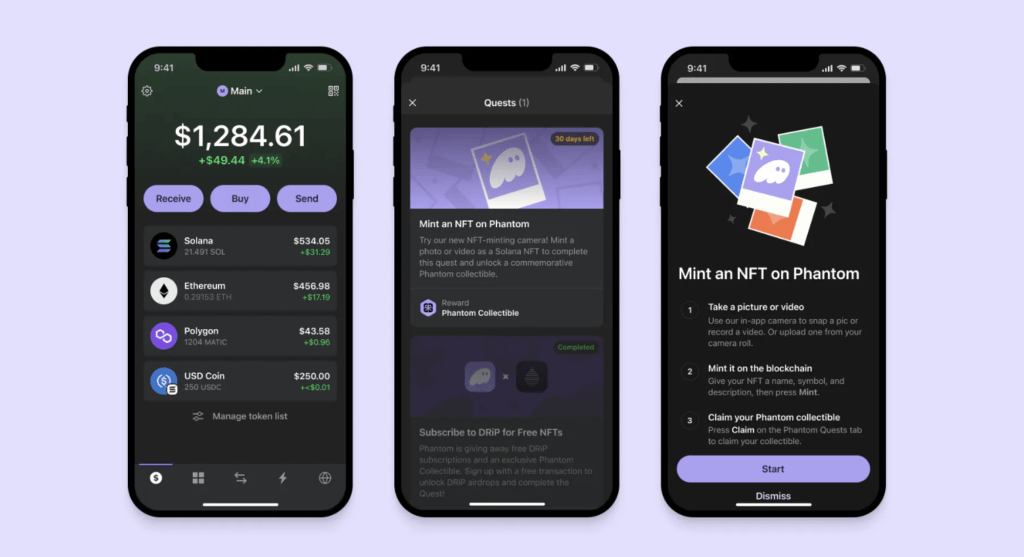
Looking to expand the accessibility of NFT creation, Phantom has recently introduced its Camera Mint feature. This innovative feature allows users to create NFTs ‘on-the-go’ using Solana’s blockchain.
One of the primary benefits of the Camera Mint is its straightforward user interface. Users can quickly and easily assign names and descriptions to their photos or videos, directly minting them as NFTs from their mobile devices. The process is affordable, costing less than a dollar for each mint, making it accessible to anyone. Additionally, the Camera Mint enables users to capture meaningful moments such as birthdays, weddings, and other life events and turn them into digital collectibles.
Getting Started with Phantom’s Camera Mint
Phantom’s Camera Mint feature provides new opportunities for novice NFT creators. Fostering a deeper understanding of the complexities of NFTs, blockchain, and asset valuation reduces the risks of the uninformed creation of NFTs.
To start using Phantom’s Camera Mint feature, open the Phantom mobile app and navigate to the Collectibles tab. Once there, click on the “+” icon in the top right corner and choose the “Mint Collectible” option. You’ll then have the option to either use the in-app camera to take a picture or record a video—capped at 15 seconds—or upload an existing file from your camera roll.
Phantom’s Reward System
In addition to making it easy to create NFTs, the feature comes with a reward system. To unlock a special commemorative Phantom collectible, go to the Explore tab, represented by a globe icon, and tap the “Mint an NFT” quest to start. Upon completing your mint, tap “Claim your reward,” and you’ll receive your commemorative Phantom collectible. You also have the option to claim your reward by revisiting the Explore tab and pressing “Claim.”
The Camera Mint feature of Phantom is another breakthrough in making blockchain technology accessible to everyone, including those who are not tech-savvy. This feature allows people to create NFTs without requiring advanced technical knowledge. Phantom also provides educational resources to help users learn how to mint NFTs and make informed decisions. This democratizes access to blockchain technology and empowers individuals and creators to participate in the NFT market.
Credit: Source link