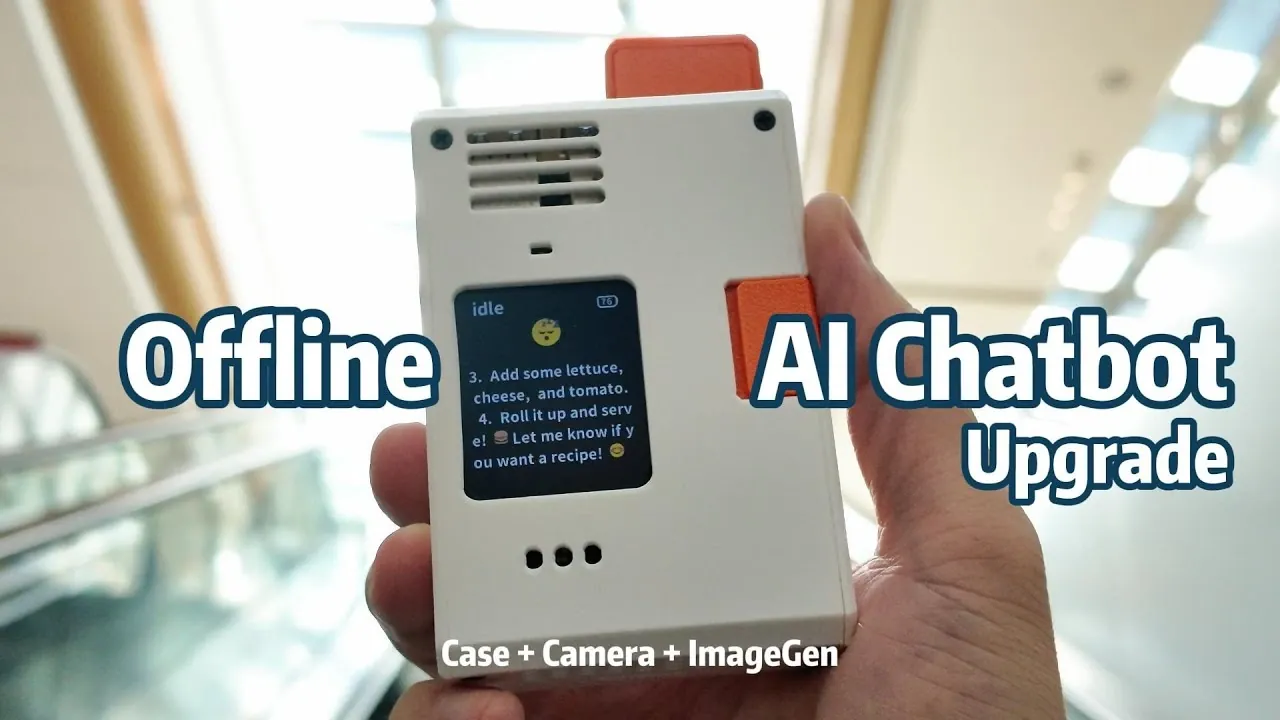
What if your next AI assistant didn’t need the internet to answer your questions, generate images, or recognize objects? Imagine a compact, powerful device sitting on your desk, running advanced AI models without sending your private data to the cloud. With the Raspberry Pi 5, this vision isn’t just possible, it’s within reach. By combining a few strategic upgrades, like a custom 3D-printed case, a camera module, and innovative AI software, you can transform this tiny computer into a privacy-focused AI chatbot that’s as secure as it is versatile. Whether you’re a tech enthusiast or someone looking for a practical, portable AI solution, this project offers a unique blend of creativity and functionality.
Jdaie Lin takes their project to the next level and explains how to unlock the full potential of your Raspberry Pi 5. From building a durable, portable case to integrating a camera for image recognition and setting up AI software for offline chatbot capabilities, each step enhances both the device’s utility and your control over your data. You’ll also discover how to balance privacy with performance, using tools like local data storage and optional online integrations for tasks like AI-driven image generation. By the end, you’ll not only have a powerful AI assistant but also a deeper appreciation for what this compact device can achieve. Could this be the most secure and innovative upgrade for your Raspberry Pi yet? Let’s find out.
Raspberry Pi 5 Offline AI Upgrades
TL;DR Key Takeaways :
- The Raspberry Pi 5 can be upgraded into a privacy-focused AI chatbot with a custom 3D-printed case, camera module, and AI-driven software, offering both offline privacy and optional online integrations.
- A custom 3D-printed case enhances protection, portability, and cooling efficiency, while providing easy access to ports and components for maintenance and upgrades.
- Adding a camera module unlocks vision-based functionalities like facial recognition, object detection, and real-time video processing, expanding the device’s AI capabilities.
- Advanced AI software enables offline chatbot interactions and image recognition, making sure data privacy by keeping all processing local to the device.
- Performance optimization strategies, such as task offloading and hardware accelerators, prepare the Raspberry Pi 5 for demanding tasks and future upgrades, making sure long-term functionality and innovation.
Custom 3D-Printed Case for Enhanced Protection and Portability
A 3D-printed case is an essential upgrade that goes beyond aesthetics, offering practical benefits for your Raspberry Pi 5. This custom enclosure provides a tailored solution to protect and optimize your device. Key advantages include:
- Durable Protection: Shields internal components from dust, physical damage, and wear, making sure long-term reliability.
- Improved Accessibility: Features such as precise cutouts for SD cards and ports make maintenance and upgrades more convenient.
- Efficient Cooling: A well-designed case incorporates airflow channels to prevent overheating during resource-intensive tasks.
Creating a custom case requires careful planning, including accurate measurements and selecting the right materials. Challenges such as calibrating your 3D printer or making sure filament quality may arise, but overcoming these ensures a professional and functional result. This upgrade not only protects your Raspberry Pi but also enhances its portability, making it ideal for on-the-go applications.
Expanding Capabilities with the Camera Module
Adding a camera module to your Raspberry Pi 5 unlocks a range of vision-based functionalities, significantly enhancing its capabilities. The Raspberry Pi Camera Module 3 is a powerful addition that supports tasks such as image recognition, object detection, and visual data analysis. Its benefits include:
- Versatility: Enables applications like facial recognition, barcode scanning, and real-time video processing.
- Modular Integration: The camera module seamlessly connects to the Raspberry Pi, allowing for easy assembly and future upgrades.
- Scalability: Supports integration with additional sensors or accelerators to expand functionality further.
Installing the camera module is straightforward due to the Raspberry Pi’s modular design. This upgrade not only enhances the device’s utility but also lays the groundwork for advanced AI-driven applications, making it a critical component of your privacy-focused chatbot.
Raspberry Pi 5 Offline AI Chatbot Upgrades
Explore further guides and articles from our vast library that you may find relevant to your interests in Raspberry Pi 5 projects.
Setting Up AI Software for Advanced Functionality
The software setup is the backbone of your Raspberry Pi’s transformation into an AI-powered device. Proper configuration ensures seamless operation and unlocks its full potential. Follow these steps to prepare your system:
- System Preparation: Use tools like Raspberry Pi Imager to install an operating system preloaded with AI libraries and models.
- Network Configuration: Simplify Wi-Fi setup with apps like Pi Sugar or configure a secure offline mode for enhanced privacy.
- Customization: Access the Raspberry Pi via SSH to fine-tune settings, activate the camera module, and optimize performance for AI tasks.
This setup equips your Raspberry Pi to handle complex AI operations, such as chatbot interactions and image recognition, while maintaining flexibility for future enhancements. By prioritizing privacy and efficiency, you create a robust foundation for your upgraded device.
Unlocking AI Chatbot and Image Recognition Features
Integrating advanced AI models transforms your Raspberry Pi 5 into a multifunctional tool capable of offline and online operations. These features are designed to prioritize privacy while delivering powerful performance. Key functionalities include:
- Offline AI Chatbot: Models like “Quen 3 1.7B” enable natural language processing and complex query handling without requiring an internet connection, making sure data privacy.
- Image Recognition: The “Quen 3 VL 2B” model supports tasks such as object identification and visual data analysis, expanding the device’s practical applications.
By keeping all processing local, these AI-driven features ensure that sensitive data remains secure. This makes the Raspberry Pi an ideal choice for privacy-conscious users seeking advanced functionality without compromising security.
Exploring Creative Possibilities with Image Generation
Image generation adds a creative dimension to your Raspberry Pi, allowing applications in art, design, and content creation. While offline capabilities may be limited by hardware constraints, there are practical solutions to explore:
- Online Integration: Use platforms like OpenAI Gemini for advanced text-to-image generation when connected to the internet.
- Offline Alternatives: Employ lightweight models or offload resource-intensive tasks to a more powerful computer for efficient processing.
These options allow you to experiment with creative applications while balancing performance and privacy. Whether online or offline, your Raspberry Pi becomes a versatile tool for innovation and expression.
Optimizing Performance and Planning Future Upgrades
To ensure your Raspberry Pi can handle demanding tasks, performance optimization is essential. Implementing the following strategies can significantly enhance its capabilities:
- Task Offloading: Connect your Raspberry Pi to a more powerful computer to process resource-intensive workloads efficiently.
- Hardware Accelerators: Incorporate LLM accelerators or other specialized hardware to boost processing speed and efficiency.
These optimizations not only improve current performance but also prepare your device for future advancements. By planning upgrades strategically, you can extend the lifespan and functionality of your Raspberry Pi, making sure it remains a innovative tool for years to come.
Prioritizing Privacy with Local Data Management
Data management is a cornerstone of this privacy-focused project. By storing all generated images, captured photos, and chat history locally, you maintain complete control over your data. Key benefits include:
- Enhanced Privacy: Sensitive information never leaves your device, reducing the risk of data breaches or unauthorized access.
- Streamlined Organization: A dedicated data folder simplifies file access and management, making sure your files are easy to locate and retrieve.
This approach reinforces the privacy-first philosophy of your Raspberry Pi project, making it a secure and reliable solution for handling sensitive tasks.
Maximizing the Potential of Your Raspberry Pi 5
Upgrading your Raspberry Pi 5 with a custom 3D-printed case, a camera module, and advanced AI capabilities transforms it into a powerful, privacy-focused device. These enhancements open up new possibilities for creativity, productivity, and secure data management. Whether you prioritize offline functionality or explore online integrations, this project demonstrates the versatility and potential of the Raspberry Pi platform. With careful planning and execution, your Raspberry Pi becomes a valuable tool for both personal and professional applications, offering a unique blend of innovation and practicality.
Media Credit: Jdaie Lin
Filed Under: AI, DIY Projects, Guides
Latest Geeky Gadgets Deals
Disclosure: Some of our articles include affiliate links. If you buy something through one of these links, Geeky Gadgets may earn an affiliate commission. Learn about our Disclosure Policy.
Credit: Source link