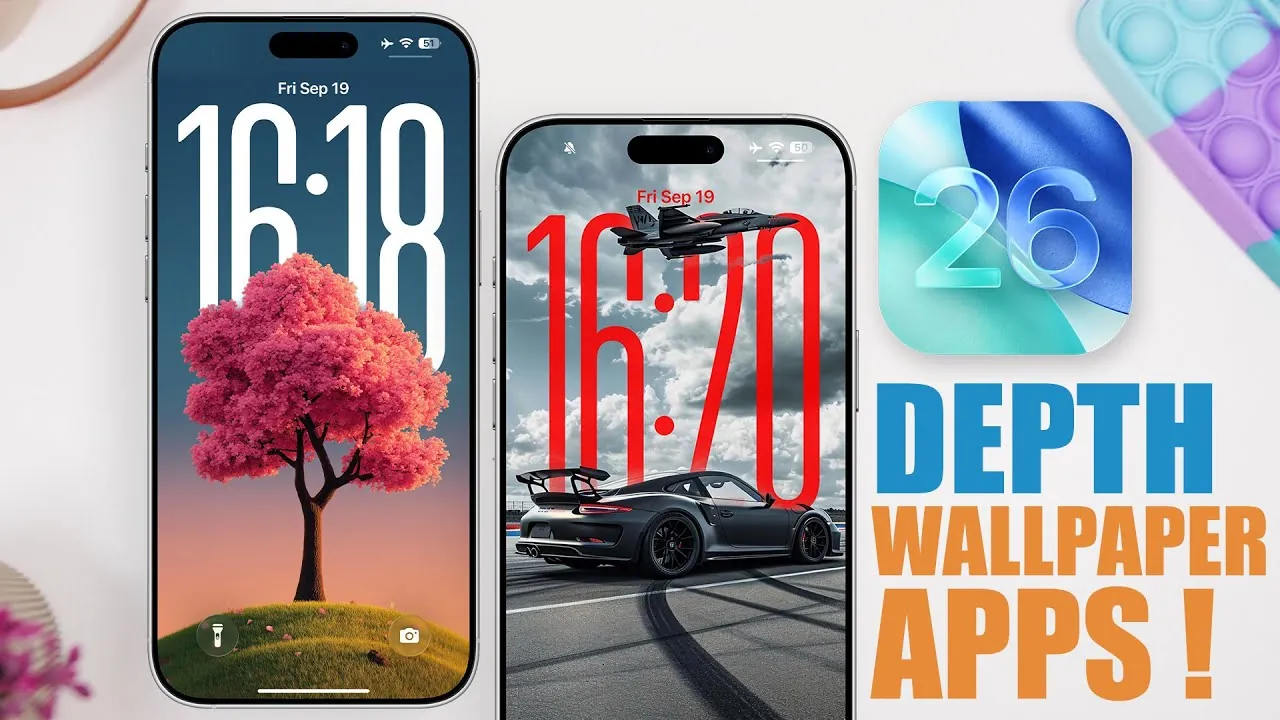
iOS 26 introduces a redesigned lock screen that features a bold clock design seamlessly integrated with depth effect wallpapers. These wallpapers create a layered, dynamic appearance by positioning elements both in front of and behind the clock, offering a visually immersive experience. To help you maximize this feature, several apps now specialize in providing depth effect wallpapers and tools for customizing your lock and home screens. Below is a detailed look at the best apps for this purpose, their standout features, and how they can enhance your iOS 26 experience.
Wallpapers App
The Wallpapers App is a versatile and user-friendly tool for iOS 26 users who want to personalize their devices. It includes a dedicated section for depth effect wallpapers, making it simple to find designs that complement the updated lock screen. Key features include:
- Live wallpapers and dual wallpapers are designed for both lock and home screens.
- Organized categories and collections for effortless browsing and selection.
- An intuitive interface that simplifies the customization process.
This app is ideal for users seeking a comprehensive solution for wallpaper customization, offering a wide range of options to suit various preferences.
Wallpaper Central 2.0
Wallpaper Central 2.0 combines functionality with a sleek, modern design. Its updated interface features a liquid glass aesthetic, enhancing the overall user experience. Highlights include:
- A “For You” section that curates wallpapers based on your preferences and usage patterns.
- A dedicated depth effect category for quick and easy access to compatible designs.
- Community uploads, allowing you to explore and download unique designs shared by other users.
- Preview functionality to visualize wallpapers on your lock screen before downloading them.
This app is perfect for users who enjoy personalized recommendations and a social element in their customization journey, making it a standout choice for those who value creativity and community-driven content.
Wallcraft
Wallcraft offers an extensive library of wallpapers, including a variety of depth effect options. While it does not have a specific section dedicated to depth effect wallpapers, its robust search functionality allows you to find these designs with ease. Additional features include:
- Live wallpapers and exclusive designs for a unique and personalized look.
- A history section to revisit and re-download previously selected wallpapers.
- A wide variety of styles and themes to suit different tastes and preferences.
Wallcraft is an excellent choice for users who value variety and flexibility, offering a broad selection of wallpapers to match any aesthetic.
Locked
Locked simplifies the process of finding depth effect wallpapers by organizing them into clearly defined categories, such as nature, neon, and cityscapes. Its intuitive design ensures a seamless browsing experience. Features include:
- Category-based browsing for quick and efficient navigation.
- Preview and download options for easy application of wallpapers.
- A focus on high-quality, visually striking designs that enhance the lock screen.
This app is ideal for users who prefer a structured and straightforward approach to wallpaper selection, making it easy to find designs that align with their personal style.
Wall-E
Wall-E caters to a wide range of preferences with its diverse wallpaper offerings. Its depth effect wallpapers are conveniently located under the “Collections” tab, making sure quick access to relevant designs. Key features include:
- Live, dark, and 4K wallpapers to suit varied tastes and preferences.
- A search bar for targeted browsing and efficient discovery of specific designs.
- Preview functionality to test wallpapers on your lock screen before applying them.
Wall-E is a solid option for users seeking variety, ease of use, and a well-organized interface for exploring high-quality wallpapers.
Foam Wall
Foam Wall focuses on trending wallpapers and offers tools for streamlined navigation. Its dedicated section for iOS 26 depth effect wallpapers ensures quick access to designs that align with the latest trends. Features include:
- Filters for efficient browsing based on categories, styles, or themes.
- Swipe and preview options for intuitive exploration and selection.
- A focus on popular and stylish designs that resonate with current aesthetic trends.
This app is well-suited for users who want to stay updated with the latest styles and enjoy a modern, user-friendly interface.
Zedge
Zedge has long been a favorite in the wallpaper customization space, and it continues to innovate with iOS 26. While not exclusively focused on depth effect wallpapers, it offers tools to find them easily. Additional features include:
- Liquid glass design wallpapers for a sleek and modern look.
- A search function to locate depth effect options quickly and efficiently.
- Extras like ringtones and live photos for a complete customization package.
Zedge is a versatile app for users who want more than just wallpapers, offering a comprehensive suite of customization tools to enhance their devices.
Enhance Your iOS 26 Experience
Customizing your iOS 26 lock screen with depth effect wallpapers has never been more accessible, thanks to these apps. Whether you prefer curated collections, community-driven designs, or trending styles, there is an app to match your specific needs. By exploring these tools, you can elevate your device’s aesthetic appeal, fully embrace the innovative features of iOS 26, and create a personalized experience that reflects your unique style.
Explore further guides and articles from our vast library that you may find relevant to your interests in Depth effect wallpapers.
Source & Image Credit: iReviews
Filed Under: Apple, Apple iPhone, Guides
Latest Geeky Gadgets Deals
Disclosure: Some of our articles include affiliate links. If you buy something through one of these links, Geeky Gadgets may earn an affiliate commission. Learn about our Disclosure Policy.
Credit: Source link