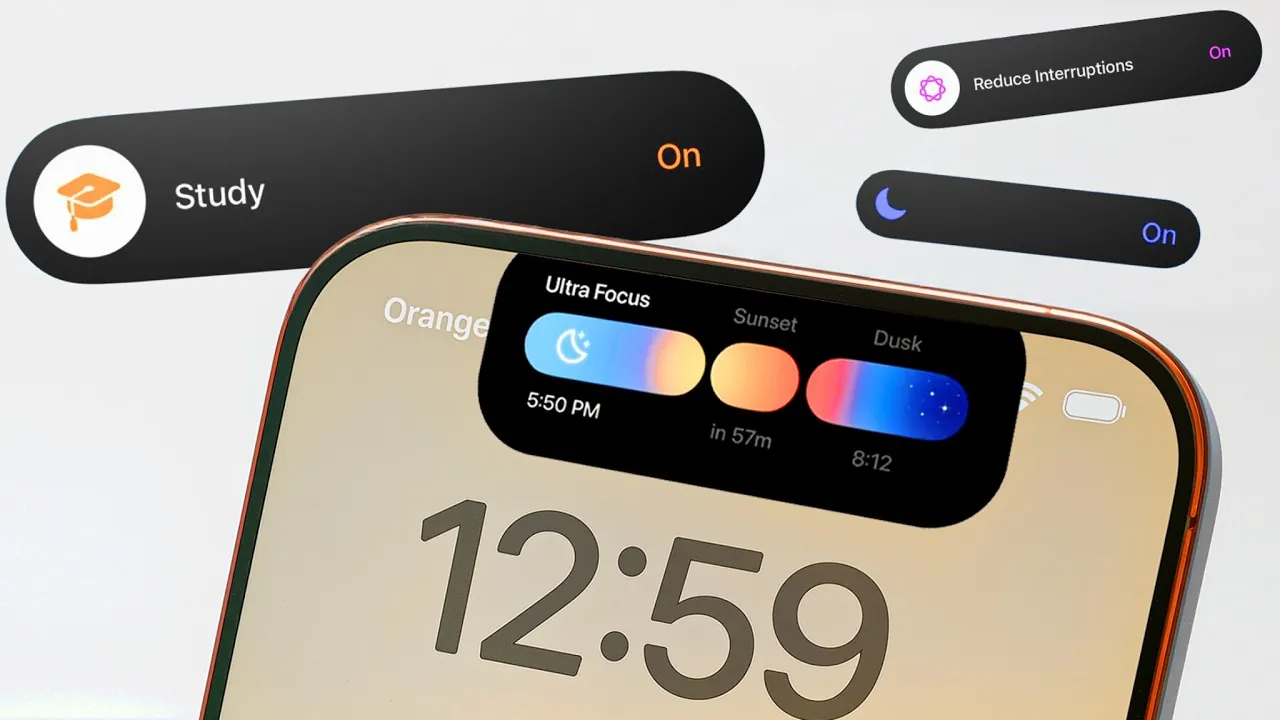
Focus Mode on Apple devices is a powerful feature designed to help you minimize distractions and enhance productivity. By customizing notifications, app access, and device settings, you can create a tailored digital environment for specific activities such as work, sleep, exercise, or driving. Whether you’re a professional managing multiple tasks or someone striving for a better work-life balance, Focus Mode offers a range of tools to help you stay on track. Understanding its features and customization options can empower you to make the most of this versatile tool. The video below from Nikias Molina gives us a look at these hidden features.
How to Activate Focus Mode
Activating Focus Mode is straightforward and adaptable, with multiple methods available to suit your preferences:
- Control Center: Swipe down to access the Control Center and select your desired Focus Mode for quick activation.
- Siri Commands: Use voice commands such as “Turn on Work Focus” for hands-free convenience.
- Action Button: On supported devices, assign Focus Mode to the Action Button for instant access with a single press.
For a seamless experience, you can automate Focus Mode activation based on specific triggers like time, location, or app usage. For instance, Sleep Focus can automatically activate at your designated bedtime, while Driving Focus can engage when your device connects to your car’s Bluetooth. Additionally, Focus Mode settings can sync across all your Apple devices, ensuring a consistent and distraction-free experience, whether you’re using an iPhone, iPad, Mac, or Apple Watch.
Customizing Focus Modes
Focus Mode offers extensive customization options, allowing you to create a personalized experience that aligns with your lifestyle and priorities. You can use pre-set templates such as Work, Sleep, or Gaming, or design custom modes tailored to your specific needs.
- Personalization: Assign unique names, colors, and icons to each mode for easy identification and quick access.
- Notification Management: Decide which apps and contacts can send notifications. For example, Sleep Focus might allow calls from family members while silencing all other alerts.
- Priority Alerts: Ensure that critical notifications, such as emergency messages, bypass silenced settings when necessary.
This level of control allows you to maintain focus on what matters most while making sure you never miss important updates or alerts.
Advanced Features for Enhanced Control
Focus Mode extends beyond basic notification silencing by offering advanced features that allow you to customize your device’s interface and functionality:
- Custom Home and Lock Screens: Tailor your home screen layout and lock screen widgets to match each Focus Mode. For example, Work Focus can display productivity apps, while Fitness Focus highlights health-related tools.
- Apple Watch Integration: Sync Focus Modes with your Apple Watch to display relevant watch faces and notifications that align with your current mode.
- Smart Activation: Automate mode switching based on context, such as allowing Driving Focus when you start your car or activating Sleep Focus at a scheduled time.
These features ensure your device adapts to your needs throughout the day, creating a seamless and distraction-free experience that supports your goals.
Practical Use Cases
Focus Mode is versatile enough to support a wide range of scenarios, making it a valuable tool for various aspects of daily life. Here are some practical examples of how you can use it effectively:
- Work Focus: Organize your home screen with productivity apps, silence non-essential notifications, and use widgets to track tasks and deadlines.
- Sleep Focus: Dim your lock screen, disable the always-on display, and allow only priority contacts to reach you during the night.
- Fitness Focus: Automatically activate during workouts, limiting distractions to health-related apps like Fitness or Music.
- Driving Focus: Minimize distractions by silencing notifications and allowing CarPlay for hands-free navigation and communication.
- Study Focus: Block social media apps, integrate Pomodoro timers, and use focus filters to enhance concentration during study sessions.
These examples demonstrate how Focus Mode can be tailored to fit various activities, helping you stay organized and focused throughout the day.
Third-Party App Integration
Focus Mode’s functionality is further enhanced through integration with third-party apps. Apps like Offscreen can complement Focus Mode by offering additional features such as app blocking, white noise, and advanced timers. These integrations provide extra layers of support, helping you maintain focus and achieve your goals more effectively. By combining Focus Mode with compatible apps, you can create a comprehensive system for managing your time and attention.
Focus Filters: Streamline Your Digital Experience
Focus Filters are a standout feature of Focus Mode, allowing you to filter content within apps and separate work and personal activities. This ensures that your device displays only what’s relevant to your current mode, reducing digital clutter and improving efficiency.
- Email and Calendar: Configure Work Focus to show only work-related emails and events, while Personal Focus highlights messages from friends and family.
- Messaging Apps: Limit notifications to specific contacts based on the active mode, making sure you only receive messages that align with your priorities.
By streamlining your digital experience, Focus Filters help you stay organized and focused, making it easier to manage your responsibilities and personal life.
Maximize Your Productivity with Focus Mode
Focus Mode is more than just a tool for silencing notifications—it’s a comprehensive system for optimizing how you interact with your devices. By customizing modes, using advanced features, and integrating third-party apps, you can create a distraction-free environment tailored to your needs. Whether you’re aiming to boost productivity, improve sleep quality, or stay focused during workouts, Focus Mode provides the flexibility and control to help you achieve your goals. With its wide range of features and customization options, Focus Mode enables you to take charge of your digital life and make the most of every moment.
Find more information on Focus Mode customization by browsing our extensive range of articles, guides and tutorials.
Source & Image Credit: Nikias Molina
Filed Under: Apple, Apple iPhone, Guides
Latest Geeky Gadgets Deals
Disclosure: Some of our articles include affiliate links. If you buy something through one of these links, Geeky Gadgets may earn an affiliate commission. Learn about our Disclosure Policy.
Credit: Source link