Apple’s iOS 26.2 has arrived, bringing a host of features designed to enhance your iPhone experience. This update focuses on improving usability, offering greater customization options, and ensuring seamless integration across Apple’s ecosystem. Whether you’re looking to streamline task management, personalize your device, or explore smarter content navigation, iOS 26.2 delivers tools to enrich your daily interactions. Below is a detailed look at the top 10 features you’ll want to explore in a new video form Proper Honest Tech.

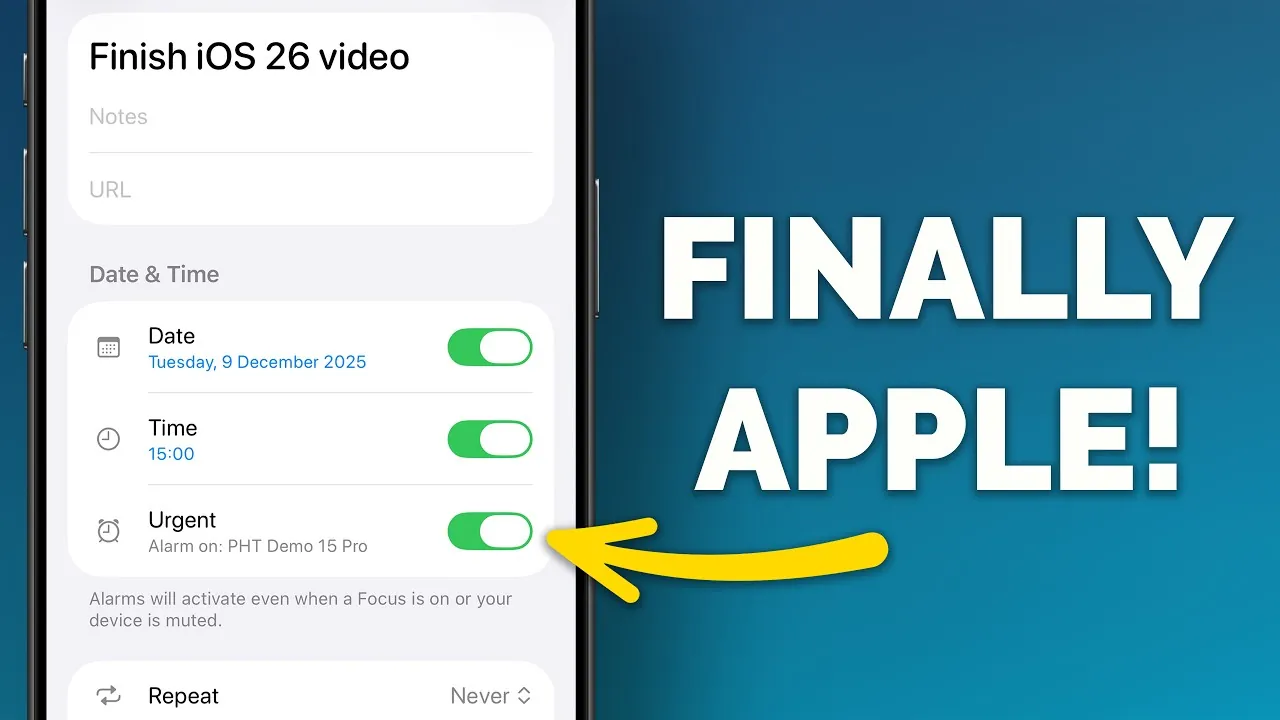
1. Prioritize Tasks with Urgent Reminders
The Reminders app now includes an “Urgent” toggle, allowing you to flag tasks that require immediate attention. This feature enables you to set specific dates and times for these reminders, pairing them with alarms for live activity prompts. By making sure critical deadlines or time-sensitive errands are highlighted, this update helps you stay on top of your priorities. Whether it’s a work deadline or a personal task, the Urgent Reminders feature ensures nothing important slips through the cracks.
2. Enhanced Lock Screen Clock Customization
Personalizing your lock screen has never been easier. iOS 26.2 introduces a slider that lets you adjust the transparency of the clock’s “glass” effect. This allows you to align the clock’s appearance with your wallpaper, creating a more cohesive and visually appealing lock screen. Whether you prefer a bold, standout clock or a subtle design that blends into the background, this feature gives you the flexibility to match your aesthetic preferences.
3. AirDrop for Non-Contacts
Sharing files with people outside your contact list is now more convenient. AirDrop in iOS 26.2 introduces the ability to send files to non-contacts by generating a six-digit code. This feature remains active for up to 30 days, making it ideal for temporary collaborations, one-time file transfers, or sharing content with new acquaintances. The expanded AirDrop functionality ensures secure and efficient file sharing, even with individuals not saved in your contacts.
4. Screen Flash Alerts for Notifications
iOS 26.2 enhances accessibility with the introduction of screen flash alerts. In addition to the rear LED flash, your screen can now flash to notify you of incoming alerts, even when your device is in silent mode. This feature can be customized for locked or unlocked devices, making sure you never miss an important notification. Whether you’re in a noisy environment or prefer visual cues, screen flash alerts provide a practical solution for staying informed.
5. AI-Generated Podcast Chapters
Navigating podcasts is now more intuitive with AI-generated chapters in the Podcasts app. This feature allows you to jump directly to specific sections of an episode, making it easier to find the content that interests you most. Additionally, podcasts are now integrated with Apple Music, Apple News, and Apple TV, allowing you to explore related content seamlessly. A new “From this episode” section highlights topics or media mentioned during the show, enriching your listening experience and connecting you to relevant information.
6. Offline Lyrics in the Music App
Music lovers will appreciate the ability to access song lyrics offline. Downloaded songs now include their lyrics, allowing you to sing along even without an internet connection. This feature is particularly useful during travel or in areas with limited connectivity. By combining offline lyrics with your music library, iOS 26.2 ensures you can enjoy a more immersive listening experience wherever you are.
7. Improved Password Management
Managing your saved credentials is now more flexible and secure. A new option in password settings lets you exclude specific websites from saving login information. This gives you greater control over your security preferences, allowing you to tailor your password management to suit your needs. Whether you’re prioritizing privacy or simplifying your login process, this update enhances the way you interact with your saved credentials.
8. Customizable Tables in Freeform
The Freeform app receives a significant upgrade with the addition of customizable tables. You can now add and modify tables directly on the canvas, making it easier to organize and structure your ideas visually. This feature is ideal for brainstorming sessions, project planning, or collaborative work, offering a versatile tool to enhance productivity. By integrating customizable tables, Freeform becomes a more powerful platform for creativity and organization.
9. More Accurate Sleep Tracking
Sleep tracking in iOS 26.2 has been refined with updated scoring bands, providing more precise feedback on your sleep quality. These improvements offer clearer insights into your sleep patterns, helping you make informed decisions to improve your rest and overall health. Whether you’re tracking your sleep for wellness goals or simply curious about your nightly habits, the enhanced sleep tracking feature delivers actionable data to support better sleep hygiene.
10. Streamlined Navigation in Apple News
The Apple News app now features quick access to highlighted categories such as sports, entertainment, and business. This streamlined navigation ensures you can find the news that matters most to you with minimal effort. By organizing content into easily accessible sections, iOS 26.2 enhances your reading experience, allowing you to stay informed and engaged with the topics you care about most.
Bonus: Voice Assistant Button Reassignment (Japan Only)
For users in Japan, iOS 26.2 introduces the ability to reassign the side button to third-party voice assistants. This feature provides greater flexibility in how you interact with your device, catering to individual preferences and offering a more personalized user experience.
Refining Your iPhone Experience
iOS 26.2 highlights Apple’s commitment to delivering meaningful updates that enhance usability, customization, and integration. From urgent task reminders and offline lyrics to smarter AirDrop functionality and refined sleep tracking, these features are designed to make your iPhone more intuitive and efficient. Whether you’re managing tasks, personalizing your device, or exploring new content, iOS 26.2 offers tools to elevate your daily experience.
Unlock more potential in iOS 26.2 features by reading previous articles we have written.
Source & Image Credit: Proper Honest Tech
Filed Under: Apple, Apple iPhone, Top News
Latest Geeky Gadgets Deals
Disclosure: Some of our articles include affiliate links. If you buy something through one of these links, Geeky Gadgets may earn an affiliate commission. Learn about our Disclosure Policy.
Credit: Source link