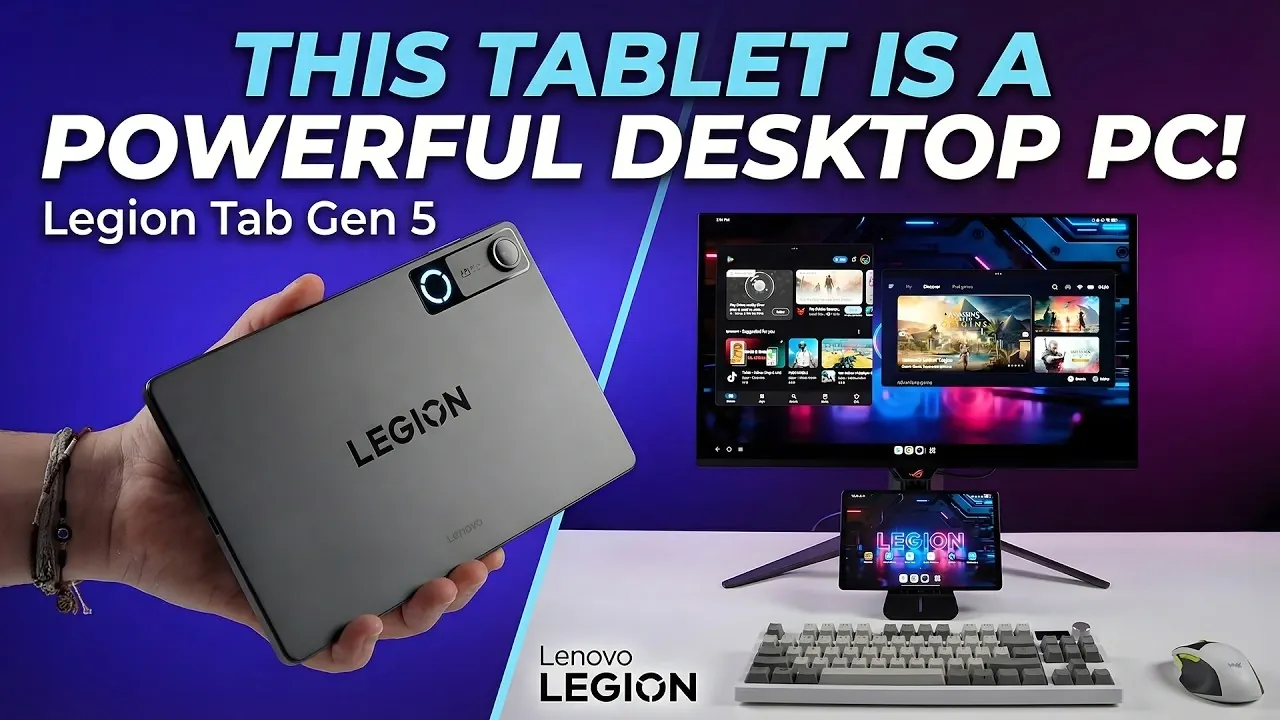
The Lenovo Legion Tab Gen 5 is an Android tablet that can be adapted for gaming and productivity, as demonstrated by ETA Prime. Equipped with a Qualcomm Snapdragon 8 Gen 2 chipset and up to 12GB of RAM, it supports demanding applications like gaming and multitasking. A notable feature is its desktop mode, which provides a PC-like interface with multi-window functionality and a taskbar for easier navigation. However, there are some constraints, such as limited extended display support in this mode, which may affect certain workflows.
Dive into how to optimize the Legion Tab Gen 5’s desktop mode for productivity by connecting external peripherals like keyboards and mice. Learn how its gaming potential includes not only Android games but also PC emulation and access to Steam libraries. Additionally, gain insight into its external display capabilities, such as 4K output at 60Hz and explore its multimedia features, including Widevine L1 certification for HD streaming.
Unmatched Hardware & Performance
TL;DR Key Takeaways :
- The Lenovo Legion Tab Gen 5 is powered by the Qualcomm Snapdragon 8 Gen 5 chipset and offers up to 24GB of RAM, delivering high performance for gaming, multitasking and streaming.
- It supports external monitors with resolutions up to 4K at 60Hz or 1440p at 120Hz, making it suitable for gaming, productivity and multimedia on larger screens.
- The tablet features a desktop mode with multi-window support, resizable apps and a taskbar, enhancing productivity by mimicking a PC-like interface.
- Gaming performance is a standout feature, with support for native Android games, Steam game emulation and a beta PC emulator for x86 games, along with Bluetooth controller compatibility.
- Beyond gaming, it excels as a productivity tool with multi-window app support, external keyboard and mouse compatibility and Widevine L1 certification for HD streaming on platforms like Netflix and Disney+.
At the core of the Lenovo Legion Tab Gen 5 is the Qualcomm Snapdragon 8 Gen 5 chipset, a processor designed to handle demanding tasks with ease. This ensures a seamless experience whether you’re gaming, streaming, or managing multiple applications simultaneously. The tablet is available in three configurations, 12GB, 16GB, or 24GB of RAM, allowing users to choose a model that aligns with their specific performance needs.
For those who require larger displays, the tablet supports external monitors through a USB-C to HDMI connection. It can output resolutions of up to 4K at 60Hz or 1440p at 120Hz, making it suitable for gaming, professional tasks, or multimedia consumption on bigger screens. This combination of raw power and adaptability ensures the device can handle both casual and intensive use cases, making it a versatile tool for a variety of users.
Desktop Mode: Bridging the Gap Between Tablet & PC
One of the standout features of the Legion Tab Gen 5 is its desktop mode, which transforms the tablet into a PC-like interface. This mode offers multi-window support, resizable apps and a taskbar for streamlined navigation, allowing users to toggle between mirror and extended display modes based on their workflow requirements.
Desktop mode is particularly beneficial for multitasking, such as working on documents, browsing the web, or performing light photo editing. However, it does come with some limitations. For example, extended mode cannot be used in conjunction with the desktop interface and accessing certain system settings requires switching back to the standard Android interface. Despite these minor drawbacks, the desktop mode significantly enhances the tablet’s productivity potential, making it a viable alternative to a traditional laptop for many tasks.

Become an expert in gaming PC with the help of our in-depth articles and helpful guides.
Gaming Performance: A Core Strength
Gaming is where the Lenovo Legion Tab Gen 5 truly shines. Native Android games run effortlessly at high settings, thanks to the tablet’s powerful hardware. Additionally, the device includes a beta PC emulator, allowing x86 game emulation. While this feature allows users to play older PC games, occasional graphical glitches may occur due to its beta status.
For modern gaming, the tablet supports Steam game emulation through GameHub, granting access to an extensive library of PC titles. Bluetooth connectivity ensures seamless pairing with controllers, enhancing the overall gaming experience. Whether you prefer casual mobile games or more demanding PC titles, the Legion Tab Gen 5 provides a versatile and portable gaming platform that caters to a wide range of preferences.
Beyond Gaming: A Productivity Powerhouse
The Lenovo Legion Tab Gen 5 is not just a gaming device, it’s also a highly capable productivity tool. Pairing the tablet with an external keyboard and mouse transforms it into a portable workstation, ideal for tasks such as document editing, spreadsheet management and even light coding. Its multi-window app support and taskbar further enhance productivity, allowing users to efficiently juggle multiple tasks.
The tablet’s Widevine L1 certification ensures HD streaming on platforms like Netflix and Disney+, making it an excellent choice for multimedia consumption. Whether you’re working remotely or relaxing with your favorite shows, the Legion Tab Gen 5 offers a well-rounded experience that balances work and entertainment seamlessly.
Considerations and Limitations
While the Lenovo Legion Tab Gen 5 offers an impressive array of features, it’s not without its limitations. The desktop mode, for instance, is restricted to mirror mode, which may hinder workflows requiring extended displays. Additionally, the PC emulator, though promising, is still in beta and may exhibit occasional graphical glitches. Navigating system settings from desktop mode can also be cumbersome, as it necessitates switching back to the standard Android interface.
These limitations, while notable, do not overshadow the tablet’s overall capabilities. For most users, the Legion Tab Gen 5 provides a compelling blend of portability, performance and versatility that is difficult to match in its category.
Who Should Consider the Lenovo Legion Tab Gen 5?
The Lenovo Legion Tab Gen 5 is designed to cater to a diverse range of users, offering a unique combination of portability and performance. Here’s how it fits various use cases:
- Gamers: Enjoy high-quality gaming on the go, complete with controller support and external display options for an immersive experience.
- Professionals: Use it as a portable workstation for tasks like document editing, spreadsheet management and light coding, with desktop mode enhancing productivity.
- Entertainment Enthusiasts: Stream HD content and enjoy multimedia on its high-resolution display, supported by Widevine L1 certification.
A Portable Powerhouse for Work and Play
The Lenovo Legion Tab Gen 5 is not intended to replace a traditional gaming PC or workstation entirely, but it offers a compelling alternative for those seeking a versatile and portable solution. With its powerful hardware, adaptable software and thoughtful features, this Android tablet caters to gamers, professionals and casual users alike. Whether you’re tackling work tasks, diving into your favorite games, or streaming high-definition content, the Legion Tab Gen 5 delivers a well-rounded experience that sets a new standard for what a tablet can achieve.
Media Credit: ETA PRIME
Filed Under: Android News, Gaming News, Tablet News
Disclosure: Some of our articles include affiliate links. If you buy something through one of these links, Geeky Gadgets may earn an affiliate commission. Learn about our Disclosure Policy.
Credit: Source link