Close Menu
  • Home
  • Crypto News
  • Tech News
  • Gadgets
  • NFT’s
  • Luxury Goods
  • Gold News
  • Cat Videos
What's Hot

FIFA Wants Jamal Musiala To Forget About Dre (During The World Cup)

June 17, 2026

Can Worldcoin Price Hit $1: Here’s Why WLD Is Suddenly Exploding

June 17, 2026

Everything New in Apple’s iOS 26.6 Beta 2 Update

June 17, 2026
Facebook X (Twitter) Instagram
  • Contact Us
  • Disclaimer
  • Privacy Policy
  • Terms of Use
  • DMCA
Facebook X (Twitter) Instagram
KittyBNK
  • Home
  • Crypto News
  • Tech News
  • Gadgets
  • NFT’s
  • Luxury Goods
  • Gold News
  • Cat Videos
KittyBNK
Home » Opera’s Latest Android Update Includes A Soccer Hub And A Refreshed Start Page
Tech News

Opera’s Latest Android Update Includes A Soccer Hub And A Refreshed Start Page

June 9, 2026No Comments2 Mins Read
Facebook Twitter Pinterest LinkedIn Tumblr Email
Opera’s Latest Android Update Includes A Soccer Hub And A Refreshed Start Page
Share
Facebook Twitter LinkedIn Pinterest Email

You can see live scores for ongoing games and follow your favorite teams for notifications.


Opera

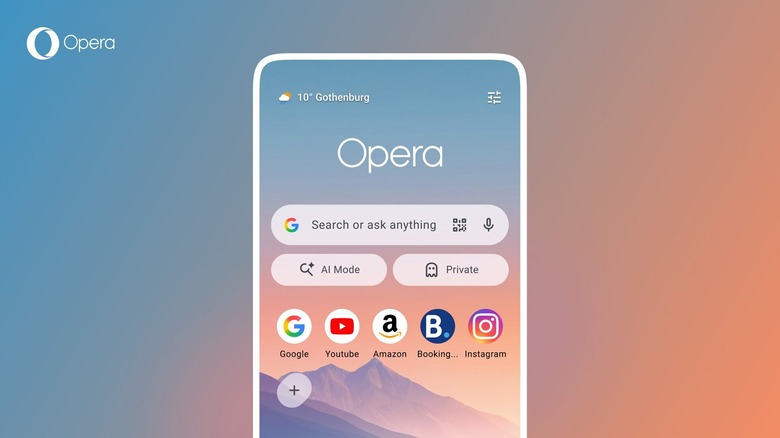
Opera has released a new version of its web browser for Android. It has a refreshed start page design and, just in time for the World Cup kicking off this week, a soccer hub that features live scores, stats and match notifications. The latter is available in Opera Mini as well.

Opera is hoping that you’ll stay up to date on all the action using its soccer hub. It includes a carousel that displays scores for all games that are currently taking place. You can tap on a match for more details and select your favorite teams to get notifications on critical moments during a game.

Unfortunately, the hub features an AI-powered news feed instead of one curated by humans. (If you’re interested in Scotland’s journey toward the World Cup final, feel free to just ask me. I’ll happily tell you all about it. I might not shut up about it.)

In terms of the start page refresh, there’s a weather widget that provides real-time conditions at a glance. Though you can still customize the start page, by default you’ll have the option to quickly switch to a private browsing session or hop into Opera’s AI mode via new shortcuts. In addition, Opera says the speed dial icons can now be square, round or “squircle.” 

Credit: Source link

Share. Facebook Twitter Pinterest LinkedIn Tumblr Email

Related Posts

FIFA Wants Jamal Musiala To Forget About Dre (During The World Cup)

June 17, 2026

The Dell XPS 13 Laptop Is Available Starting Today

June 16, 2026

The Webb Telescope Has Captured Its First ‘Bulge Fossil Fragment’

June 16, 2026

Evan Spiegel Doesn’t Want You To Call Snap Specs AI Glasses

June 16, 2026
Add A Comment
Leave A Reply Cancel Reply

What's New Here!

McEwen Mining increases gold equivalent production in Q3, reiterates 2023 guidance

October 30, 2023

The 2026 Guide to Claude AI Skill Levels

May 13, 2026

Civil War-Era Gold Coin Hoard Valued Over $2 Million Discovered in Kentucky Cornfield

November 8, 2023

How to compare 1-ounce gold coins

February 2, 2024

BingX Vs Crypto.com 2025: Which Is Better?

December 20, 2025
Facebook X (Twitter) Instagram Telegram
  • Contact Us
  • Disclaimer
  • Privacy Policy
  • Terms of Use
  • DMCA
© 2026 kittybnk.com - All Rights Reserved!

Type above and press Enter to search. Press Esc to cancel.