First, you’ll want to access the dashboard and generate your first reflect report. To do so, follow these steps:
-
Open your browser and navigate to claude.ai.
-
Click on your name and profile photo.
-
Click Settings.
-
Select Reflect.
Claude will take a moment to generate your report. By default, the chatbot will summarize the last month of your usage, but you can also see the last three, six or 12 months by clicking the toggle at the top.
Once your first report is ready, you’ll see a short summary of your conversations with Claude. As of the writing of this article, you can’t see the exact amount of time you’ve spent using Claude. If you click the Time spent tab, the page just says “coming soon.” Ryn Linthicum, Anthropic’s head of wellbeing policy, told Engadget the reason for that is the company didn’t have an internal system for measuring time spent on Claude when it began working on the Reflect dashboard.
In any case, the dashboard gives you two different ways to manage your time on Claude. First, you can set break reminders, which the chatbot will deliver in the form of a nudge after you use it for a set amount of time. After just how much time Claude prompts you to take a break, is up to you. You can set reminders for every 15, 30 or 45 minutes, or every few hours. Separately, you can set quiet hours, which are designed to prevent you from using Claude during certain hours of the day. You can set different hours for each day of the week independently of each other. So, for example, on Monday you can put up a roadblock from 5PM to 8PM, while on Saturday you can set it from 12PM to 4PM.
As with any screen time tool, it’s ultimately up to you to honor the usage limits you’ve set for yourself since you can freely dismiss all of Claude’s nudges. If you want to tweak your break reminders, you can do so from the Time and focus section of the settings menu.
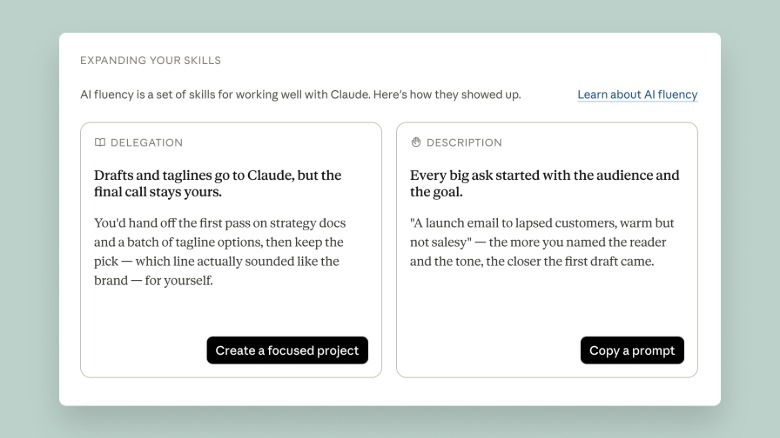
One more feature of the dashboard I’ll highlight here involves the AI fluency section, which you’ll find toward the bottom of the interface. Under this section, Claude will generate recommendations designed to streamline your usage of the chatbot. For example, if Claude finds you frequently re-establish the same or similar context when you go to write a question or request, it will recommend you use its Projects feature to group your prompts together, so that you don’t need to repeat yourself so often. In my testing, this tool has helped me use Claude smarter. So I recommend giving some of the tips Claude generates a try.
Credit: Source link