Samsung has confirmed the inclusion of an app lock feature in its forthcoming One UI 9.5 update, signaling a significant step forward in mobile privacy and security. This highly anticipated feature allows you to lock individual apps, making sure that sensitive information remains protected from unauthorized access. By requiring biometric authentication or a screen lock to open these apps, Samsung is empowering users with greater control over their digital privacy. The feature will debut with the Galaxy S27 series, while a stable One UI 9 update is expected to roll out soon for existing Galaxy devices. The video below from AppX gives us more details about the feature.
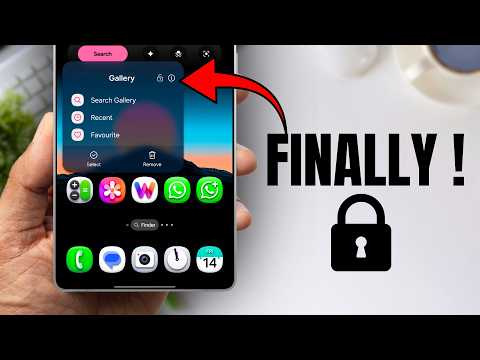
What the App Lock Feature Brings to the Table
The app lock feature in One UI 9.5 is designed to provide you with enhanced control over your personal data. Here’s how it works:
- You can lock specific apps, restricting access to only authorized users.
- To unlock these apps, you’ll need to authenticate using biometric methods such as fingerprints or facial recognition, or a traditional PIN or password.
- Widgets and shortcuts for locked apps are automatically removed from your home screen, minimizing the risk of unauthorized access.
- Notification content for locked apps is hidden, making sure private messages or alerts don’t appear on your lock screen or notification panel.
This feature is particularly valuable for apps containing sensitive information, such as banking, messaging, or photo storage apps. By adding this extra layer of security, Samsung is addressing the growing demand for enhanced privacy in today’s interconnected digital world. The app lock feature not only protects your data but also provides peace of mind, knowing that your private information is safeguarded.
Balancing Privacy and Functionality
While the app lock feature significantly strengthens privacy, it is designed to ensure that locked apps remain functional within the broader ecosystem of your device. Data from locked apps can still be accessed by other apps that have been granted prior permissions. For example:
- A photo editing app with access to your gallery can retrieve images from a locked photo app.
- Messaging apps with permission to access your contacts can still function seamlessly, even if the contacts app is locked.
This balanced approach ensures that your device remains practical and user-friendly while safeguarding sensitive information. Samsung has carefully designed the feature to avoid disrupting your workflow, allowing you to enjoy both privacy and convenience.
One UI 9.5: Built on Android “Cinnamon Bun”
The One UI 9.5 update introduces the app lock feature alongside a host of other refinements to Samsung’s user interface. Built on Android’s latest version, nicknamed “Cinnamon Bun,” the update promises several improvements:
- Smoother performance for a more seamless and responsive user experience.
- Enhanced customization options, allowing you to tailor your device to your preferences.
- Improved battery optimization to extend device usage throughout the day.
Early testing of One UI 9.5 has shown promising results, with the app lock feature integrating seamlessly into the updated interface. The update is set to launch alongside the Galaxy S27 series, offering the latest privacy features right out of the box. For existing Galaxy devices, the stable One UI 9 update is expected to roll out in the coming weeks, starting with the Galaxy S26 series. Beta programs for the Galaxy S24 and S25 series are also nearing completion, signaling a broader rollout soon.
Additional Privacy Enhancements
Beyond app locking, One UI 9.5 introduces subtle yet impactful changes to further enhance your privacy:
- Locked apps automatically have their widgets and shortcuts removed from the home screen, reducing the risk of accidental exposure.
- Notification content for locked apps is hidden, making sure sensitive information remains private even when your device is locked.
- Improved permission management tools, giving you greater control over which apps can access your data.
These enhancements reflect Samsung’s commitment to providing a secure and user-friendly experience, addressing common concerns about data protection. By integrating these features, Samsung is making sure that your device not only meets but exceeds modern privacy expectations.
What This Means for You
Samsung’s focus on privacy and security is evident in the development of One UI 9.5. By integrating features like app locking, the company is responding to growing concerns about data protection in an increasingly connected world.
For you, this means:
- A more secure and personalized mobile experience with the Galaxy S27 series.
- Access to many of these features on existing Galaxy devices through the upcoming One UI 9 update.
- Greater peace of mind, knowing that your sensitive information is protected by advanced security measures.
Whether you’re safeguarding financial data, personal conversations, or private photos, the app lock feature provides a practical solution to modern privacy challenges.
The Future of Mobile Security
With the introduction of app lock and other privacy-focused updates, Samsung is setting a new benchmark for mobile security. These tools empower you to take control of your digital life, making sure your personal information remains protected without compromising usability.
As the Galaxy S27 series prepares to launch with these enhancements and One UI 9 rolls out to current devices, Samsung is demonstrating its commitment to providing a safer, more secure mobile experience for all users. By prioritizing privacy and functionality, Samsung is not only meeting the demands of today’s users but also shaping the future of mobile security.
Source & Image Credit: AppX
Filed Under: Android News
Disclosure: Some of our articles include affiliate links. If you buy something through one of these links, Geeky Gadgets may earn an affiliate commission. Learn about our Disclosure Policy.
Credit: Source link