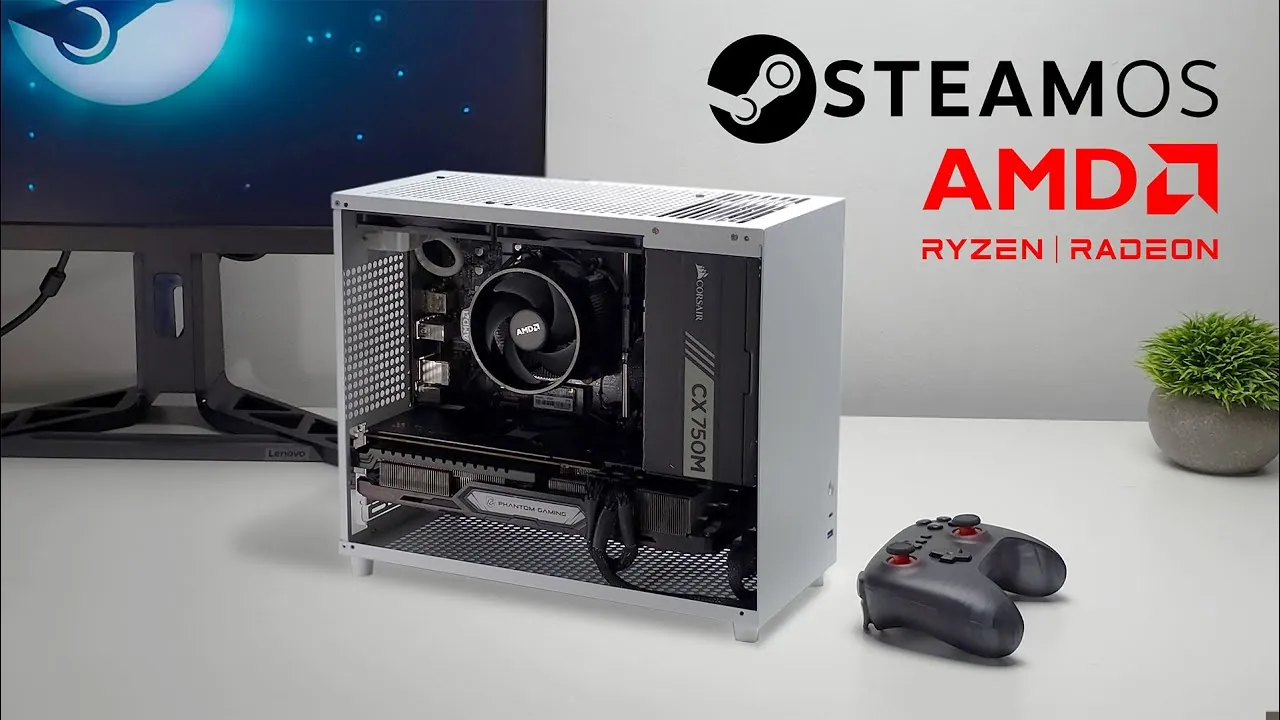
What if you could build a gaming PC that delivers stunning 1440p performance without breaking the bank? In a world where high-end gaming rigs often come with eye-watering price tags, the idea of achieving console-quality gameplay on a budget might sound too good to be true. But here’s the twist: by combining the power of modern hardware with the efficiency of SteamOS, it’s not only possible, it’s practical. This perspective explores how you can assemble a budget-friendly gaming PC that doesn’t just meet expectations but crushes them, offering smooth frame rates and breathtaking visuals in today’s most demanding titles. Whether you’re a seasoned builder or a first-timer, this setup promises exceptional value without compromise.
In the following guide, ETA Prime explains how to craft a high-performance gaming machine tailored for 1440p gaming. From selecting the right components, like the versatile AMD Ryzen 7 5700G and the Radeon RX 6750 XT, to using SteamOS for a streamlined, console-like experience, every detail is designed to maximize performance while minimizing costs. You’ll also learn practical assembly tips, customization options, and how to optimize your build for long-term reliability. If you’ve ever wondered how to achieve premium gaming on a budget, this is your chance to explore a solution that redefines what’s possible. After all, gaming shouldn’t just be about performance, it should also be about possibility.
Budget 1440p Gaming PC Guide
TL;DR Key Takeaways :
- Use the AM4 platform with components like the AMD Ryzen 7 5700G CPU and Radeon RX 6750 XT GPU for a cost-effective, high-performance 1440p gaming PC.
- Optimize the build with 16GB DDR4 RAM, a 1TB M.2 SSD, and a semi-modular 750W power supply for smooth performance and efficient cable management.
- Install SteamOS for a console-like gaming experience, with an easy setup process and a user-friendly interface tailored for gaming.
- Enhance performance with FidelityFX Super Resolution (FSR) for higher frame rates in demanding games like Cyberpunk 2077 and Doom Eternal.
- Customize the build to fit your budget or preferences, such as opting for the RX 6600 GPU for affordability or focusing on 1080p gaming for smoother frame rates.
Key Hardware Choices for Performance and Value
Selecting the right components is crucial to balancing performance and affordability. This build is centered around the versatile AM4 platform, which offers excellent compatibility and upgrade potential. Below are the recommended components:
- CPU: The AMD Ryzen 7 5700G is an 8-core, 16-thread processor with integrated graphics, making it a flexible choice for initial setup and future upgrades.
- GPU: The Radeon RX 6750 XT is ideal for 1440p gaming, delivering smooth performance in demanding titles. For a more budget-conscious option, the RX 6600 provides solid 1080p performance and entry-level 1440p capabilities.
- RAM: 16GB of DDR4 memory clocked at 3200 MHz ensures smooth multitasking and optimal gaming performance.
- Storage: A 1TB M.2 SSD offers fast load times and ample storage for your game library, enhancing overall system responsiveness.
- Case and Power Supply: A compact microATX case with tempered glass provides a sleek design, while a semi-modular 750W power supply ensures efficient power delivery and easier cable management.
This configuration is designed to handle modern games at 1440p with ease, while also offering flexibility for those with tighter budgets or specific gaming needs.
Assembly Tips for a Smooth Build
Building this PC is straightforward, even for beginners. The semi-modular power supply simplifies cable management, which not only improves airflow but also makes the interior of the case more organized. To maintain optimal cooling, install two 120mm fans, one for intake at the front and one for exhaust at the rear. This setup ensures efficient airflow and keeps temperatures under control.
While the motherboard in this build does not include onboard Wi-Fi or Bluetooth, Ethernet connectivity provides a stable and reliable internet connection. If wireless connectivity is essential, USB Wi-Fi and Bluetooth adapters are affordable and easy to install, offering a simple solution without adding significant cost.
Step-by-Step Guide to Building a 1440p Gaming PC with SteamOS

Here are more detailed guides and articles that you may find helpful on SteamOS.
Installing SteamOS
SteamOS, Valve’s Linux-based operating system, is the cornerstone of this gaming setup. Its installation process is user-friendly, even for those unfamiliar with Linux. To get started, download the Steam Deck recovery image from Valve’s official website, write it to a USB drive using a tool like Rufus, and follow Valve’s step-by-step installation guide. Once installed, SteamOS provides a streamlined, console-like interface optimized for controller use, making it an excellent choice for living room gaming or a minimalist setup.
Performance Insights: 1440p Gaming on a Budget
This build is specifically designed to deliver a high-quality 1440p gaming experience. One of the key technologies that enhances performance is FidelityFX Super Resolution (FSR), a graphics upscaling feature that increases frame rates without significantly impacting visual quality. Tested games such as Cyberpunk 2077, Doom Eternal, and Spider-Man 2 run smoothly at high settings, showcasing the system’s ability to handle demanding titles.
Temperature management is another strength of this build. The Ryzen 7 5700G remains cool under load, thanks to its included Wraith Spire cooler, while the Radeon RX 6750 XT benefits from the additional case fans. Average temperatures stay well within safe limits, making sure consistent performance and long-term reliability.
Customizing Your Build
This build is highly adaptable, allowing you to make adjustments based on your specific needs or budget. Here are some customization options to consider:
- For a more affordable setup, opt for the RX 6600 GPU and a smaller microATX case to reduce costs without sacrificing too much performance.
- Adding a bottom-mounted fan can improve GPU cooling, especially in compact cases where airflow may be restricted.
- If smoother frame rates are a higher priority than resolution, focus on 1080p gaming. This allows for better performance on less demanding hardware while still delivering an enjoyable gaming experience.
These adjustments provide flexibility, allowing you to tailor the build to your gaming preferences and financial constraints.
Maximizing Value with SteamOS and Modern Hardware
By combining affordable, high-performance components with the efficiency of SteamOS, this gaming PC offers an exceptional 1440p gaming experience at a fraction of the cost of high-end systems. Features like FSR enhance performance in demanding games, while the modular design of the build allows for future upgrades and customization. Whether you’re a first-time builder or an experienced enthusiast, this guide provides a practical roadmap for creating a cost-effective, powerful gaming machine that meets your needs. With careful planning and attention to detail, you can enjoy a premium gaming experience without exceeding your budget.
Media Credit: ETA PRIME
Filed Under: Gaming News, Hardware
Latest Geeky Gadgets Deals
Disclosure: Some of our articles include affiliate links. If you buy something through one of these links, Geeky Gadgets may earn an affiliate commission. Learn about our Disclosure Policy.
Credit: Source link