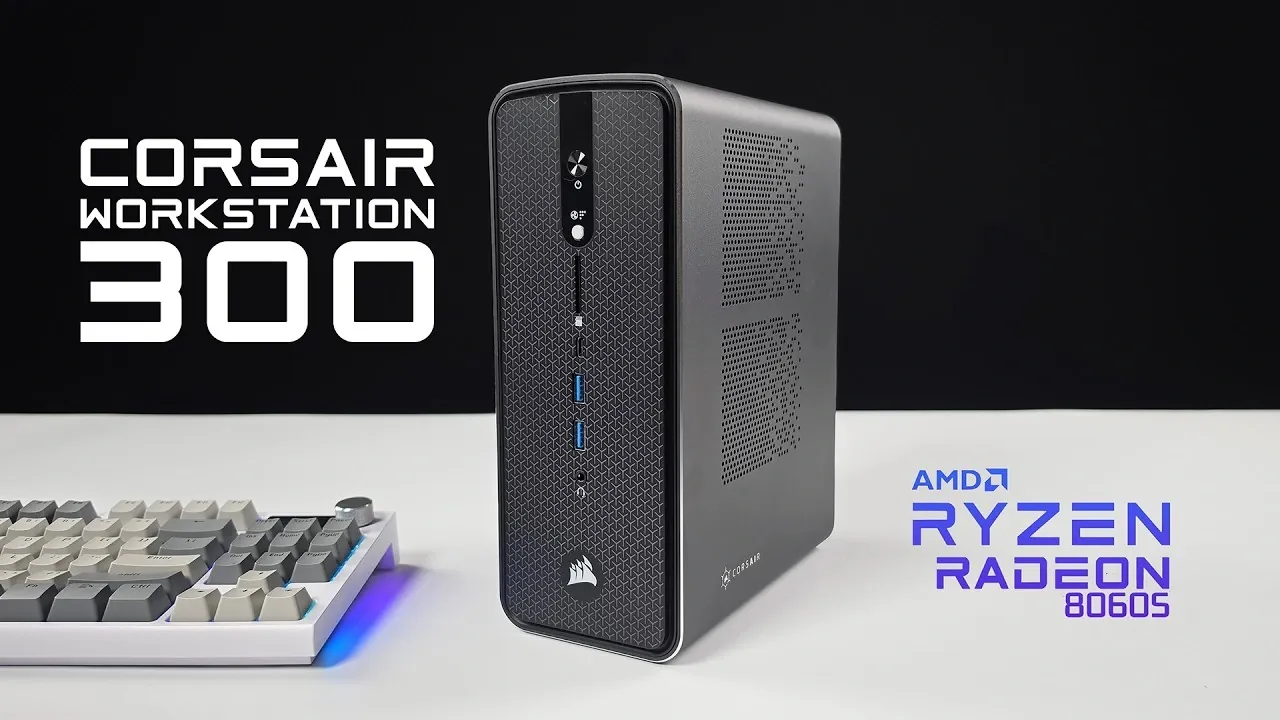
Compact yet capable, the Corsair AI Workstation 300 is designed to meet the demands of professionals and gamers who need high performance in a small form factor. As highlighted by ETA Prime, this mini PC is powered by the AMD Ryzen AI Max Plus 395 APU, a 16-core processor with clock speeds of up to 5.1 GHz, paired with the Radeon 8060S integrated GPU. With support for up to 96 GB of VRAM and 128 GB of high-speed RAM, the system is well-equipped for tasks like AI model training, video rendering and gaming at 1440p resolutions. Its compact design also integrates a 300 W flex power supply, eliminating the need for bulky external adapters and keeping workspaces tidy.
Explore how this system balances customizable performance modes, advanced connectivity options and Linux compatibility to cater to diverse workflows. You’ll gain insight into its benchmark results, which showcase competitive performance in CPU-intensive tasks and moderate gaming scenarios. Additionally, discover how its storage configuration, featuring dual PCIe 4.0 M.2 slots, supports up to 4 TB of ultra-fast storage for large datasets or game libraries. This overview provides a detailed breakdown of what makes the Corsair AI Workstation 300 a compelling choice for users with demanding workloads.
Top-Tier Hardware for Demanding Tasks
TL;DR Key Takeaways :
- The Corsair AI Workstation 300 features a powerful AMD Ryzen AI Max Plus 395 APU (16-core, 32-thread) and Radeon 8060S iGPU, optimized for AI workloads and 1440p gaming.
- Equipped with 128 GB of high-speed RAM and up to 4 TB of PCIe 4.0 storage, it ensures seamless multitasking and ample space for large datasets or games.
- Compact design with extensive connectivity options, including USB 4, HDMI 2.1, DisplayPort 1.4, 2.5 GB Ethernet and an SD 4.0 card reader, enhances versatility.
- Customizable performance modes (Quiet, Balanced, Max) and advanced BIOS settings allow users to optimize the system for specific tasks like AI processing or gaming.
- Excels in AI-focused tasks, supports Linux for open source tools and delivers competitive 1440p gaming performance, though it may not match dedicated GPUs for high-end gaming.
At the heart of the Corsair AI Workstation 300 lies the AMD Ryzen AI Max Plus 395 APU, a 16-core, 32-thread processor built on the Zen 5 architecture. With clock speeds reaching up to 5.1 GHz, this processor is engineered to handle resource-intensive tasks with ease. Complementing the CPU is the Radeon 8060S integrated GPU, based on RDNA 3.5 architecture, which features 40 compute units and a maximum clock speed of 2900 MHz. This GPU supports up to 96 GB of VRAM, making it ideal for AI processing and gaming at 1440p resolutions.
The system is equipped with 128 GB of high-speed RAM operating at 8,000 MT/s, making sure seamless multitasking and efficient memory allocation. For storage, the workstation includes two PCIe 4.0 M.2 slots, supporting up to 4 TB of ultra-fast storage, providing ample space for large datasets or game libraries. Additionally, the built-in 300 W flex power supply eliminates the need for an external power brick, enhancing portability and reducing workspace clutter.
Compact Design with Comprehensive Connectivity
Despite its small footprint, the Corsair AI Workstation 300 offers an extensive array of connectivity options, making it highly versatile for both professional and personal use. The front I/O panel includes:
- USB 3.2 Gen 2 and USB 4 ports for high-speed data transfer
- An SD 4.0 card reader for quick access to external storage
- A 3.5 mm combo audio jack for headphones or microphones
- A performance mode selector for quick system adjustments
The rear panel expands the connectivity options with additional ports, such as USB 2.0, USB 3.2 Gen 2, USB 4, HDMI 2.1, DisplayPort 1.4, 2.5 GB Ethernet, and a headphone jack. This comprehensive range of ports ensures compatibility with a wide variety of peripherals, monitors and external devices, making the system adaptable to diverse workflows.

Advance your skills in mini PC by reading more of our detailed content.
Customizable Performance Modes
The Corsair AI Workstation 300 provides three performance modes—Quiet, Balanced and Max, that can be toggled using a front-facing button or adjusted through the BIOS. This feature allows users to optimize the system for specific tasks, whether prioritizing silent operation for office environments or maximizing power for demanding workloads. Advanced BIOS options further enhance customization, offering settings such as:
- VRAM allocation for optimized memory usage
- Resizable bar for improved GPU performance
- 4G decoding for enhanced compatibility with modern software
These features enable users to fine-tune the system for AI workloads, gaming, or other resource-intensive applications, making sure it adapts to their unique requirements.
Optimized for AI Workloads
The Corsair AI Workstation 300 excels in handling AI-focused tasks, making it a reliable choice for professionals in fields like AI research, machine learning and content creation. Its high-speed RAM and efficient memory management allow it to run large language models, such as GPT OSS20B, with ease. Additionally, the system is well-suited for generating video content or processing complex datasets, demonstrating its capability to support innovative AI applications.
For developers and researchers, the system’s Linux compatibility further enhances its utility, providing access to a wide range of open source tools and frameworks commonly used in AI development.
Gaming Capabilities
While the Corsair AI Workstation 300 is not marketed as a dedicated gaming rig, it delivers competitive gaming performance for a mini PC. The Radeon 8060S iGPU, combined with FidelityFX Super Resolution (FSR) technology, enables smooth gameplay at 1440p resolutions with high settings in modern titles like Cyberpunk 2077 and Red Dead Redemption 2. However, it is important to note that the iGPU cannot match the performance of dedicated GPUs found in larger systems, making it better suited for casual or moderate gaming rather than high-end competitive play.
Benchmark Insights
Benchmark results highlight the impressive capabilities of the Corsair AI Workstation 300. In Cinebench R24, the system outperforms Apple’s M1 Ultra in multi-core performance, showcasing its strength in CPU-intensive tasks. Similarly, the 3DMark Time Spy benchmark demonstrates the iGPU’s ability to compete with entry-level dedicated GPUs, solidifying its position as a versatile and powerful mini PC.
Who Should Consider the Corsair AI Workstation 300?
The Corsair AI Workstation 300 is a premium solution designed for users who require a balance of AI processing power, gaming capabilities and portability. Its advanced hardware and compact design make it an excellent choice for professionals working on AI projects, gamers seeking a portable system, or anyone managing resource-intensive tasks.
However, the system’s high price may deter budget-conscious buyers or gamers solely focused on performance, who might find better value in custom-built PCs. For those who prioritize convenience, versatility and a ready-to-use solution, the Corsair AI Workstation 300 offers a compelling package tailored to meet diverse needs. Its compatibility with Linux further broadens its appeal, particularly for developers and professionals relying on open source software. Whether you’re tackling AI workloads, gaming at high resolutions, or seeking a compact workstation, this mini PC delivers a powerful and efficient solution.
Media Credit: ETA PRIME
Filed Under: Hardware, Top News
Disclosure: Some of our articles include affiliate links. If you buy something through one of these links, Geeky Gadgets may earn an affiliate commission. Learn about our Disclosure Policy.
Credit: Source link