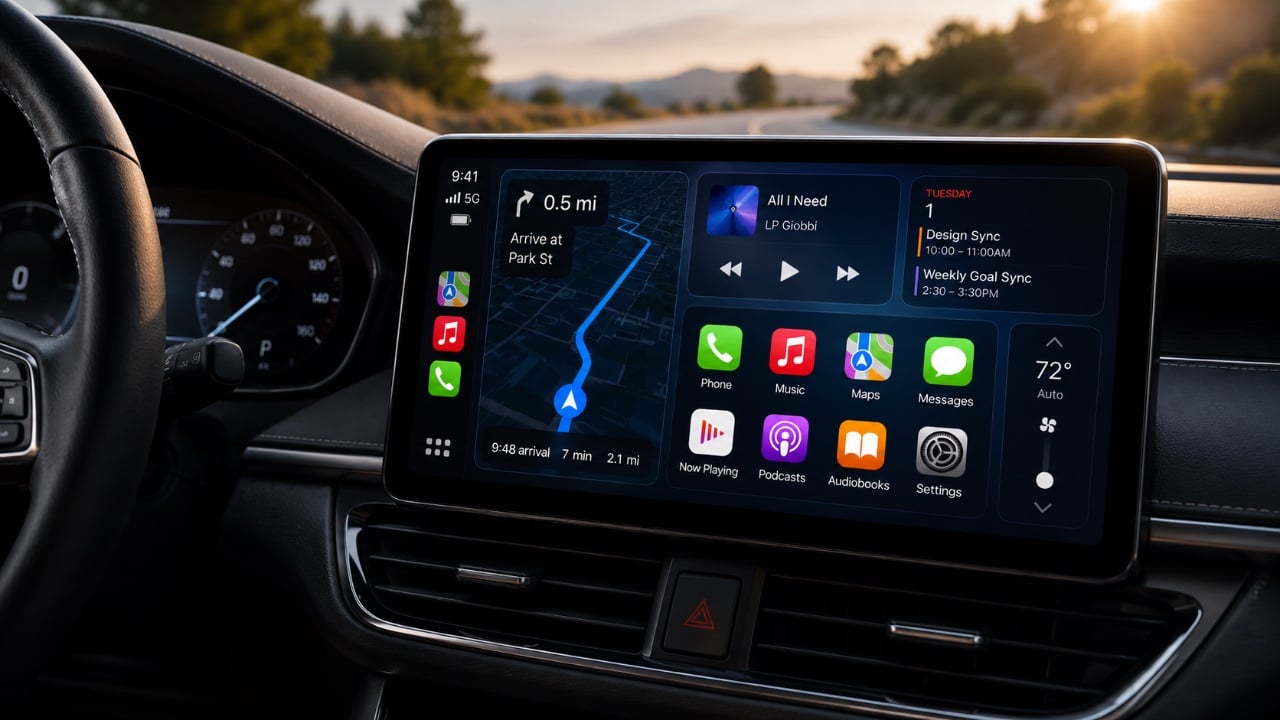
Apple’s release of the iOS 27 public beta marks a significant step forward for CarPlay, introducing a range of updates designed to enhance in-car connectivity, usability, and personalization. With a focus on improving the user experience, the update brings a refreshed interface, smarter Siri functionality, expanded widget support, and advanced navigation features. These enhancements aim to make driving safer, more intuitive, and seamlessly connected to your digital life. The video below from HotshotTek gives us more details about the new Apple CarPlay features.

What’s New in the CarPlay Interface?
The iOS 27 beta introduces a series of visual and functional updates to the CarPlay interface, making sure a more modern and user-friendly experience. Redesigned icons now feature a sleek “liquid glass” effect, offering a polished and contemporary look. Notifications, calls and messages have been streamlined for better readability, allowing you to access essential information quickly and without unnecessary distractions.
Dynamic wallpapers are another standout feature. These wallpapers include day and night modes that adjust automatically based on the time of day, providing a visually appealing and functional enhancement. The ability to customize your CarPlay dashboard with these new themes adds a personal touch, making the interface feel more tailored to your preferences.
Siri Gets Smarter and Less Distracting
Siri has undergone a significant transformation in iOS 27, with improvements aimed at reducing distractions and enhancing functionality. A new orb-like animation replaces the previous edge-to-edge design, creating a more subtle and less intrusive visual presence. However, the changes go beyond aesthetics, as Siri’s capabilities have been expanded to make it a more effective assistant.
– Enhanced Navigation: Siri now delivers more precise turn-by-turn directions, helping you navigate with greater accuracy.
– Conversation Continuity: The assistant can remember previous interactions, allowing you to seamlessly continue tasks or conversations.
– Broader Capabilities: From answering complex questions to managing smart home devices, Siri is now more versatile and reliable.
These upgrades position Siri as a dependable Copilot, whether you’re navigating unfamiliar roads or multitasking during your commute.
Widgets and Smart Home Integration
CarPlay now supports a wider range of widgets, including those from your iPhone and Apple Watch that were previously unavailable. This expanded integration allows you to access critical information and controls directly from the CarPlay interface, streamlining your interactions while driving. Key examples of this functionality include:
- View your calendar to check upcoming appointments.
- Monitor real-time weather updates for your location or destination.
- Controlling smart home devices, such as adjusting your thermostat or turning off lights remotely.
For smart home enthusiasts, this seamless integration offers unparalleled convenience. Imagine adjusting your home’s settings or checking your schedule without needing to pick up your phone; everything is accessible directly from your car’s dashboard.
Enhanced Media Experience with Apple Music and Third-Party Apps
Music lovers will appreciate the updates to Apple Music’s interface in iOS 27. The new design includes enhanced media controls and improved scrubbing functionality, making it easier to navigate playlists and control playback while driving. These updates ensure that your music experience remains smooth and distraction-free.
Third-party apps like Spotify and Pandora also benefit from these improvements, with consistent and user-friendly interfaces across platforms. Whether you prefer Apple Music or another streaming service, the iOS 27 beta ensures a cohesive and enjoyable media experience.
Navigation Upgrades with Apple Maps
Apple Maps has received significant enhancements in iOS 27, focusing on accuracy and real-time updates. The improved GPS functionality ensures more reliable navigation, while real-time traffic and route updates help you avoid delays. A particularly noteworthy feature is the ability to send navigation data directly to your vehicle’s GPS system or heads-up display, available in select vehicles.
These updates are especially beneficial for long road trips or navigating busy urban areas, making sure you always have the most accurate and up-to-date directions at your fingertips.
Apple Watch Integration and Privacy Enhancements
The connection between CarPlay and the Apple Watch has been strengthened in iOS 27, introducing features that improve convenience and security. A new backtracking feature allows your Apple Watch to mark your parked car’s location automatically, making it easier to find your vehicle in crowded parking lots or unfamiliar areas. This feature is particularly useful for frequent travelers or those attending large events.
Privacy remains a top priority in iOS 27. Improved camera usage indicators provide greater transparency, making sure you’re always aware of when and why your camera is being accessed. These enhancements reflect Apple’s ongoing commitment to protecting user data and maintaining trust.
Video Streaming: A Glimpse into the Future
For the first time, iOS 27 introduces limited support for video streaming on CarPlay. Currently, Apple TV content can be streamed to compatible head units when the vehicle is in park. While this feature is still in its early stages, it opens the door to future possibilities, such as expanded support for platforms like YouTube or Netflix. This development hints at a future where CarPlay could serve as an entertainment hub during downtime, such as while waiting in your parked car.
Why iOS 27 Matters for CarPlay Users
The iOS 27 public beta represents a comprehensive upgrade to CarPlay, emphasizing customization, smarter assistance and seamless integration. From the enhanced Siri capabilities and expanded widget support to improved navigation and media controls, these updates make CarPlay more versatile and user-friendly than ever before. Whether you’re managing your smart home, streaming music, or navigating unfamiliar roads, iOS 27 ensures that your in-car experience is safer, smarter and more enjoyable.
Browse through more resources below from our in-depth content covering more areas on CarPlay Updates.
Source & Image Credit: HotshotTek
Filed Under: Apple, Apple iPhone, Top News
Disclosure: Some of our articles include affiliate links. If you buy something through one of these links, Geeky Gadgets may earn an affiliate commission. Learn about our Disclosure Policy.
Credit: Source link