
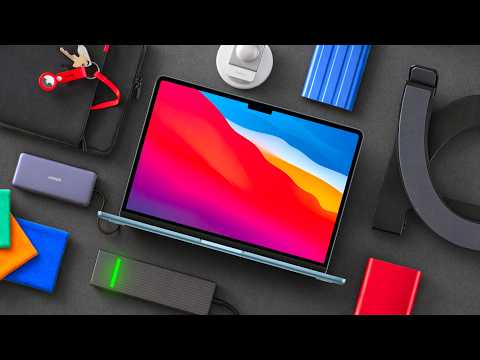
If you’ve recently purchased a new MacBook, equipping it with the right accessories is essential to maximizing its potential. The right tools not only protect your investment but also enhance its functionality, usability, and overall experience. This guide explores the must-have accessories for your MacBook, focusing on practicality, durability, and value. From protective solutions to connectivity enhancements, these recommendations will help you make the most of your MacBook while keeping it in excellent condition. The video below from Mac Vince gives us more details about the best accessories for your new MacBook.
Protect Your MacBook with a Quality Laptop Sleeve
A laptop sleeve is one of the most important accessories for safeguarding your MacBook. It acts as a protective barrier against scratches, bumps and accidental spills. The TomToc laptop sleeve is a standout option, designed specifically for MacBooks. Its snug fit ensures your device stays secure, while the soft microfiber interior prevents scratches. Thick bumpers provide additional protection against impacts and the water-repellent fabric shields your MacBook from spills. Durable YKK zippers add to its reliability, making sure long-term use. For added convenience, the sleeve features an extra pocket to store small essentials like keys, cables, or AirTags. Whether you’re commuting or traveling, a high-quality sleeve like this is a must-have to keep your MacBook safe.
Expand Your Storage with External Drives
Running out of storage space can disrupt your workflow, especially if you handle large files or need reliable backups. An external SSD is an excellent solution for expanding your storage capacity. The Samsung T7 SSD is a popular choice, offering fast transfer speeds and dependable performance. This makes it ideal for tasks such as video editing, file management, or storing large media libraries. For those who need extra durability, the T7 Shield variant includes water and dust resistance, making sure your data remains safe even in challenging environments. While global supply chain challenges have impacted pricing, investing in a high-quality external drive ensures you’ll always have the storage you need without compromising on speed or reliability.
Boost Connectivity with USB-C Hubs
MacBooks are known for their sleek and minimalist design, but the limited number of ports can pose challenges for users who rely on multiple peripherals. A USB-C hub is an essential accessory to expand your connectivity options. The UG Green Revodoc 6-in-1 hub is a budget-friendly choice that offers fast USB ports, power delivery and 4K HDMI support, making it perfect for connecting external monitors or charging devices. For users who need additional features, the Anker 8-in-1 hub includes an SD card slot and Ethernet port, providing even greater versatility. These hubs allow you to seamlessly connect peripherals, external displays and other devices, making sure uninterrupted productivity and convenience.
Upgrade Video Calls with a Webcam Mount
For those who frequently participate in video calls or create video content, a MagSafe-compatible webcam mount is a valuable accessory. This mount allows you to use your iPhone as a high-quality webcam, taking advantage of advanced features like Center Stage for automatic framing and Desk View for capturing unique angles. The wireless connection ensures a clutter-free setup, while the image quality surpasses most built-in MacBook webcams. Whether you’re attending professional meetings, hosting webinars, or producing creative content, this accessory enhances your video experience, delivering sharp and professional visuals.
Improve Ergonomics with a Laptop Stand
Using your MacBook for extended periods can lead to discomfort and strain on your posture. A laptop stand is a practical solution to improve ergonomics and reduce physical strain. The Soundance stand is a cost-effective option with a sturdy design and adjustable height, allowing you to position your MacBook at an optimal viewing angle. For users seeking a premium alternative, the 12 South Curve Flex stand offers a lightweight, foldable design and includes a carry bag for portability. Both options not only promote better posture but also improve airflow around your MacBook, helping to keep it cool during intensive tasks. By elevating your device, a laptop stand enhances both comfort and performance.
Keep Your Screen Pristine with Cleaning Cloths
Maintaining a clean screen is essential for an enjoyable viewing experience and to preserve your MacBook’s display quality. Affordable microfiber cloths, such as those from Amazon Basics, are highly effective at removing smudges and fingerprints without scratching the screen. These cloths are a cost-efficient alternative to Apple’s more expensive polishing cloths, offering the same level of care for your MacBook’s display. Regular cleaning with a microfiber cloth ensures your screen remains clear and free from damage, enhancing your overall user experience.
Accessories to Avoid
While many accessories can enhance your MacBook experience, some can cause more harm than good. It’s important to avoid products that compromise your device’s functionality or longevity.
- Keyboard Covers: While they may seem like a good idea for protecting your keyboard, these covers can trap heat and damage the display when the MacBook lid is closed. Over time, this can lead to performance issues or hardware damage.
- Screen Protectors: These can interfere with the anti-reflective coating on your MacBook’s screen, reducing its effectiveness and potentially causing long-term damage. Instead, focus on using cleaning cloths to maintain your screen’s clarity.
By avoiding these accessories, you can ensure your MacBook remains in optimal condition without unnecessary risks.
Maximizing Your MacBook Experience
Equipping your MacBook with the right accessories ensures it stays protected, functional and efficient for years to come. From the TomToc laptop sleeve for reliable protection to the Samsung T7 SSD for expanded storage and USB-C hubs for enhanced connectivity, these recommendations cater to a wide range of needs and budgets. Ergonomic solutions like laptop stands improve comfort during extended use, while cleaning cloths help maintain your screen’s pristine condition. By choosing accessories that complement your MacBook’s design and performance, you can enjoy a seamless and productive experience while avoiding products that may compromise its longevity.
Source & Image Credit: MacVince
Filed Under: Apple, Guides, Laptops
Disclosure: Some of our articles include affiliate links. If you buy something through one of these links, Geeky Gadgets may earn an affiliate commission. Learn about our Disclosure Policy.
Credit: Source link