Close Menu
  • Home
  • Crypto News
  • Tech News
  • Gadgets
  • NFT’s
  • Luxury Goods
  • Gold News
  • Cat Videos
What's Hot

Nanoleaf’s Monitor Stand Is An All-In-One Setup That Brightens Up Your Desk Space

July 26, 2026

#chocolate #eating 😂😜 style #cat #catvideos #youtubeshorts #cats #comedy #viral

July 26, 2026

How To Get YouTube Music’s Best Audio Quality

July 26, 2026
Facebook X (Twitter) Instagram
  • Contact Us
  • Disclaimer
  • Privacy Policy
  • Terms of Use
  • DMCA
Facebook X (Twitter) Instagram
KittyBNK
  • Home
  • Crypto News
  • Tech News
  • Gadgets
  • NFT’s
  • Luxury Goods
  • Gold News
  • Cat Videos
KittyBNK
Home » How To Get YouTube Music’s Best Audio Quality
Tech News

How To Get YouTube Music’s Best Audio Quality

July 26, 2026No Comments2 Mins Read
Facebook Twitter Pinterest LinkedIn Tumblr Email
How To Get YouTube Music’s Best Audio Quality
Share
Facebook Twitter LinkedIn Pinterest Email

You’re just a few taps away.


YouTube / Will Shanklin for Engadget

YouTube Music doesn’t offer the best sound quality, even for Premium subscribers. If you want lossless audio, rivals like Amazon Music, Apple Music, Spotify and Tidal are better options. But it still has its advantages, including unofficial uploads, live performances, remixes and rare tracks. Regardless of your reasons, you can make YouTube Music sound better than its default settings. Here’s how.

By default, YouTube Music uses the Normal bitrate setting, which maxes out at 128 kbps. That’s fine for conserving data, but not for a high-quality listening experience. The service’s highest available setting is 256 kbps, which can sound noticeably cleaner, especially with good headphones or speakers. The tradeoff is that it uses more data, so it makes the most sense with a strong connection and a decent data plan.

The big catch? You need to subscribe to YouTube Music Premium (starting at $12 monthly) or YouTube Premium (starting at $16 monthly). Otherwise, you’re capped out at the Normal bitrate.

How to change YouTube Music’s streaming quality
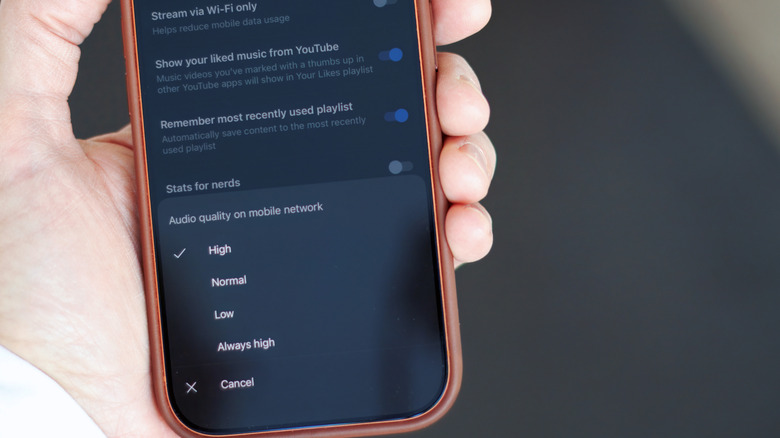

Closeup of an iPhone, showing the streaming quality menu in the YouTube Music app
Will Shanklin for Engadget

The streaming settings are in slightly different places on Android and iOS. Beyond that, the options are identical.

In the YouTube Music app:

  1. Tap your profile picture and go to Settings.
  2. Open the playback menu (Data saving on Android, Playback & restrictions on iPhone).
  3. Change Audio quality on mobile network and Audio quality on Wi-Fi to High or Always High. (High uses 256 kbps when your connection is strong enough, while Always High tries to maintain that quality even on weaker connections.)

How to change YouTube Music’s download quality

While you’re at it, you can also change the bitrate for downloaded music:

  1. Tap your profile picture and go to Settings > Download & storage > Audio quality.
  2. Choose High. As with the streaming settings, that gives you the cleaner 256 kbps.

There’s one caveat for downloaded music: It doesn’t automatically upgrade the tracks you’ve already downloaded. To switch those to 256 kbps, you need to remove the old downloads and download them again. (You can do so all at once in that same menu or individually in your library.)

Credit: Source link

Share. Facebook Twitter Pinterest LinkedIn Tumblr Email

Related Posts

Nanoleaf’s Monitor Stand Is An All-In-One Setup That Brightens Up Your Desk Space

July 26, 2026

A New Look For The Apple Watch May Still Be At Least A Year Away

July 26, 2026

The Reason Why The MacBook Air Doesn’t Need A Fan

July 26, 2026

God Of War Laufey Will Hit PS5 On February 16

July 25, 2026
Add A Comment
Leave A Reply Cancel Reply

What's New Here!

Ferrari sees strong demand stretching into the distance

November 2, 2023

When Kitten Boss Around Big Dogs 🤣 Funny Cat Videos 2025 Ever!

January 19, 2026

The robots we saw at CES 2025: The good, the bad and the completely unhinged

January 10, 2025

Check out the top 10 real estate sales of West Van luxury mansions last year

January 28, 2024

How to Use AI to Make 3D Models You Can Print Yourself

January 11, 2026
Facebook X (Twitter) Instagram Telegram
  • Contact Us
  • Disclaimer
  • Privacy Policy
  • Terms of Use
  • DMCA
© 2026 kittybnk.com - All Rights Reserved!

Type above and press Enter to search. Press Esc to cancel.