Close Menu
  • Home
  • Crypto News
  • Tech News
  • Gadgets
  • NFT’s
  • Luxury Goods
  • Gold News
  • Cat Videos
What's Hot

tinglu ne doctor ko scratch kar diya 🙄 #cat #catvideos #catlife #explore

July 14, 2026

#cat #facts #growwithcats #kitten #kitty #cute #cutecat #pets #pet #catvideos #catshorts #cats

July 14, 2026

XRP ETF Gains Institutional Backing From Virginia and Florida Investment Advisors

July 13, 2026
Facebook X (Twitter) Instagram
  • Contact Us
  • Disclaimer
  • Privacy Policy
  • Terms of Use
  • DMCA
Facebook X (Twitter) Instagram
KittyBNK
  • Home
  • Crypto News
  • Tech News
  • Gadgets
  • NFT’s
  • Luxury Goods
  • Gold News
  • Cat Videos
KittyBNK
Home » How To Use AirPods To Control Your iPhone Camera
Tech News

How To Use AirPods To Control Your iPhone Camera

June 13, 2026No Comments3 Mins Read
Facebook Twitter Pinterest LinkedIn Tumblr Email
How To Use AirPods To Control Your iPhone Camera
Share
Facebook Twitter LinkedIn Pinterest Email

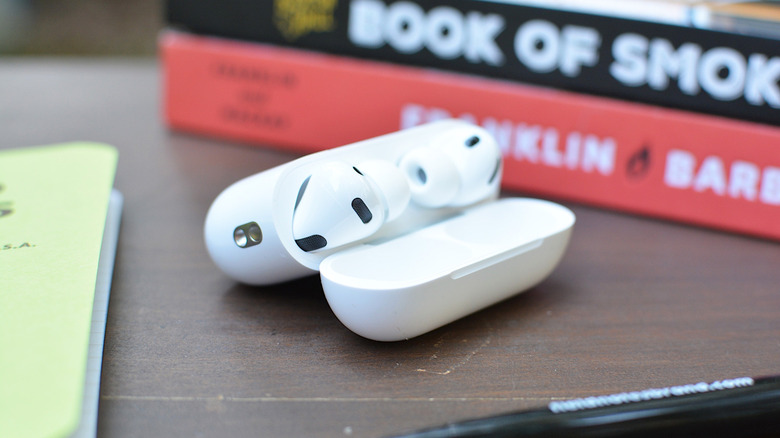
If you don’t own an Apple Watch, this is another way you can control your iPhone’s camera.


Billy Steele for Engadget

When Apple released iOS 26 last September, it added a handful of new AirPods features. One of those was Camera Remote. As you can probably guess from the name, it allows you to use your AirPods as a wireless shutter release for your iPhone.

This is useful if you don’t have an Apple Watch handy and therefore can’t access the dedicated Camera Remote app. Instead of placing your iPhone on a surface, setting a 10-second timer and running back to take a selfie, you can just click your AirPods to trigger the camera whenever you’re ready. If that sounds useful, here’s how to configure your AirPods for camera controls.

What you’ll need to control your iPhone camera with AirPods

Before I explain how to enable Camera Remote, let’s go over what you’ll need.

Unfortunately, older models of AirPods, like the original Pro release, don’t support Camera Remote.

How to enable Camera Remote
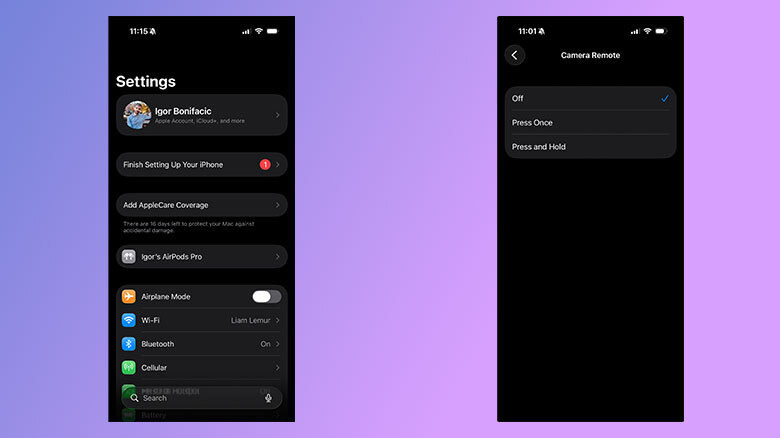

A pair of screenshots showing the Apple settings app for Camera Remote.
Screenshots

By default, Camera Remote is turned off. To start, if your iPhone and AirPods aren’t already paired, follow our guide to do so before returning here. Once you’re ready, follow these instructions:

  1. Open the Settings app on your iPhone.
  2. Tap the name of your AirPods. If they don’t appear, open your AirPods case.
  3. Scroll down and find the Camera Control section.
  4. Tap the Camera Remote field and select either Press Once or Press and Hold.

Now, with Camera Remote enabled, any time you have the Camera app on your iPhone open, you can snap a photo or start and stop recording a video by pressing on the stem or Digital Crown of your AirPods or AirPods Max. It’s worth pointing out here that (at least one of) your AirPods have to be in your ears for this to work. If you just have them sitting on your desk or in your palm, you won’t be able to control your camera with them.   

Note that if you enable the setting, you won’t be able to use your AirPods to wake Siri or switch between listening modes when the Camera app on your phone is open. As Apple explains in the Settings app: “When using AirPods for camera actions, if you select Press Once, media control gestures will be unavailable, and if you select Press and Hold, listening mode and Siri gestures will be unavailable.”

Credit: Source link

Share. Facebook Twitter Pinterest LinkedIn Tumblr Email

Related Posts

Please Let This Hot Pink Pixel 11 Leak Be Real

July 13, 2026

Microsoft Is Making The Windows Search Box More Streamlined And Useful

July 13, 2026

Public Betas For iOS 27, macOS 27 And More Apple Platforms Are Now Available

July 13, 2026

iCloud+ Vs. Apple One: Which Is Worth It For You?

July 13, 2026
Add A Comment
Leave A Reply Cancel Reply

What's New Here!

Check Out Rolex’s 2024 Novelties

April 11, 2024

China TV host and actress flaunts wealth, dresses ‘princess’ daughter head to toe in designer clothes, igniting debate

April 14, 2024

Germany arrests individuals & raids properties linked to sale of luxury cars to Russia

July 2, 2024

He started with a $5,000 loan from his aunt and went onto make billions from Victoria’s Secret and Bath & Body works. Take a look at Leslie Wexner’s 316-feet long superyacht Limitless which was once the largest yachts in the world.

December 28, 2023

M5 MacBook Pro vs M4: Is the Upgrade Worth It?

October 21, 2025
Facebook X (Twitter) Instagram Telegram
  • Contact Us
  • Disclaimer
  • Privacy Policy
  • Terms of Use
  • DMCA
© 2026 kittybnk.com - All Rights Reserved!

Type above and press Enter to search. Press Esc to cancel.