
As someone who often wears contacts, but defaults to my prescription glasses most days of the week, Ray-Ban Meta glasses with see-through (but not prescription) lenses haven’t made much sense to me. I get that having transition lenses can make an expensive pair of glasses useful in more situations, but I’ve generally preferred the sunglasses form factor because it tends to be a better fit for the situations when I most want to reach for a pair of smart glasses.
That said, I’ve always wondered if I would feel differently if I had my own prescription in a pair. After wearing the Ray-Ban Meta Optics as my primary glasses for two weeks, I’m starting to see the appeal. The glasses are very similar to the second-generation frames, but have a few upgrades that make them easier and more comfortable to wear throughout the day.
One issue I’ve had with just about every pair of Ray-Ban Meta glasses is that the slightly oversized frames tend to slip down my nose. With the Optics lineup, Meta made the inner nosepads swappable so you can get a more secure fit. I changed the “universal fit” pads that came on out of the box for the “high bridge” pads and immediately noticed less slippage. There’s also a low bridge option included if you need it.
The “Scriber” style frames I tested were still oversized, but they stayed on my face better than the Gen 2 Wayfarers I tested last year. The tips of the glasses are also moldable (at a Meta store or optician’s office) so you can get an even more precise fit, though I didn’t have this done with my pair. I found that the overextension hinges helped a lot with overall comfort, and I didn’t have issues with the glasses pressing uncomfortably around my ears like I do with many other frames.
I also appreciated that the frame styles felt a bit more subtle than previous versions. The “Scriber” frames I tested were still larger than the glasses I would normally choose for myself, but the color scheme felt more natural than the brightly-colored or super-dark styles Meta has had in other lines. I had multiple people tell me they had no idea I was wearing smart glasses rather than “regular” Ray-Ban frames.
Meta has also improved the battery life slightly compared with the other Gen 2 glasses. While the older Gen 2 model gets “up to 8 hours” of battery life, according to Meta, the Blayzer and Scriber frames are rated for “more than 8 hours.” Battery life in general is very dependent on what you’re doing, some features will drain it a lot quicker. But I found I was easily able to wear my Scriber frames for well over 8 hours without charging. That’s with intermittent audio from the open-ear speakers and occasional Meta AI use.
 Karissa Bell for Engadget
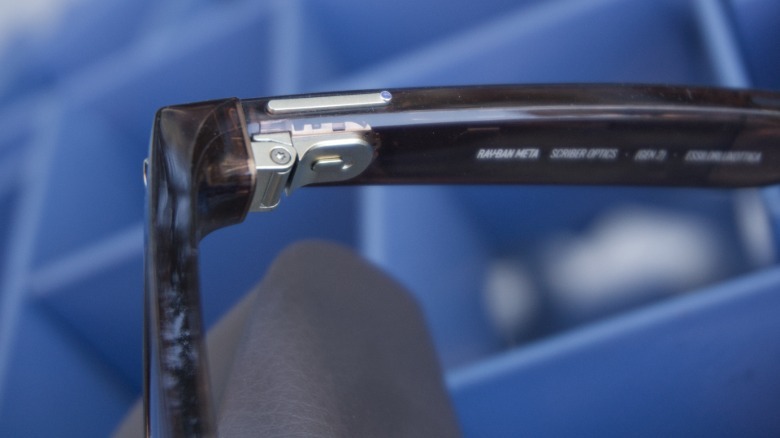
The other big change with the optics line is the addition of an action button, a customizable button that acts as a shortcut for frequently-used commands. The feature first debuted on the Oakley Meta Vanguard sunglasses, which had the button on the bottom side of the frames. On the Optics-branded glasses, it’s now a tiny extra button on the end of the main capture control.
When I reviewed the Vanguard shades I never really landed on one “ideal” use case for the button. But after some more time with my latest frames, I think I’ve figured out the best setup.I use the “custom prompt” setting (you can adjust it in the Meta AI app) to “read my latest text message.”
This is ideal because while I appreciate that my glasses can announce when I get an incoming text (a lot like how Siri will with AirPods), I don’t always want Meta AI to just start reading them by default. It can be extremely disruptive if I’m in the middle of a conversation or concentrating on a task. But with the action button, I can just give it a quick push to hear my texts, with no need to say “Hey Meta.” It’s even more subtle than glancing down at my phone.
Credit: Source link