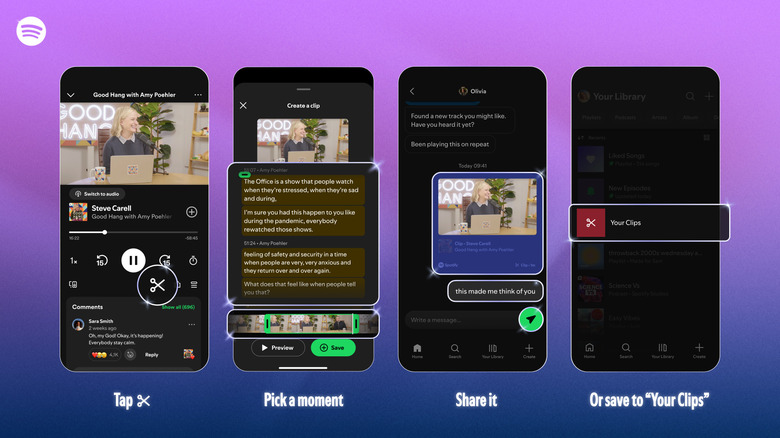
Podcast Clips lets you find specific moments through a text search.
You’ve likely discovered a podcast through a short clip on social media at some point; Spotify will make it easy to create your own. The company just released a new tool called Podcast Clips that lets you find specific moments through a text search, then “capture, revisit and share them,” it wrote in a press release.
When listening to any supported podcast, you can tap the new scissor icon in the Now Playing view. That brings up a text and video interface (or audio presumably for audio-only podcasts), letting you select the moment you want and trim it to fit. You can then preview the clip if you want and save it, and it will appear in your library. From there, you can share by tapping the sharing button and choose the “clip” format and send it friends via Spotify Messages or other supported platforms.
Spotify has been busy of late, introducing a lot of new AI-related and other features. One of those is a chatbot that will answer questions about podcast episodes to give you more context around a host or guest. A more controversial feature lets users generate “personal podcasts” based on prompts, text, PDFs and web links.
The clips feature could be a good way to turn friends or family onto podcasts or just give give them a laugh with a choice segment. Spotify also updated the sharing experience with additional options including episodes, chapters, timestamps and clips, all available from the share icon. Clips is now rolling out globally to Free and Premium users on mobile, with “availability expanding across more shows over time,” Spotify said.
Credit: Source link