Close Menu
  • Home
  • Crypto News
  • Tech News
  • Gadgets
  • NFT’s
  • Luxury Goods
  • Gold News
  • Cat Videos
What's Hot

Baby & Cat Playtime! 😂🐱 | Non-Stop Giggles & Funny Moments | Baby Giggles

September 12, 2026

😂🐱 Meow Meow Billi Cartoon | Cat Cartoon | Cat Videos

September 12, 2026

Car Cat Kitten #cats #cat #catvideos #kittens #kucing #billi #kucinglucu #anakkucing #kereta #gatos

September 12, 2026
Facebook X (Twitter) Instagram
  • Contact Us
  • Disclaimer
  • Privacy Policy
  • Terms of Use
  • DMCA
Facebook X (Twitter) Instagram
KittyBNK
  • Home
  • Crypto News
  • Tech News
  • Gadgets
  • NFT’s
  • Luxury Goods
  • Gold News
  • Cat Videos
KittyBNK
Home » Opera’s Latest Android Update Includes A Soccer Hub And A Refreshed Start Page
Tech News

Opera’s Latest Android Update Includes A Soccer Hub And A Refreshed Start Page

June 9, 2026No Comments2 Mins Read
Facebook Twitter Pinterest LinkedIn Tumblr Email
Opera’s Latest Android Update Includes A Soccer Hub And A Refreshed Start Page
Share
Facebook Twitter LinkedIn Pinterest Email

You can see live scores for ongoing games and follow your favorite teams for notifications.


Opera

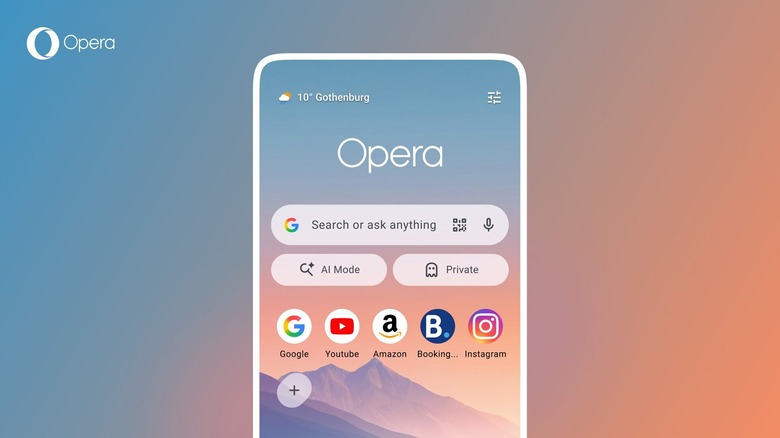
Opera has released a new version of its web browser for Android. It has a refreshed start page design and, just in time for the World Cup kicking off this week, a soccer hub that features live scores, stats and match notifications. The latter is available in Opera Mini as well.

Opera is hoping that you’ll stay up to date on all the action using its soccer hub. It includes a carousel that displays scores for all games that are currently taking place. You can tap on a match for more details and select your favorite teams to get notifications on critical moments during a game.

Unfortunately, the hub features an AI-powered news feed instead of one curated by humans. (If you’re interested in Scotland’s journey toward the World Cup final, feel free to just ask me. I’ll happily tell you all about it. I might not shut up about it.)

In terms of the start page refresh, there’s a weather widget that provides real-time conditions at a glance. Though you can still customize the start page, by default you’ll have the option to quickly switch to a private browsing session or hop into Opera’s AI mode via new shortcuts. In addition, Opera says the speed dial icons can now be square, round or “squircle.” 

Credit: Source link

Share. Facebook Twitter Pinterest LinkedIn Tumblr Email

Related Posts

The Downsides Of Switching From Windows To Mac

August 31, 2026

How To Disable Your Digital Wallet If You Lose Your Phone

August 31, 2026

Does Turning Off Bluetooth Actually Make Wi-Fi Better?

August 31, 2026

Why Is The GameCube Controller So Loved By Gamers?

August 30, 2026
Add A Comment
Leave A Reply Cancel Reply

What's New Here!

Minisforum HX77G SteamOS and AMD Hardware for 1440p Gaming PC

April 9, 2025

PS5 Pro vs PS5: Key Differences and Upgrade Advice

May 10, 2025

BitGo Cuts 15% of Workforce to Focus on Stablecoins and AI

June 26, 2026

Bowers & Wilkins Px8 S2 review: Headphone extravagance

November 7, 2025

$380B Wiped Out as $2.6B Liquidations Push Bitcoin to $60K- What’s Next?

February 6, 2026
Facebook X (Twitter) Instagram Telegram
  • Contact Us
  • Disclaimer
  • Privacy Policy
  • Terms of Use
  • DMCA
© 2026 kittybnk.com - All Rights Reserved!

Type above and press Enter to search. Press Esc to cancel.