You can now gift games without a Steam account and sort your wishlist into categories.
Valve has pushed updates to Steam’s gifting and wishlist features to — surprise, surprise — make it even easier to buy games. Among the improvements, it’s now possible to use a guest account to purchase games, instead of just gift cards and Steam hardware. And if you’re interested in organizing your wishlist, the company has made it possible to sort saved games into categories.
Making guest accounts more useful goes a long way towards streamlining the game purchasing process on Steam, but Valve is also expanding how games can be gifted. As part of this update, you can now send games directly over email. Previously, you needed to know the recipient’s Steam account to send a game, but now you can message them a link to claim a game even if their email address isn’t associated with their account. The only limitations are that you need to be in the same country as the recipient, and if they don’t accept the game after 30 days, it’s automatically refunded. To send a game to someone in a different country, you’ll still need to be friends with them on Steam, but Valve says it will now automatically calculate the cost of a game in your friend’s region at checkout. All three of these changes should make it easier for the less gaming-inclined to buy PC games for their loved ones.
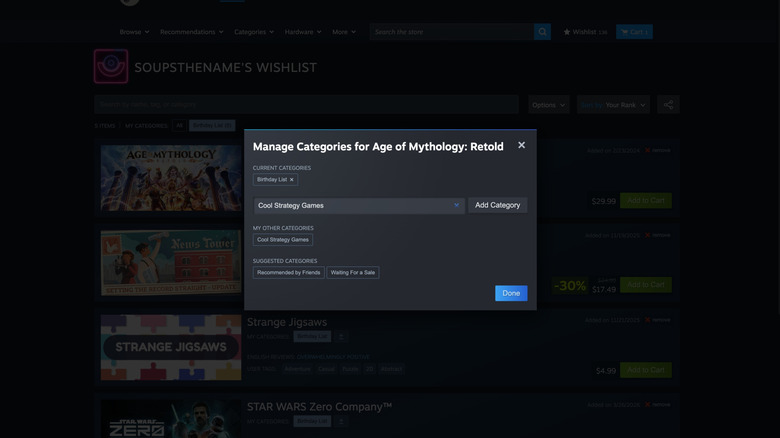
Steam’s new wishlist improvements make organizing it easier while also acknowledging the feature is for more than just saving games you want to buy later. Categories are best thought of as a folder or tag system for your games. You can name categories whatever you like and easily add games to a category from their store page or your existing wishlist. Selecting the category from the top of Steam’s wishlist page filters your wishlist to only the games in that category. Notifications you receive about wishlist items going on sale can be enabled or disabled for specific categories rather than your entire list. Those big changes are being paired with some smaller tweaks, too: You can now generate a shareable link to your wishlist or a specific category, see whether saved games have demos and play trailers for games on your wishlist when you hover over them.
Credit: Source link