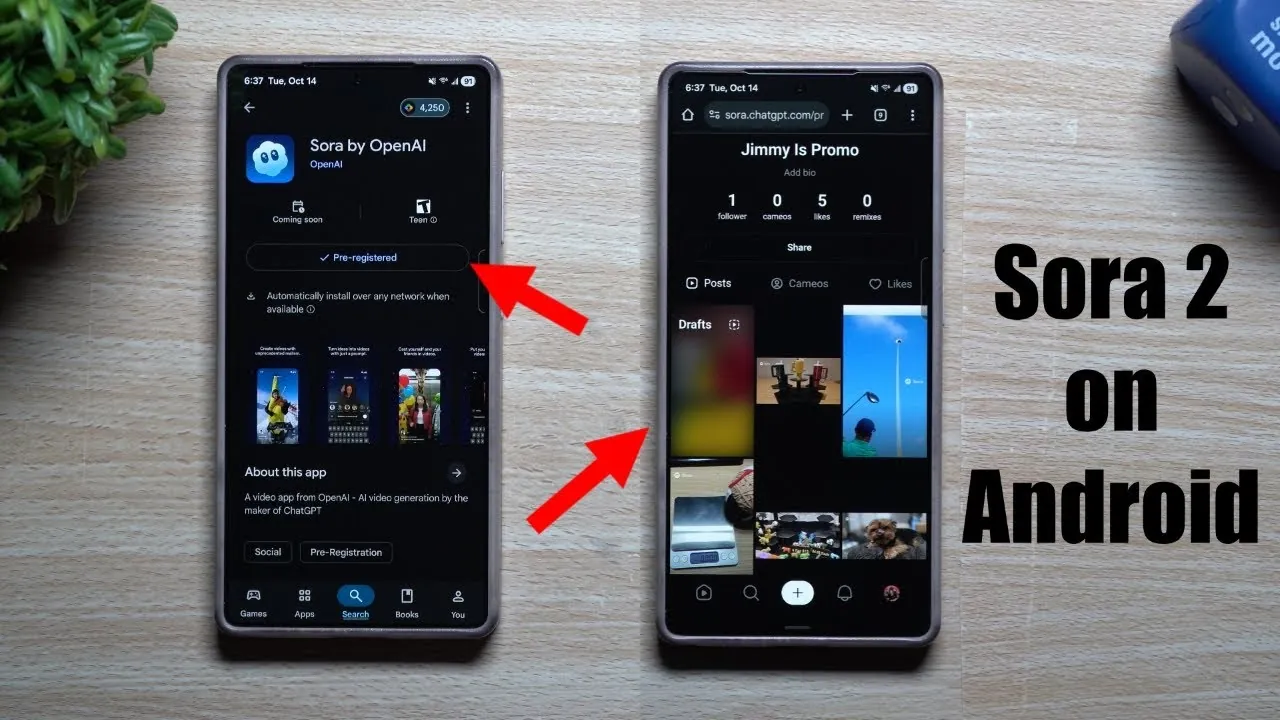
Sora 2, developed by OpenAI, is an advanced application designed for creating AI-driven video content. While it is officially available only for iOS, Android users can still explore its features through pre-registration and a web-based workaround. The video below, from Jimmy, provides a detailed walkthrough on accessing Sora 2 on Android, creating content, managing drafts, and optimizing your experience, while also addressing its current limitations and future potential.

Accessing Sora 2 on Android
Although the Android version of Sora 2 has not yet been released, there are practical steps you can take to begin using the platform:
- Pre-registration: Head to the Google Play Store and pre-register for Sora 2. This ensures you’ll receive an immediate notification when the app becomes available for download.
- Web-based access: Visit the web version of Sora 2 at sora.hatgpt.com. This allows you to explore the platform’s core functionalities without waiting for the official Android app release.
By following these steps, you can gain early access to Sora 2’s features and familiarize yourself with its tools, even before the Android app is officially launched.
Creating AI-Driven Video Content
Sora 2 simplifies the video creation process by using AI-powered tools. Here’s how you can start producing high-quality, engaging content:
- Generate videos: Provide detailed prompts or upload images to create videos. The AI processes your input to deliver customized and visually appealing results.
- Adjust orientation: Select between landscape or portrait mode depending on your target platform or audience preferences. This flexibility ensures your content is optimized for different viewing experiences.
- Personalize content: Enhance your videos by adding specific details to your prompts, such as themes, tones, or visual elements. This helps achieve a more tailored and professional output.
By using these features, you can create videos that align with your creative vision and meet the expectations of your audience.
Managing Drafts and Organizing Content
Efficient content management is essential for refining your videos before sharing them. Sora 2 offers tools to help you stay organized and streamline the editing process:
- Edit drafts: Access saved drafts to make changes, add titles, or fine-tune your content. This feature ensures your videos are polished and ready for publication.
- Delete drafts: Switch your device to horizontal orientation to access additional options for managing and deleting drafts. This functionality helps you maintain a clutter-free workspace.
These tools make it easier to manage your creative workflow, allowing you to focus on producing high-quality content.
Features, Limitations, and Future Potential
Sora 2 offers a robust set of tools for video creation, but there are some limitations Android users should be aware of:
- Invitation-only access: Currently, Sora 2 requires a referral code for access. These codes can often be found in online communities, such as Discord groups, where users share resources and tips.
- No Cameo videos: The app does not yet support Cameo videos—those that use personal facial data—on Android devices. This feature is expected to be included in future updates.
Despite these limitations, Sora 2 remains a valuable tool for content creators. Future updates are anticipated to address these gaps, offering expanded functionality and improved compatibility with Android devices.
Maximizing Your Experience with Sora 2
To make the most of Sora 2’s capabilities, consider the following tips:
- Be specific with prompts: The more detailed and precise your prompts, the better the AI can customize the video to meet your creative needs.
- Save and share videos: Once your video is complete, save and download it for seamless sharing across various platforms. This ensures your content reaches your intended audience efficiently.
These strategies can help you optimize your workflow and achieve the best possible results when using Sora 2.
Looking Ahead: Anticipated Updates
The full release of Sora 2 for Android is highly anticipated. Future updates are expected to include enhanced customization options, improved compatibility with Android devices, and new features such as Cameo videos. By pre-registering, you position yourself to be among the first to access these advancements, making sure you stay ahead in the evolving landscape of AI-driven video creation.
Sora 2 represents a significant step forward in simplifying video production through AI. By using the web-based workaround and pre-registration, Android users can begin exploring its potential today while looking forward to a more comprehensive and user-friendly experience in the near future.
Browse through more resources below from our in-depth content covering more areas on Sora 2 Android.
Source & Image Credit: Jimmy is Promo
Filed Under: Android News, Mobile Phone News
Latest Geeky Gadgets Deals
Disclosure: Some of our articles include affiliate links. If you buy something through one of these links, Geeky Gadgets may earn an affiliate commission. Learn about our Disclosure Policy.
Credit: Source link