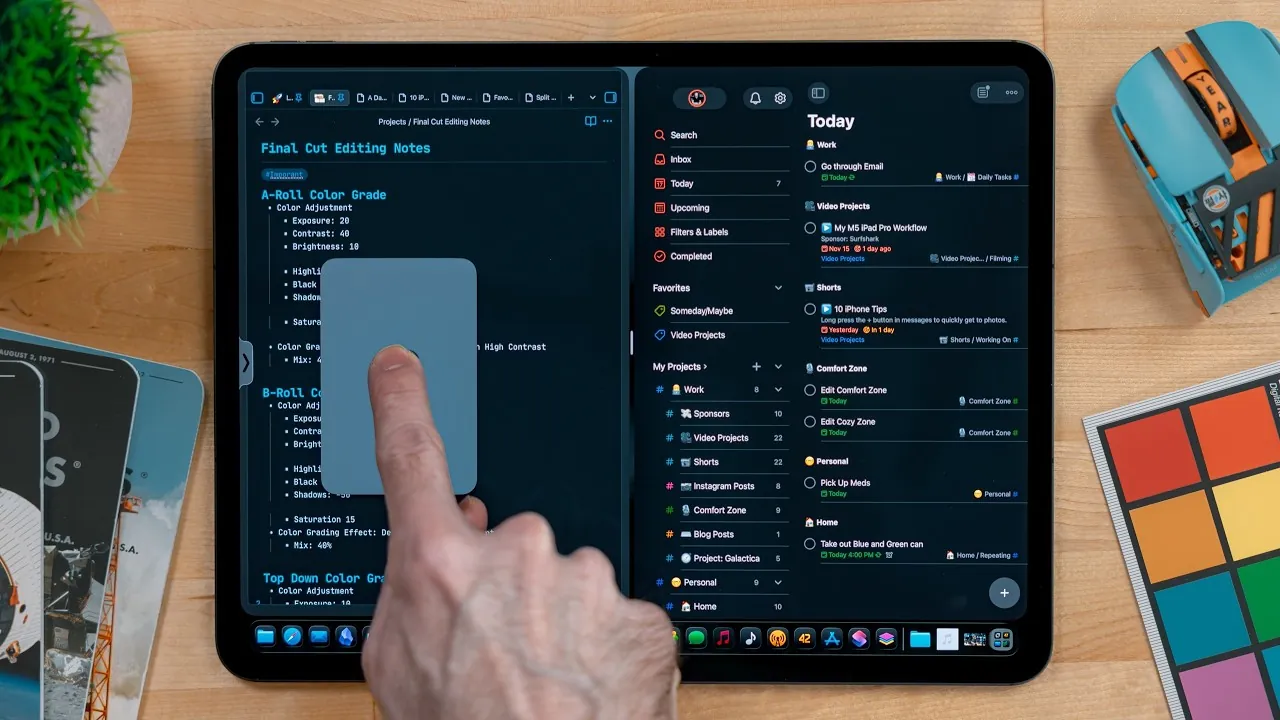
Apple has reintroduced the Split View feature in iPadOS 26.2 beta 3, marking a significant step forward in improving multitasking capabilities on iPads. This update integrates Split View seamlessly with existing multitasking tools, creating a more unified and efficient experience for users. Currently available in the developer beta, the feature is expected to roll out to public beta testers and general users in the coming months, offering a more versatile and user-friendly multitasking environment. The video below from
Christopher Lawley gives us a look at Split View in the new iPadOS 26.2 beta 3

What Is Split View and How Does It Work?
Split View is a multitasking feature that allows you to use two apps side by side, making it easier to manage multiple tasks simultaneously. With iPadOS 26.2, Apple has refined this feature to make it more intuitive and efficient. You can now drag and drop apps into a split-screen arrangement directly from the dock, app library, or Spotlight, streamlining the process and saving time.
Key improvements in this update include:
- Freely resizable app windows, giving you precise control over how much screen space each app occupies.
- Preservation of custom window sizes when replacing apps, making sure your preferred layout remains intact.
For instance, if you’re drafting a report while referencing a webpage, you can adjust the app sizes to prioritize the task that requires more focus. This flexibility makes Split View a powerful tool for both professional and personal use, catering to diverse workflows and preferences.
Integration with Other Multitasking Features
iPadOS 26.2 enhances multitasking by integrating Split View with other features like Stage Manager and windowed apps mode. This integration eliminates the need to switch between different multitasking modes, creating a more cohesive and efficient user experience.
By combining these tools, Apple has streamlined the multitasking process, allowing you to manage multiple apps without unnecessary interruptions. Whether you’re organizing a presentation, editing a video, or switching between creative tools, the system adapts to your needs seamlessly, reducing friction and enhancing productivity.
Improvements to Slide Over
The Slide Over feature, which enables you to access a single app in a floating window, has also received notable updates in iPadOS 26.2. You can now drag and drop apps into Slide Over by simply pushing them to the screen’s edge, making it easier to add or replace apps on the fly.
Additional enhancements include:
- Quick dismissal and recall of Slide Over, allowing you to toggle between tasks effortlessly.
- A simplified app replacement process, allowing you to adapt to changing priorities without disrupting your workflow.
Although Slide Over remains a one-app-at-a-time interface, these updates make it a more practical and versatile tool for handling short-term tasks or quickly referencing information while working on other apps.
A Unified and Flexible Multitasking Experience
The updates in iPadOS 26.2 aim to create a more cohesive and flexible multitasking environment. By combining features like Split View, Slide Over, and Stage Manager, Apple has made it easier to customize the iPad to suit your workflow and preferences.
Here’s what you can expect from these updates:
- Resizing app windows to match your specific needs and priorities.
- Seamless transitions between multitasking modes, making sure you can switch tasks without losing progress.
- Quick access to apps for short-term tasks using Slide Over, enhancing convenience and efficiency.
This unified approach enables users to manage their tasks more effectively, whether they’re working on complex projects, multitasking between apps, or simply browsing for leisure. The flexibility and ease of use introduced in iPadOS 26.2 make the iPad a more powerful and adaptable device for a wide range of activities.
Refining the iPad Experience
The reintroduction of Split View in iPadOS 26.2, alongside enhancements to multitasking tools like Slide Over and Stage Manager, represents a significant refinement of the iPad’s usability. Features such as drag-and-drop functionality, resizable windows, and seamless multitasking integration ensure that the iPad continues to evolve as a versatile device for both work and play.
Whether you’re a professional managing intricate workflows or a casual user juggling multiple apps, these updates provide a smoother, more productive experience. With iPadOS 26.2, Apple reaffirms its commitment to making the iPad a powerful tool for multitasking, offering users greater control, efficiency, and flexibility in their daily tasks.
Here are more guides from our previous articles and guides related to Split View that you may find helpful.
Source & Image Credit: Christopher Lawley
Filed Under: Apple, Apple iPad, Top News
Latest Geeky Gadgets Deals
Disclosure: Some of our articles include affiliate links. If you buy something through one of these links, Geeky Gadgets may earn an affiliate commission. Learn about our Disclosure Policy.
Credit: Source link