
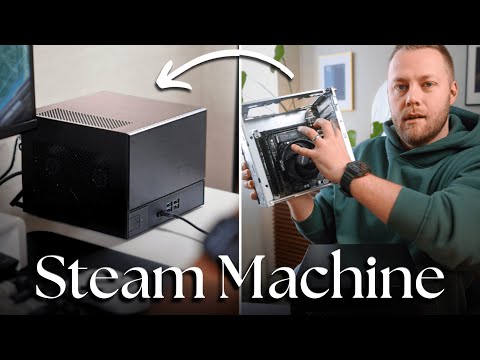
Valve’s Steam Machine aims to bridge the gap between PC performance and console simplicity, but you don’t have to wait for its official release to enjoy a similar experience. Spencer Scott Pugh explores how you can build a custom Windows-based gaming PC that mirrors the Steam Machine’s functionality. By using Steam’s Big Picture Mode and selecting compact, high-performance components like the AMD Ryzen CPU and Asus RX960 XT Radeon GPU, you can create a system that combines power with a sleek, console-like design.
Dive into this guide to uncover practical steps for assembling your own Steam Machine-inspired build. Learn how to navigate space constraints during hardware assembly, configure Windows to boot directly into Big Picture Mode and optimize your system for smooth gameplay on modern titles. Whether you’re a seasoned builder or exploring this for the first time, this breakdown offers clear insights to help you craft a gaming PC tailored to your needs.
Valve’s Steam Machine 2026
TL;DR Key Takeaways :
- The Steam Machine, set for release in early 2026, combines the power of a PC with the simplicity of a console, running on Valve’s Linux-based Steam OS for seamless integration with the Steam ecosystem.
- Gamers can build a custom Steam Machine-inspired PC using Windows and Steam’s Big Picture Mode, offering a console-like experience with the flexibility to customize and upgrade hardware.
- Key components for a custom build include an AMD Ryzen CPU, Asus RX960 XT Radeon GPU, compact Desk Meet case, 16GB+ RAM, SSD storage and a reliable power supply.
- Installing Windows on a custom build ensures broader game compatibility compared to Steam OS, while Big Picture Mode provides an intuitive, controller-friendly interface.
- Building a custom Steam Machine offers insights into hardware assembly and system optimization, delivering a portable, high-performance gaming solution tailored to individual preferences.
The Steam Machine represents Valve’s bold vision to redefine gaming hardware. It merges the compact, user-friendly design of a console with the raw power and flexibility of a PC. Running on Steam OS, a Linux-based operating system, it provides a streamlined interface and seamless integration with the Steam ecosystem. This device is designed to cater to gamers who value convenience without sacrificing performance.
For those who prefer the versatility of Windows or want complete control over their hardware, building a custom Steam Machine-inspired PC is an exciting alternative. This approach allows you to enjoy the benefits of a console-like experience while maintaining the freedom to customize and upgrade your system as needed.
How to Build a Custom Steam Machine
Creating your own Steam Machine-inspired gaming PC involves careful planning and assembly. Follow these steps to build a compact yet powerful system:
- Choose the Right Components: Selecting the appropriate hardware is crucial for achieving a balance between performance and size. Consider the following components:
- Processor: Opt for an AMD Ryzen CPU for reliable performance in gaming and multitasking.
- Graphics Card: The Asus RX960 XT Radeon GPU is a solid choice for handling modern games at high settings.
- Case: A Desk Meet case with a pre-installed motherboard offers a compact and efficient solution.
- Memory: Ensure you have sufficient RAM, ideally 16GB or more, to handle demanding games.
- Storage: Use a fast SSD to minimize load times and improve overall system responsiveness.
- Power Supply: Invest in a reliable power supply unit to ensure stable performance.
- Assemble the Hardware: Building a compact PC can be challenging due to space constraints. Carefully follow the assembly instructions, paying close attention to fitting components like the GPU and managing cable connections. Double-check all connections to ensure the system is securely assembled.
The result of this effort is a sleek, portable gaming PC that combines the power of a traditional desktop with the convenience of a console-like form factor.
Uncover more insights about Steam Machine in previous articles we have written.
Setting Up the Operating System
Once your hardware is assembled, the next step is to configure the operating system. While Steam OS is the default choice for the official Steam Machine, it has limitations, particularly in terms of game compatibility. Many popular titles from publishers like Ubisoft and EA may not run smoothly on Linux-based platforms.
Installing Windows is a more versatile option for your custom build. Windows supports a broader range of games and software, making it the ideal choice for a gaming-focused system. To replicate the console-like experience of the Steam Machine, configure Windows to boot directly into Steam’s Big Picture Mode. This interface is optimized for controller navigation and provides an intuitive way to access and manage your game library.
Optimizing Performance
With your system up and running, it’s time to fine-tune its performance. The hardware configuration outlined earlier is capable of running modern games like Battlefield 6 and Hogwarts Legacy at ultra settings, delivering smooth gameplay and stunning visuals.
Steam’s Big Picture Mode serves as the centerpiece of your gaming experience, offering a clean and user-friendly interface. Its integration with Windows ensures compatibility with a wide range of games, including those outside the Steam ecosystem. This combination of power, portability and ease of use makes your custom build a versatile and efficient gaming solution.
Why the Steam Ecosystem Matters
Building your own Steam Machine alternative allows you to fully use the advantages of the Steam ecosystem. If you’re already a Steam user, you likely have access to an extensive library of games. Features such as cloud saves, community forums and frequent sales further enhance the gaming experience.
Additionally, the compact design of your custom build mirrors the portability and convenience of the official Steam Machine. This approach not only provides a glimpse into what Valve’s device might offer but also highlights the flexibility and potential of the Steam platform in shaping the future of gaming hardware.
Lessons Learned from the Build
Constructing your own Steam Machine-inspired PC is both a technical challenge and a rewarding endeavor. For first-time builders, it offers valuable insights into hardware assembly, troubleshooting and system optimization. While challenges such as fitting components into a small case or configuring software may arise, the process ultimately results in a gaming system tailored to your specific needs.
As the official Steam Machine’s release approaches, you may find yourself comparing your custom build to Valve’s finalized product. Regardless of the comparison, the experience of building your own system demonstrates the feasibility of achieving a console-like gaming experience with the flexibility and power of a PC.
The Future of Gaming Hardware
By building a custom PC inspired by the Steam Machine, you can enjoy the best of both worlds: the performance and adaptability of a PC combined with the simplicity and convenience of a console. With the right components, a Windows operating system and Steam’s Big Picture Mode, you can create a compact, high-performance system that delivers an exceptional gaming experience.
Whether you choose to build your own system or wait for the official Steam Machine, one thing is certain: the evolution of gaming hardware continues to open up exciting possibilities for gamers everywhere.
Media Credit: Spencer Scott Pugh
Filed Under: Gaming News, Guides, Hardware
Disclosure: Some of our articles include affiliate links. If you buy something through one of these links, Geeky Gadgets may earn an affiliate commission. Learn about our Disclosure Policy.
Credit: Source link